

Have you ever wanted to mirror a movie across multiple projector screens for a backyard party or duplicate a presentation across several monitors in a conference room? The challenge often lies in finding a reliable way to split a single HDMI signal without losing quality or causing frustrating lag. This guide is designed for anyone looking to expand their visual setup, from home theater enthusiasts to business professionals needing consistent multi-screen displays.
We have assessed eight of the top HDMI splitters on the market, focusing on their compatibility with projectors and other displays. Our goal is to help you find the right device to mirror your content seamlessly, whether you need to connect two screens or four. For more on optimizing your projector setup, explore our guide on the best projector switchers.
| Pick | Product | AI Score | Buy |
|---|---|---|---|
| Prime |
 Closs HDMI Splitter 1 in 3 Out
|
9.8/10 | Buy on Amazon |
| Prime |
 MT-VIKI 4K HDMI Splitter 1 in 2 Out
|
9.6/10 | Buy on Amazon |
| Prime |
 ENBUER 1x4 HDMI Splitter
|
9.6/10 | Buy on Amazon |
| Prime |
 Happfeel 4K HDMI Splitter 1 in 4 Out
|
9.6/10 | Buy on Amazon |
| Prime |
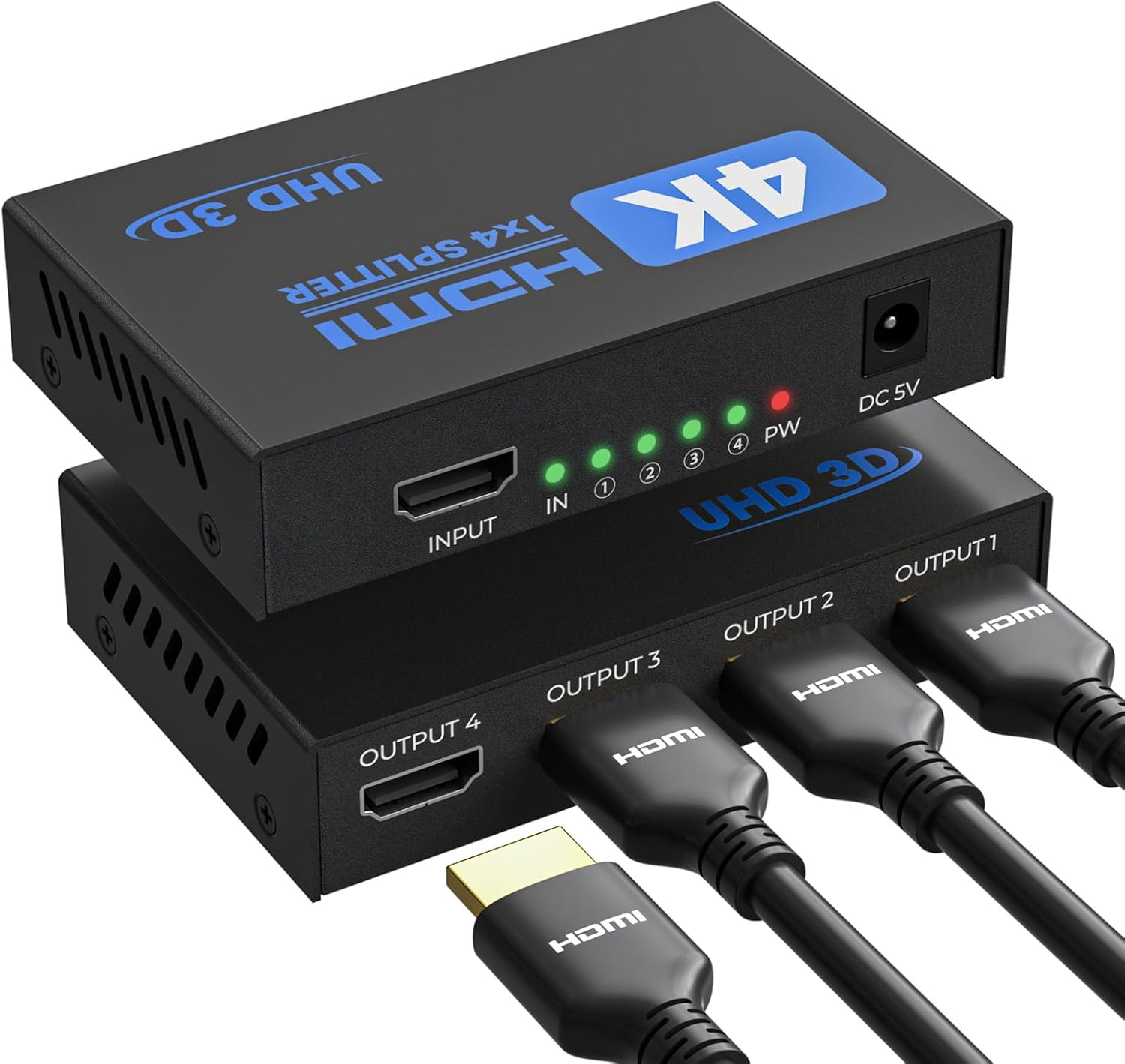 UZANPIE HDMI Splitter 1 in 4 Out 4K@30Hz
|
9.5/10 | Buy on Amazon |
| Prime |
 EZCOO SP12H2 4K HDMI Splitter 1x2 with Down
|
9.5/10 | Buy on Amazon |
| Prime |
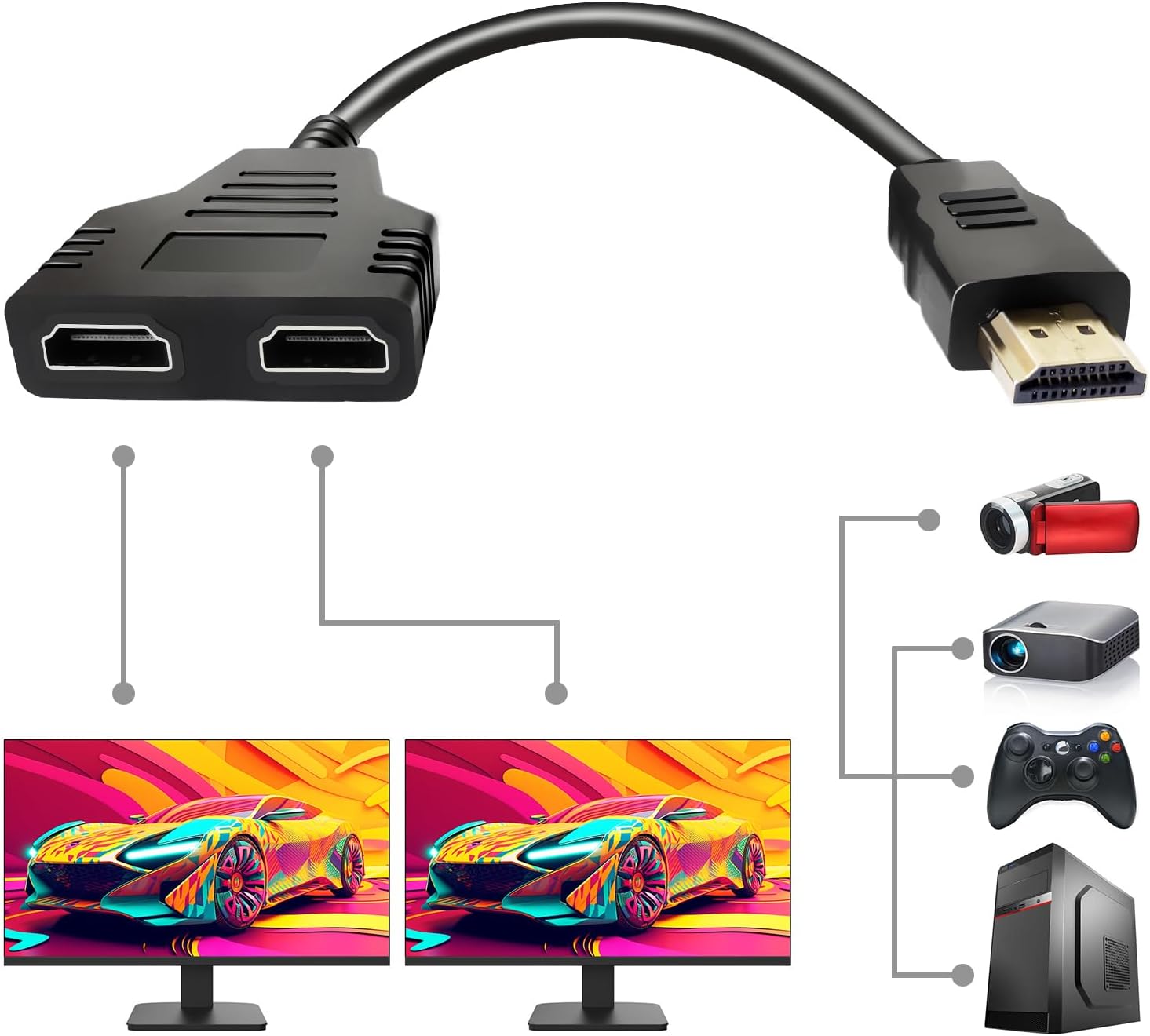 SORTHOR HDMI Splitter 1 in 2 Out
|
9.2/10 | Buy on Amazon |
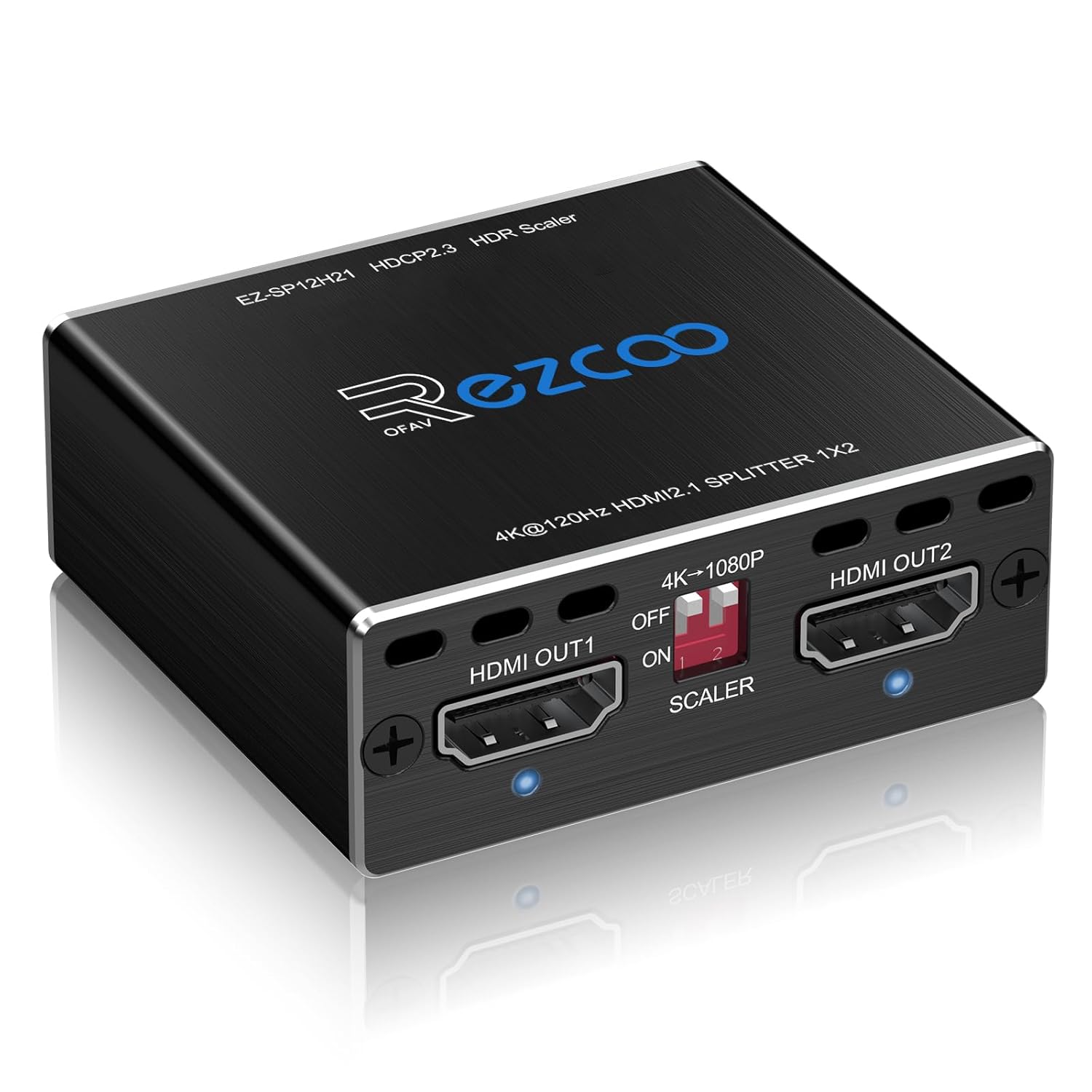 EZCOOTECH HDMI 2.1 Splitter 1x2, 4K 120Hz 8K 60Hz
|
9.2/10 | Buy on Amazon |
Pros
- Simple, driver-free setup that works with laptops, PS5, Blu-ray players, and more
- Durable metal housing helps with heat management during long usage sessions
- Per-port LED status lights simplify diagnosing connection issues
- Compact footprint fits easily into home or office AV setups
- Strong 4.7-star rating suggests reliable real-world performance
Cons
- Requires a separate USB-C power adapter since one isn't included in the box
- Capped at 4K@30Hz rather than 4K@60Hz, which may not suit fast-motion or gaming content
- Mirrors identical content only; it cannot display different content on each screen
The Closs HDMI Splitter 1 in 3 Out is built for anyone who needs to display the same content across multiple screens at once, whether that's a retail store running three displays, an office presentation room, or a home theater with a mirrored setup. It's a straightforward mirroring solution rather than a multi-source switch, so it's best suited for users who want identical content shown simultaneously rather than independent feeds.
Performance-wise, the unit supports up to 4K@30Hz resolution along with 3D Blu-ray playback and 36-bit deep color, giving it enough visual quality for movies, presentations, and general computer use. It's not designed for high-refresh 4K gaming since it tops out at 30Hz, but for standard video and productivity tasks, the image quality holds up well and is backward compatible down to 1080p and 720p.
Build quality stands out thanks to the full aluminum alloy casing, which helps dissipate heat during extended use and reduces electromagnetic interference that can cause signal dropouts. Each output port also includes its own LED indicator, making it easy to spot which display channel might be having issues at a glance.
The main caveat is the power setup: the splitter requires a USB-C power source to function, but the adapter itself isn't included, only the cable. This means users need to supply their own USB-C power brick or use an available USB port, which could catch some buyers off guard during initial setup.
Overall, this splitter delivers solid value for its price point, offering reliable multi-screen mirroring, respectable image quality, and a durable metal build. It's a smart choice for home entertainment or business displays needing synchronized screens, as long as buyers are prepared to source their own power adapter.
Connector Type: HDMI, following the HDMI 1.4b standard for wide compatibility with modern and legacy devices.
Maximum Resolution: 4K@30Hz (3840x2160), with backward compatibility to 1080p@60Hz and 720p for older sources and displays.
Compatible Devices: Laptops, PS5, DVD players, monitors, projectors, televisions, Blu-ray players, set-top boxes, and Fire Stick devices.
Build Material: Full aluminum alloy housing for heat dissipation and electromagnetic interference shielding.
Power Requirement: USB-C powered (cable included, power adapter sold separately). Compact size measuring 3.26 x 2.16 x 0.78 inches.
Pros
- Simple, reliable way to duplicate one HDMI signal onto two screens
- Supports 4K resolution for sharp, high-quality visuals
- Powered design reduces signal loss and flickering
- Easy plug and play setup with no software needed
- Affordable price point for a powered splitter
Cons
- Only supports mirror mode, cannot extend the display across two screens
- No built-in audio output port
- May require a high-quality HDMI cable rated for 4K30Hz to avoid signal detection issues
The MT-VIKI MT-SP102 is a straightforward 1-in-2-out HDMI splitter designed for anyone who needs to display the same content on two screens at the same time. It's a good fit for home theater fans, small conference rooms, retail displays, or training setups where duplicating a single feed matters more than extending a desktop.
The standout feature here is its 4K@30Hz support, which keeps images sharp while remaining backward compatible with 1080P and 3D content. Real-world performance should be stable thanks to the included 5V/2A power adapter, which is specifically meant to prevent the flickering and signal interruptions that plague unpowered splitters.
Build quality appears solid for the price, with a compact black housing measuring just under 2.6 inches square. Setup is plug and play, requiring no drivers, software, or configuration, which makes it accessible even for non-technical users.
The main limitation to keep in mind is that this device only mirrors content, it does not support extended display mode, so it won't work for users wanting two different images across screens. It also lacks a built-in audio port, and some users may need to upgrade their HDMI cable to one rated for 4K30Hz if they run into signal detection issues.
Overall, this is a practical, no-frills solution for signal duplication at an accessible price. Anyone needing true multi-monitor extension or audio splitting should look elsewhere, but for straightforward screen mirroring across two displays, the MT-SP102 gets the job done.
Pros
- Reliable signal duplication across 4 screens with no noticeable quality loss
- Simple, plug-and-play installation with no external software required
- Supports high-quality audio and video formats including 4K and 3D
- Great value for multi-display setups like karaoke systems or retail signage
- Backed by a 1-year manufacturer warranty
Cons
- Only supports mirroring, not extending screens across displays
- No support for HDR, VRR, or CEC functionality
- Limited to 4K@30Hz rather than full 4K@60Hz in standard color formats
The ENBUER 1x4 HDMI Splitter is designed for users who need to display one HDMI source, like a cable box, PC, or gaming console, on up to four screens simultaneously. It's ideal for bars, classrooms, retail displays, or home entertainment setups where identical content needs to reach multiple TVs or monitors.
Performance-wise, the splitter handles 4K x 2K@30Hz and 1080P@120Hz smoothly, with support for advanced audio formats like DTS-HD and Dolby-TrueHD. Real-world feedback confirms it performs reliably even in demanding multi-screen scenarios, such as running three TVs and a monitor for a karaoke setup without signal degradation.
Build quality is compact and functional, with a small footprint that fits discreetly behind entertainment centers or AV racks. Setup is straightforward, requiring no additional drivers or software, just a power adapter and standard HDMI cables to get started.
The main limitations are its lack of HDR, VRR, and CEC support, along with its 4K cap at 30Hz rather than the smoother 60Hz refresh most modern devices support. It's also strictly a duplicator, not an extender, so users hoping to show different content on each screen will need a different solution.
Overall, this splitter delivers solid, no-frills performance for anyone needing simple screen mirroring across multiple displays. It's a great budget-friendly choice for signage, presentations, or shared viewing setups, though users seeking HDR or high-refresh 4K should look elsewhere.
The ENBUER MAX-376 splitter features one HDMI input and four HDMI outputs, supporting resolutions up to 4K x 2K@30Hz, QHD 2K@60Hz, and FHD 1080P@120Hz. It supports 3D content and deep color depths of 8, 10, and 12-bit.
It is HDCP 1.4 compliant and compatible with HDMI 1.4 output standards, working well with devices like PS3, PS4, Xbox, Blu-ray players, and set-top boxes. Output devices can include projectors, HDTVs, and standard monitors.
The unit measures a compact 0.87" x 2.44" x 0.87" and comes in black. It includes a 5V DC power supply and user manual in the box, backed by a 1-year manufacturer warranty.
Pros
- Reliable, lag-free mirroring confirmed by multiple real-world users
- Powered design outperforms passive splitters for signal strength
- Simple, tool-free setup with clear LED status indicators
- Sturdy metal build with good heat dissipation
- Wide device compatibility including PS5, Xbox, Roku, and PCs
Cons
- Uses a proprietary DC power adapter instead of more universal USB-C power
- Mirror only, does not support extended display across screens
- Limited to 4K@30Hz rather than higher refresh 4K modes
The Happfeel 4K HDMI Splitter is a 1-in, 4-out powered device designed to duplicate a single HDMI source across four displays simultaneously. It's built for scenarios like watch parties, church services, restaurants, or multi-room home theaters where the same content needs to appear on several screens at once.
In real-world use, reviewers consistently praise its plug-and-play simplicity and lag-free performance, even during high-stakes streaming like live sports events. The powered design, backed by an included UL-certified adapter, clearly outperforms passive splitters by maintaining a stronger, more stable signal across all four outputs, especially over the rated 100ft transmission range.
Build quality benefits from a metal housing that helps dissipate heat during extended use, and LED indicators make it easy to monitor connection status at a glance. Setup requires no drivers or software, with most users reporting a working configuration within a minute of plugging it in.
The main limitations are its mirror-only functionality, meaning it can't extend a desktop across screens, and its cap at 4K@30Hz rather than higher refresh 4K modes. It also relies on a DC barrel power adapter rather than the more modern USB-C standard, which some buyers may find less convenient.
Overall, this splitter delivers exactly what it promises: dependable, synchronized HDMI mirroring for multiple screens without the signal degradation common in unpowered units. It's a smart, affordable choice for group viewing setups, presentations, or casual gaming across several displays.
The Happfeel HDMI Splitter features one HDMI input and four HDMI outputs, supporting 4K@30Hz and 1080P@120Hz resolutions with HDCP 1.4 and HDMI 1.4 compatibility. It transmits signals up to 100ft when using AWG26 HDMI 2.0 cables, split as 50ft input and 50ft output.
Power comes from an included 5V DC UL-certified adapter, ensuring consistent performance across all four screens. The unit has a durable metal shell for heat dissipation and includes LED indicators for real-time connection status.
It's compatible with a wide range of devices including PS4 Pro, Xbox One and 360, Blu-Ray players, Fire Stick, Roku, Chromecast, PCs, laptops, monitors, TVs, and projectors. The product ships in black and is backed by a 2-year manufacturer warranty.
Pros
- Easy plug-and-play mirroring across up to 4 displays
- Supports advanced audio formats like Dolby TrueHD and DTS-HD
- Wide device compatibility including consoles, players, and PCs
- Affordable price point for a 4-output splitter
- Backed by 18-month breakage service and 1-year warranty
Cons
- Only supports duplicate/mirror mode, no extend functionality
- Requires all connected displays to share the same resolution or it defaults to the lowest
- No ARC or audio extraction support, so soundbars/speakers can't be connected directly
The UZANPIE HDMI Splitter is designed for users who need to send one HDMI source to four displays at the same time, such as classrooms, retail signage walls, or multi-room home theater setups. It's strictly a mirroring device, so anyone looking to extend their desktop across monitors should look elsewhere.
Performance-wise, it supports 4K@30Hz output with backward compatibility down to 480i, along with HDR, 3D, and rich audio formats like Dolby TrueHD and DTS-HD. This makes it versatile for gaming consoles, Blu-ray players, and streaming boxes, provided you use HDMI 2.0+ cables for full 4K clarity.
Build quality appears straightforward and functional, coming bundled with a USB to DC power cable and manual, though a power adapter isn't included. The unit must stay powered on during use, which is a minor inconvenience for permanent installations but shouldn't be an issue for most setups.
The most notable limitation is its dependency on matching resolutions across all connected displays. If your monitors or TVs differ in native resolution, the splitter defaults to the lowest one, which could disappoint users expecting independent optimization per screen. It also lacks ARC support and can't function as a switcher or audio extractor.
Overall, this splitter delivers solid value for straightforward mirroring needs at an accessible price point. It's a practical choice for education, retail, or home theater users who want synced 4K content on multiple screens, but gamers or professionals needing extended displays or higher refresh rates should consider alternative solutions.
Before purchasing, confirm that all your intended displays support the same resolution, ideally 4K or 1080p, since mismatched resolutions will force the splitter to default to the lowest common setting.
This device is ideal for scenarios requiring identical content across multiple screens, like digital signage, classroom displays, or watching the same movie in different rooms. It is not suited for multi-tasking setups that require extended desktop space.
Make sure to use HDMI 2.0+ rated cables to achieve full 4K@30Hz performance, and keep cable lengths within the recommended 13-meter range for stable signal transmission.
Pros
- Simultaneous 4K and 1080P output on two screens
- Supports major HDR and audio formats including Dolby Vision and Atmos
- Simple EDID copy setup and broad device compatibility
- Small footprint and USB powered, easy to install anywhere
- Responsive after-sales support with refund window
Cons
- No up-scaling support, only down-scales from 4K to 1080P
- Lacks ARC, eARC, VRR, and CEC functionality out of the box
- VRR or 4K HDR Dolby Vision down-scaling requires a firmware upgrade from the seller
The EZCOO SP12H2 is a 1x2 HDMI splitter designed for users who need to send the same 4K source to two different displays at once, one of which may be an older 1080P TV or monitor. It's aimed at gamers, home theater enthusiasts, and anyone running dual-display setups with consoles like the PS5 or Xbox Series X.
Its standout feature is the independent down-scaling on each output, meaning you can feed a 4K screen and a 1080P screen simultaneously without needing a separate converter box. It also supports HDCP2.2, HDMI2.0, and passes through HDR formats including Dolby Vision, along with immersive audio codecs like Dolby Atmos, DTS:X, and Dolby TrueHD.
Build quality follows EZCOO's typical mini-form-factor design, compact enough to tuck behind a TV or AV rack, and it draws power via USB rather than requiring a bulky adapter. The included cable tie is a small but appreciated touch for cable management in tight setups.
The main limitations are clearly disclosed by the manufacturer: this unit does not up-scale, and it lacks ARC, eARC, VRR, and CEC support by default. Users wanting VRR or 4K HDR Dolby Vision down-scaling will need to request a firmware upgrade from the seller, which adds an extra step most plug-and-play users won't expect.
Overall, the SP12H2 is a practical, budget-friendly solution for mirroring 4K content across mixed-resolution displays, provided buyers understand its scope. It's best suited for those who specifically need down-scaling rather than up-scaling, and who don't require advanced features like eARC or VRR right out of the box.
Before purchasing, confirm whether your setup needs down-scaling or up-scaling. The SP12H2 only handles the former, converting 4K signals down to 1080P on one or both outputs, so it won't help if you're trying to boost an older 1080P source up to 4K.
Check your HDMI cables as well. EZCOO recommends new, certified HDMI2.0 cables under 3 meters in length to maintain a stable 18Gbps connection for 4K 60Hz 4:4:4 content and full HDR passthrough.
If your use case involves variable refresh rate gaming or Dolby Vision down-scaling, plan on reaching out to the seller for a firmware update after purchase, since these features aren't enabled by default on the standard firmware.
Pros
- Very affordable price point for basic HDMI mirroring
- Simple plug-and-play design with no power adapter needed
- Works fine for short cable runs and identical display models
- Compact and lightweight, easy to store or travel with
Cons
- Frequently fails when displays are different models or sizes
- Signal degrades or drops over longer cable distances
- Requires both displays powered on simultaneously, unlike a true switch
The SORTHOR HDMI Splitter is a compact 1-in-2-out cable designed to mirror a single HDMI source, such as a Blu-ray player, DVD player, or Xbox, onto two displays simultaneously. It's aimed at users who need to duplicate the same image on two identical screens, like a projector and TV combo in a church setting, rather than those looking to extend their desktop or switch between multiple inputs.
Its standout feature is simplicity: no external power supply is needed, and setup involves connecting the source and turning on displays in sequence. However, real-world performance is inconsistent. Several users report that it works well when both displays are the exact same model and placed close together, but fails outright or shows no signal when displays differ or cables run longer distances.
Build quality is basic but functional, with a short 30cm cable and lightweight construction weighing under 2 ounces. This makes it easy to tuck behind equipment, though the short length may require additional extension cables for many practical setups, which some reviewers note introduces static or signal loss.
The main drawback is the narrow use case: it only mirrors, doesn't extend or switch, and both displays must remain powered on for the signal to pass through. Numerous reviews cite frustration with 'no signal' errors, especially when expectations don't match the product's limited scope.
Overall, this is a low-cost tool that can work for very specific mirroring needs, such as duplicating a signal across two identical, closely positioned displays. Anyone expecting a flexible splitter for mixed displays or long cable runs should look elsewhere, as the mixed reviews reflect its inconsistent real-world reliability.
Pros
- Effectively solves signal-splitting needs for streamers using capture cards alongside a live TV feed
- Handles high refresh rates and resolutions well for next-gen gaming consoles and PC setups
- EDID and scaling features offer flexibility for mixed-display environments
- Solid aluminum build quality
- Broad compatibility across gaming, streaming, and media devices
Cons
- Does not downscale HDR Dolby Vision signals, which can cause compatibility issues with some AV receivers and projectors
- Some users report unit failure after a few months with slow or unresponsive customer support
- CEC support is inconsistent and requires extra firmware steps that aren't clearly documented
The EZCOOTECH HDMI 2.1 Splitter is a 1-in, 2-out signal distributor built for gamers and streamers who need to send one source to two displays at once. It targets users running PS5, Xbox, or high-end PCs who want to mirror gameplay to both a TV and a monitor, or who need to bypass capture card limitations while streaming.
Its standout feature is the ability to output 4K at 120Hz and 1080p at 120Hz simultaneously, thanks to onboard EDID management and a downscaler. Real-world feedback confirms this works well for streamers using capture devices like the Elgato HD60S+, letting them loop a full 4K120 HDR signal to their TV while capturing a lower-resolution stream without added lag.
Build quality benefits from an aluminum housing that feels durable for a device in this price range, and setup is mostly plug-and-play via USB-C power. However, getting the EDID settings dialed in for your specific combination of source and displays may take some trial and error, especially in advanced audio/video chains.
The main drawbacks show up in edge cases: Dolby Vision passthrough to AV receivers and projectors can be inconsistent, CEC functionality is only partially supported and requires manual firmware tweaks, and a subset of users report the unit dying after a few months with underwhelming customer support response times.
Overall, this splitter delivers strong value for straightforward 4K120/1080p mirroring tasks, particularly for console gamers and streamers. Buyers with complex home theater setups involving Dolby Vision or CEC-dependent automation should manage expectations and keep the return window in mind.
How to Choose the Right Projector Splitter
Output Count and Resolution Support
The first decision is how many displays you need to power. Splitters come in configurations like 1×2, 1×3, and 1×4. More outputs allow for larger setups but may require more robust power and higher quality cables. Equally important is the maximum resolution. For modern 4K projectors and gaming at high refresh rates, ensure the splitter supports the required spec, such as 4K@60Hz or even 8K for future-proofing.
Remember, these devices only mirror or duplicate the same signal. They do not create an extended desktop. If your projectors have different native resolutions, the output will typically default to the lowest common denominator, which is a key consideration for mixed setups.
Advanced Features and Compatibility
Look beyond basic mirroring. Features like HDR, Dolby Vision, and HDCP 2.3 compliance are essential for enjoying high-dynamic-range content from streaming services and next-gen gaming consoles. Audio pass-through capabilities, supporting formats like Dolby Atmos, ensure your sound system works in tandem with your visuals. A downscaler function can be invaluable for sending a 4K signal to a 1080p projector without issues.
Compatibility checks are non-negotiable. Verify the splitter works with your specific source devices, be it a PS5, laptop, or media streamer. Using certified high-speed HDMI cables is often recommended, especially for longer runs, to prevent signal degradation. For related accessories, our review of the best projector mounts under 30 can help complete your installation.
Build Quality and Power Requirements
A metal casing, typically aluminum, is a sign of a well-built splitter. It aids in heat dissipation during prolonged use and provides shielding against electromagnetic interference. This is crucial for maintaining a stable signal across all connected displays. Never overlook the power supply. Most splitters require external power via a USB-C or DC adapter for stable operation, especially when driving multiple outputs.
Units that come with their own reliable power adapter are often preferred. Inadequate power is a common source of flickering, signal dropouts, or failure to detect displays. A stable power source ensures consistent performance, whether you are running a 24/7 digital signage setup or an evening movie marathon. For protecting your equipment, consider pairing your setup with a quality projector lens cap.
Final Thoughts
Selecting the ideal projector splitter hinges on matching its capabilities to your specific display needs and source equipment. For a straightforward, budget-friendly solution to duplicate a signal onto two screens, the MT-VIKI HDMI Splitter 1 in 2 Out is a solid, verified choice. If your setup demands advanced features like 4K at 120Hz for gaming or support for the latest HDR formats to future-proof your home theater, the high-performance HDMI 2.1 Splitter 4K 120Hz 8K 60Hz 1 in2 Out VRR is worth the investment for its robust feature set and build quality.
Frequently Asked Questions
Can I use an HDMI splitter to extend my desktop across two projectors?
No, an HDMI splitter is designed only for mirroring or duplicating the same content on multiple displays. To extend your desktop, where each screen shows different content, you need either a graphics card with multiple outputs or a specialized video wall processor, not a standard splitter.
Why does my screen go black when I connect my splitter?
A black screen often points to an HDCP (High-bandwidth Digital Content Protection) handshake failure. Ensure all devices in the chain, including your source player and displays, support the same HDCP version (e.g., HDCP 1.4 or 2.2). Using certified high-speed HDMI cables and ensuring the splitter is adequately powered usually resolves this issue.
What is the maximum cable length I can use with a splitter?
Maximum length depends on the resolution and the splitter’s capability. For 4K signals, it is generally recommended to keep cables under 10 feet (3 meters) for optimal performance. Some splitters, like the 4K HDMI Splitter 1 in 4 Out, Supports 1080P@120Hz, are rated for longer distances up to 100 feet with high-quality, thick-gauge HDMI cables, which is ideal for large venue installations.
Do I need a special splitter for gaming?
For modern gaming, especially on consoles like the PS5 or Xbox Series X, look for a splitter that supports HDMI 2.1 features. Key specs include 4K at 120Hz, Variable Refresh Rate (VRR), and Auto Low Latency Mode (ALLM) to prevent input lag and screen tearing. This ensures your gaming experience remains smooth and responsive across multiple displays. For more on enhancing your gaming setup, check out our picks for the best projector speakers in 2026.





Write Your Review
No reviews yet. Be the first to share your experience!