

Finding a projector that delivers clear, vibrant images in a brightly lit classroom without constant maintenance is a common challenge for educators and administrators. You need a reliable visual tool that engages students and withstands daily use, all while staying within a practical budget. This guide focuses on the best laser classroom projectors available for under $1500, highlighting models that combine high brightness, sharp resolution, and long-lasting laser light sources. We have assessed five top-performing projectors to simplify your search for the ideal classroom AV solution. For a broader look at professional options, explore our guide on the best laser business projectors under 2000.
| Pick | Product | AI Score | Buy |
|---|---|---|---|
 ViewSonic LS741HD 5000-Lumen 1080p Laser Projector
|
9.9/10 | Buy on Amazon | |
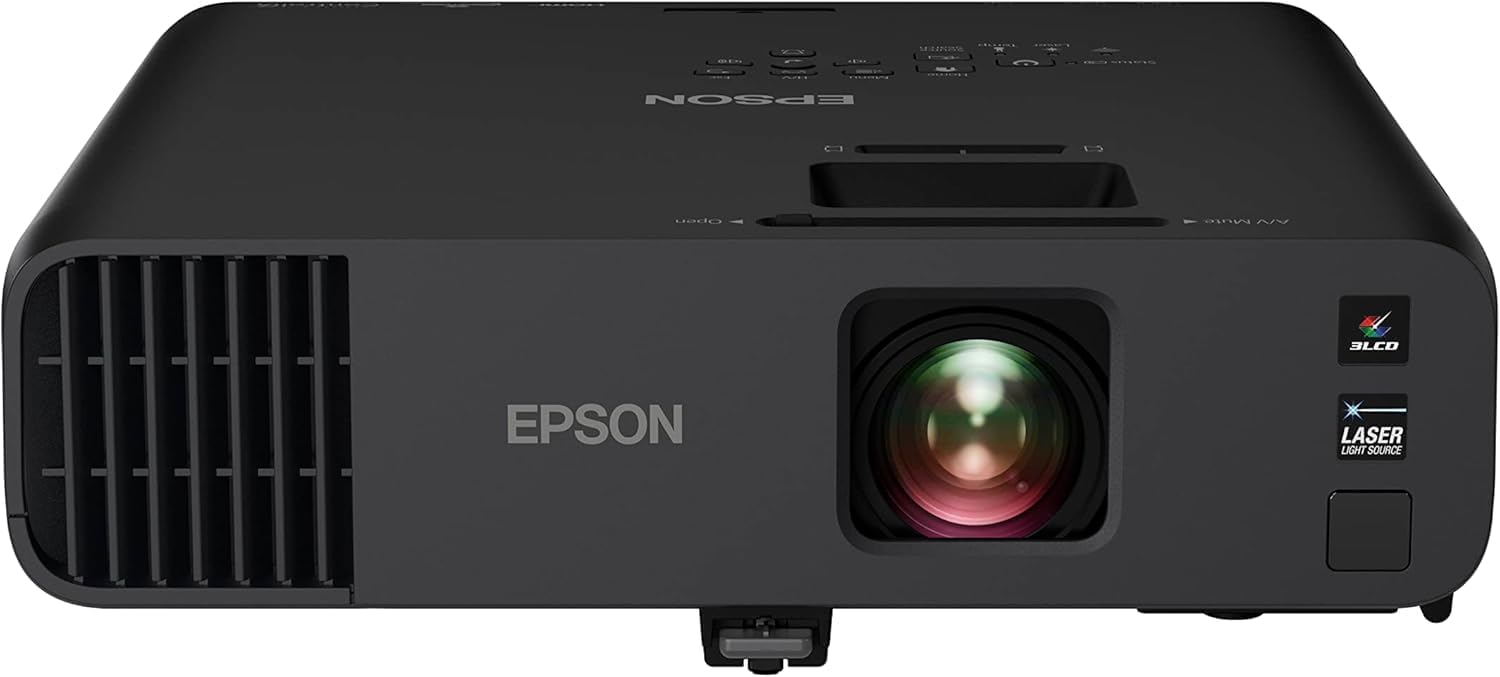 Epson Pro EX11000 Full HD 1080p Wireless Laser
|
9.8/10 | Buy on Amazon | |
| -7% OFF |
 Optoma ZH406ST Short Throw Laser Projector
|
9.1/10 | Buy on Amazon |
 Optoma ZH451 Full HD 1080p Laser Projector
|
N/A | Buy on Amazon | |
| Prime |
 Optoma ZH521 Full HD 1080p Laser Projector
|
N/A | Buy on Amazon |
Pros
- Exceptionally bright output, noticeably brighter than lower-lumen competitors according to real users
- Laser light source means no lamp replacements and long-term reliability for 24/7 use
- Extensive image adjustment options (zoom, keystone, 4-corner, 360-degree) simplify professional installs
- Strong network control features make it IT-friendly for schools and businesses
- Consistently high customer satisfaction, especially for church and classroom use
Cons
- Keystone adjustment is manual, not motorized, which is inconvenient for setups that need frequent repositioning
- Native 1080p resolution may not satisfy users seeking 4K clarity
- At 6.6 lbs and designed for ceiling mounting, it's less ideal for casual or portable use
The ViewSonic LS741HD is a laser-powered 1080p projector designed for professional and educational environments where brightness and reliability matter most. With 5,000 ANSI lumens, it's built for boardrooms, lecture halls, auditoriums, and houses of worship that deal with high ambient light.
Real-world feedback confirms its standout brightness, with one reviewer measuring it at 2.5 to 3 times brighter than a 1500-lumen unit. Churches and classrooms report crisp, vivid images even on large 100-inch screens, and the laser light source means no lamp swaps for up to 30,000 hours of use.
Setup flexibility is a major strength, with 1.6x optical zoom, horizontal/vertical keystone, 4-corner adjustment, and 360-degree projection support. However, the keystone correction is manual rather than automatic, which some users note makes repeated setup and teardown less convenient for temporary installations.
Build quality is solid and compact for a projector in this brightness class, weighing 6.6 pounds and supporting professional ceiling mounts. Network-savvy features like LAN control via Crestron, AMX, and PJ Link add real value for IT departments managing multiple units remotely.
Overall, the LS741HD is an excellent choice for permanent or semi-permanent installations that demand high brightness and dependable performance, though buyers wanting 4K resolution or fully automated setup should look elsewhere. For bright rooms and large-screen 1080p presentations, it delivers outstanding value and consistent praise from real users.
Choose the ViewSonic LS741HD if you need a projector for a large, brightly lit space such as a classroom, boardroom, or sanctuary where image clarity can't be compromised by ambient light.
This model is best suited for fixed or ceiling-mounted installations rather than frequent transport, since the manual keystone adjustment requires extra setup time each use.
If your priority is ultra-high resolution or 4K detail, consider ViewSonic's 4K variant instead, as this unit focuses on brightness and reliability over pixel density.
For IT-managed environments, the built-in LAN control support makes this projector a smart pick for institutions needing centralized, remote management across multiple rooms or campuses.
Pros
- Exceptional 4,600-lumen brightness performs confidently in well-lit rooms without washing out the image
- Laser light source eliminates ongoing lamp replacement costs and downtime over a 20,000-hour lifespan
- 3-Chip 3LCD technology provides superior color accuracy and eliminates the color-wheel rainbow effect common in DLP projectors
- Versatile connectivity with dual HDMI, USB power, Miracast, RJ-45, and RS-232 suits virtually any business setup
- Large 300-inch projection capability makes it ideal for big conference rooms and auditorium-style presentations
Cons
- At nearly 9.5 lbs and a premium price point, this projector is better suited as a semi-permanent installation than a portable travel unit
- Wireless functionality is limited to Miracast only, lacking native Apple AirPlay support found on some competing models
- The higher price compared to lamp-based alternatives may be difficult to justify for light or infrequent users
The Epson Pro EX11000 is a professional-grade Full HD laser projector built specifically for the modern workplace. Designed for conference rooms, training spaces, and large-group presentations, it delivers a 300-inch 1080p image with 4,600 lumens of color and white brightness, making it one of the brightest business projectors in its class. It is best suited for organizations that need reliable, high-quality projection on a daily basis.
The standout feature of this projector is its 20,000-hour laser light source, which effectively eliminates the recurring cost and hassle of lamp replacements. Paired with Epson's 3-Chip 3LCD technology, every frame is rendered using 100% of the RGB color signal, resulting in accurate, vibrant colors without the distracting rainbow effect associated with single-chip DLP projectors. In real-world use, the brightness holds up impressively well even with ambient lighting left on, which is a critical advantage in busy office environments.
Connectivity is a genuine strength of the EX11000. Two HDMI ports, a USB power port for streaming sticks, Miracast wireless mirroring, RJ-45, RS-232, and legacy inputs like RCA and D-Sub make this one of the most versatile projectors available in its category. The built-in 16W speaker is notably powerful for a projector, reducing the need for external audio equipment during meetings and video conferences.
On the downside, the EX11000 is a relatively heavy unit at 9.5 lbs, which makes it less practical for users who need to carry a projector between locations regularly. Apple AirPlay is absent, which may frustrate teams that rely heavily on iOS and macOS devices for wireless sharing. The premium price point also means it requires a clear business case to justify over more affordable lamp-based alternatives.
Overall, the Epson Pro EX11000 is a compelling investment for businesses that prioritize image quality, long-term reliability, and versatile connectivity. Its laser technology, exceptional brightness, and rich feature set make it a top-tier choice for organizations ready to upgrade their presentation infrastructure for the long haul.
Resolution: Full HD 1080p | Brightness: 4,600 lumens color and white (IDMS/ISO rated) | Light Source: Laser, up to 20,000 hours | Technology: 3-Chip 3LCD
Connectivity: 2x HDMI, RCA, D-Sub, RS-232, RJ-45, USB Power (5V-2A) | Wireless: Miracast | Optical Zoom: 1.0x to 1.6x | Vertical Correction: Auto
Built-In Speaker: 16W | Max Screen Size: 300 inches | Dimensions: 12.8 x 11.8 x 4.1 inches | Weight: 9.5 lbs | Warranty: 1-Year Limited
If you are evaluating the Epson Pro EX11000 against other business projectors, the most important factor to consider is your room size and lighting conditions. This projector's 4,600-lumen output is specifically designed for medium to large conference rooms where the lights stay on, giving it a clear edge over lower-lumen competitors in the same lineup.
For organizations planning a long-term installation, the laser light source is a major financial consideration. While the upfront cost is higher than lamp-based models, eliminating bulb replacements over a 20,000-hour lifespan can result in significant savings and reduced IT overhead over time. It is an especially smart choice for high-frequency users such as corporate training centers, universities, or boardrooms.
If wireless connectivity is a priority, confirm that your devices support Miracast before purchasing, as this projector does not include Apple AirPlay. Teams that rely primarily on iPhones and MacBooks may want to consider a streaming stick such as an Apple TV connected via HDMI as a simple workaround. For everyone else, the combination of dual HDMI, USB power for streaming devices, and Miracast covers virtually every modern use case with ease.
Pros
- Ultra short throw ratio ideal for small rooms and large venue screens
- Laser light source reduces long-term maintenance costs and downtime
- Flexible installation options including portrait mode and four corner correction
- Strong connectivity suite with dual HDMI, VGA, LAN, and RS-232
- Long warranty coverage on both projector and light source
Cons
- Some users report actual brightness falls short of expectations compared to competing lamps
- At least one buyer received a unit defaulting to Chinese language menus with no easy fix
- Mixed customer ratings suggest inconsistent quality control across units
The Optoma ZH406ST is a short throw laser projector designed for professional environments like classrooms, boardrooms, and digital signage installations. Its standout 0.5:1 throw ratio lets it cast a 120-inch image from just over four feet away, making it a smart choice for space constrained rooms or stages where presenters need to move freely without blocking the projection.
Performance wise, the DuraCore laser light source is the headline feature, rated for up to 30,000 hours and eliminating the need for lamp or filter changes altogether. One reviewer specifically chose it for a large 18-foot venue screen where a short throw was essential, calling it the best value among a limited pool of projectors that met their needs. Support for 4K HDR10 and HLG content adds further versatility for modern video sources.
Build quality feels aimed squarely at institutional use rather than home theater flash. The compact 13.27 x 13.27 x 4.82 inch chassis, IPX6 dust resistance, and quiet operation suit long-term ceiling mounted deployments, while built-in 10W stereo speakers and network control options like LAN, RS-232, Extron, and AMX simplify setup across multi-room installations.
That said, the ZH406ST isn't without complaints. A couple of reviewers reported brightness that didn't match the advertised 4,200 lumens compared to cheaper alternatives, and one buyer received a unit stuck in Chinese language menus, raising quality control concerns. These issues, combined with a modest 3.5 star average, suggest some inconsistency in unit quality or customer experience.
Overall, this projector is best suited for institutions and AV integrators who value flexible short throw placement, low maintenance laser technology, and robust connectivity over sheer brightness numbers. Buyers prioritizing peak lumen performance may want to compare closely against pricier alternatives before committing.
The ZH406ST features a native 1920 x 1080 Full HD resolution paired with a 300,000:1 contrast ratio and 4,200 ANSI lumens of brightness, suitable for lights-on environments in classrooms and meeting rooms.
Its short throw lens offers a 0.5 to 1 meter throw distance with 0.8 to 2.0x digital zoom, plus four corner correction and 360 degree projection support for flexible mounting, including portrait orientation.
Connectivity is extensive, covering dual HDMI, VGA, composite, RJ45, RS-232, 3D Sync, Mic-In, USB power, and Micro USB, allowing integration with both modern and legacy AV systems.
The unit runs on 120V power at 125 watts and includes a 2-year parts and labor warranty on the projector along with a 5-year or 12,000-hour warranty on the laser light source, whichever comes first.
Pros
- Very bright 4,600-lumen output suited for well-lit rooms
- Long-life laser source removes the hassle of lamp maintenance
- Flexible mounting and projection orientation options
- Strong connectivity suite for centralized IT management
- Backed by a solid 3-year projector and 5-year light source warranty
Cons
- No built-in speaker mentioned, so external audio may be required
- Miracast relies on an included USB adapter rather than native built-in wireless
- At this price point, it lacks 4K resolution for users needing ultra-high-definition output
The Optoma ZH451 is a Full HD 1080p laser projector aimed squarely at business and education environments where reliability and brightness matter more than home-theater flair. With 4,600 lumens on tap, it's built to hold up in classrooms and meeting rooms with windows and overhead lighting, a common pain point for lower-brightness projectors.
The standout feature here is the DuraCore laser engine, rated for up to 30,000 hours of use. That effectively removes lamp replacement from the maintenance checklist, a real advantage for IT departments managing multiple units across a school or office. Flexible installation options, including 360-degree and portrait projection with zoom and keystone correction, mean it can be mounted on ceilings, walls, or tabletops without awkward workarounds.
Connectivity is clearly designed with IT integration in mind: dual HDMI, VGA, LAN, and RS232 ports allow centralized control and easy incorporation into existing AV setups, while the included Miracast USB adapter adds wireless casting without demanding a fully modern display infrastructure. The compact 8.5 x 10.8 x 4.5-inch chassis and dust-resistant build also suggest Optoma designed this for long-term, low-fuss deployment rather than occasional home use.
On the downside, there's no mention of onboard audio, so buyers will likely need external speakers for presentations, and the reliance on a bundled Wi-Fi adapter for Miracast rather than native wireless could feel like an extra step for some users. It also sticks to 1080p rather than 4K, which is a reasonable trade-off for brightness and price but worth noting for anyone expecting higher resolution.
Overall, the Optoma ZH451 looks like a dependable, business-focused laser projector that prioritizes brightness, low maintenance, and IT-friendly connectivity over flashy extras. It's a strong fit for schools, conference rooms, and corporate settings that need consistent daily performance without the recurring cost of lamp swaps.
Pros
- Bright enough for well-lit classrooms and offices without dimming lights
- Long-life laser reduces maintenance costs and downtime
- Flexible installation options with zoom and geometric correction
- Strong connectivity suite for business and education AV systems
- Backed by a solid 3-year warranty plus 5-year light source coverage
Cons
- No listed customer reviews yet, so real-world reliability data is limited
- Fixed throw distance range may limit placement flexibility in smaller or larger rooms
- Price point is higher than typical home entertainment projectors, better suited for business budgets
The Optoma ZH521 is a Full HD 1080p laser projector designed primarily for classrooms, meeting rooms, and professional AV setups, though it can double as a bright home theater unit. With 5,500 lumens of output, it's built to handle spaces where controlling ambient light isn't always possible.
The standout feature here is the DuraCore laser engine, rated for up to 30,000 hours of maintenance-free operation. Combined with a 1.3x zoom lens and four-corner geometric correction, installers get real flexibility when mounting the unit in different room configurations, including portrait or 360-degree orientations.
Build quality reflects its business-first design: a compact 10.8 x 4.5 x 8.5 inch chassis weighing 6.4 pounds, with support for tabletop, wall, or floor mounting. Connectivity is comprehensive, featuring dual HDMI 2.0, VGA, LAN, RS232, and USB ports, making it easy to integrate into existing AV or classroom control systems.
One tradeoff is the fixed throw distance of 32.8 feet, which may not suit very small rooms without careful planning. There are also no user reviews yet, so buyers are relying on spec sheets and brand reputation rather than field-tested feedback.
Overall, the ZH521 is a well-equipped, low-maintenance projector aimed at schools, offices, and training facilities that need dependable brightness and centralized management through Optoma's OMS platform. It's less about home theater flair and more about consistent, hassle-free performance in professional environments.
The ZH521 features a native resolution of 1920 x 1080 (Full HD) with a maximum brightness of 5,500 ANSI lumens, making it suitable for rooms with moderate to high ambient light.
Its DuraCore laser light source is rated for up to 30,000 hours, and Optoma backs the unit with a 3-year limited parts and labor warranty plus a 5-year or 12,000-hour light source warranty, whichever comes first.
Connectivity includes dual HDMI 2.0 inputs, VGA, LAN, RS232, and USB, along with support for Miracast via the included Wi-Fi adapter. The projector measures 10.8 x 4.5 x 8.5 inches and weighs 6.4 pounds, making it easy to transport or permanently mount.
Choosing Your Classroom Laser Projector
Brightness for Lights-On Viewing
A projector’s brightness, measured in lumens, is critical for classrooms where you cannot always dim the lights. Look for models with at least 4000 lumens to ensure text, graphics, and videos remain visible and crisp. This allows students to take notes while viewing the screen without eye strain. High brightness combats ambient light from windows and overhead fixtures, keeping presentations vivid and professional. Our review includes several high-lumen options validated for well-lit environments.
Resolution and Image Quality
Installation Flexibility and Throw Ratio
Consider your room’s layout and where you can mount the projector. A short-throw model, like the Optoma ZH406ST, can produce a large image from a very short distance, minimizing shadows and glare. For standard installations, look for features like optical zoom, keystone correction, and four-corner adjustment. These tools help you achieve a perfectly squared image regardless of the projector’s placement, making setup much easier. Flexible installation support is key for both permanent mounts and mobile carts.
Laser Longevity and Connectivity
The core advantage of a laser projector is its maintenance-free light source, which can last tens of thousands of hours. This eliminates the cost and hassle of frequent lamp replacements. Also, confirm the projector has the right ports for your needs, such as HDMI for modern devices and VGA for legacy computers. Network connectivity like LAN control allows IT staff to manage multiple projectors remotely, a major benefit for school-wide deployments. For other high-brightness solutions on a tighter budget, consider the best classroom projectors under 500.
Final Thoughts
Investing in a laser projector is a smart decision for any modern classroom, offering brilliant, reliable performance that traditional lamp-based models cannot match. For environments that demand exceptional brightness and advanced network control, the ViewSonic LS741HD 5000 Lumens 1080p Laser stands out. If you need a versatile, compact solution with strong wireless features, the Epson Pro EX11000 3-Chip 3LCD Full HD 1080p is an excellent choice to foster collaboration. We are confident one of the models reviewed here will meet your specific educational needs and enhance learning for years to come.
Frequently Asked Questions
Why choose a laser projector over a lamp-based one for a classroom?
Laser projectors are superior for classrooms due to their exceptional longevity and consistent brightness. They offer a light source rated for up to 30,000 hours, meaning you can use them for years without the cost and downtime of replacing a lamp. Their performance remains stable over time, with no gradual dimming, ensuring your images stay bright and clear throughout the projector’s life. This reliability makes them a more cost-effective and hassle-free solution in the long run.
What is a good brightness level for a classroom with windows?
For classrooms with significant ambient light from windows or bright overhead lighting, a projector with at least 4000 to 5000 lumens is recommended. This high brightness level ensures that presentations, videos, and text remain vivid and easily readable for all students without requiring the lights to be turned off. It helps maintain an engaged learning environment where students can simultaneously view the screen and take notes. You can find more options suited for bright rooms in our review of the best business projectors under 1000 with high brightness.
Are these projectors difficult to set up and align?
Modern laser classroom projectors are designed for easy setup. Most models we reviewed include features like vertical and horizontal keystone correction, four-corner adjustment, and optical zoom. These tools allow you to digitally manipulate the projected image to fit your screen perfectly, even if the projector is placed at an angle. This flexibility simplifies installation on carts, shelves, or ceiling mounts, saving you time and technical frustration.
Can I connect a laptop wirelessly to these projectors?
Yes, several models in this category offer wireless connectivity options like Miracast, which allows for screen mirroring from compatible laptops, smartphones, and tablets. This feature promotes a more dynamic and collaborative classroom by enabling teachers and students to share content instantly without dealing with cables. It is a convenient way to switch between different presenters and devices seamlessly during a lesson or meeting.




Write Your Review
No reviews yet. Be the first to share your experience!