

You are setting up a dynamic classroom, a collaborative boardroom, or an immersive home theater. The right interactive projector is the difference between a flat presentation and an engaging experience where ideas come to life. This guide is for educators, business professionals, and home cinema enthusiasts who demand more than just a big picture. We have assessed the latest models from top brands to help you find a powerful tool that fits your interactive needs.
For those outfitting a professional environment, our related guide on the best business projectors offers additional insights into dedicated commercial solutions.
| Pick | Product | AI Score | Buy |
|---|---|---|---|
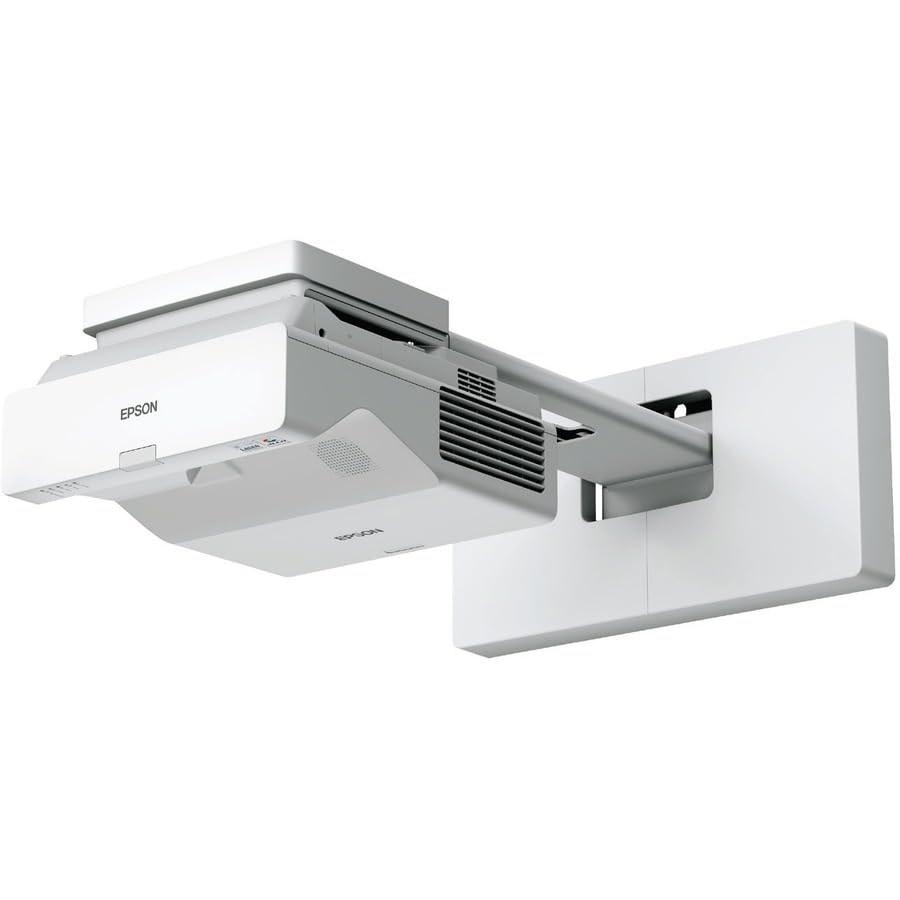 Epson BrightLink 770Fi Ultra Short Throw 3LCD
|
9.9/10 | Buy on Amazon | |
 BenQ LU930 WUXGA Laser Projector
|
9.9/10 | Buy on Amazon | |
| -11% OFF |
 JMGO N3 Ultimate 4K Triple Laser Projector
|
9.6/10 | Buy on Amazon |
 XGIMI HORIZON 20 Max 4K Triple Laser Projector
|
9.6/10 | Buy on Amazon | |
 Epson Lifestudio Grand LS670W Ultra Short Throw 4K
|
9.2/10 | Buy on Amazon |
Pros
- Extremely large interactive display area compared to standard interactive panels at a lower cost per square inch
- Laser light source eliminates lamp replacement costs and maintenance headaches for years
- Strong multi-user and multi-device collaboration features suited for classrooms and conference rooms
- Wide range of connectivity options including HDMI, USB, Ethernet, Wi-Fi and Bluetooth
- Backed by a solid 3-year manufacturer warranty and comes bundled with pens, cables, and mounting accessories
Cons
- High price point may be a barrier for smaller classrooms or budget-conscious buyers
- Wall mounting and short throw setup require careful installation and calibration
- 1080p resolution, while sharp, is not 4K, which may matter for detailed visual content
The Epson BrightLink 770Fi is an ultra short throw interactive projector designed specifically for classrooms and collaborative meeting spaces. It replaces traditional whiteboards and interactive panels with a projected 1080p display that can scale up to 100 inches, giving teachers and presenters a huge canvas without needing a large panel or extensive throw distance.
What stands out most is its combination of brightness and interactivity. With 4,100 lumens of color and white brightness powered by 3-chip 3LCD technology, images stay clear and readable even under normal classroom lighting. The dual-pen support and optional eight-user touch module make it genuinely useful for group work, while the PC-free whiteboard functionality means teachers can jump straight into annotating without booting up a laptop.
Build quality feels solid and purpose-built for institutional use, with a wall-mountable form factor and a laser light source rated for 20,000 hours, effectively eliminating the ongoing cost and hassle of lamp replacements. The bundled accessories, including interactive pens, corner markers, and a full cable set, suggest Epson designed this as a complete out-of-box solution for schools.
The main drawbacks are practical rather than performance-related: the price sits well above consumer projectors, and getting the ultra short throw geometry and wall mount aligned correctly takes more care than a standard setup. It's also worth noting the resolution tops out at 1080p rather than 4K, though for whiteboard and presentation use this is rarely a limiting factor.
Overall, the BrightLink 770Fi is a strong choice for schools, training centers, and corporate meeting rooms that want a large-format interactive display without the cost of a comparably sized touch panel. It's not aimed at home theater users, but for its intended educational and collaborative use case, it delivers a compelling mix of size, brightness, and interactivity.
Pros
- Bright 5000-lumen output suited for large rooms and ambient light
- Maintenance-free laser design lowers long-term ownership costs
- Strong connectivity and network control options for enterprise use
- High contrast ratio (3,000,000:1) for sharp, detailed visuals
- Backed by a 3-year manufacturer warranty
Cons
- Premium price point compared to lamp-based projectors
- Manual focus only, lacking motorized lens convenience
- Short throw distance range may limit placement flexibility in some rooms
The BenQ LU930 is a WUXGA laser DLP projector designed for businesses, classrooms, and control rooms that need reliable, high-output projection without the hassle of lamp replacements. With 5000 ANSI lumens and native 1920x1200 resolution, it's built for environments where brightness and clarity matter more than portability.
Its standout feature is the sealed, IP5X-certified laser engine rated for 20,000 hours, meaning users can expect years of maintenance-free operation even under 24/7 use. Color accuracy is also impressive, with 92% Rec 709 coverage that keeps logos, charts, and video content looking natural and professional.
Build quality reflects BenQ's enterprise-grade design, with a sturdy desktop form factor, extensive I/O including dual HDMI, RS232, and LAN for network control, and support for AMX, PJ Link, and Crestron integration. This makes it easy to deploy and manage across multiple rooms or facilities.
The main drawbacks are its manual focus lens, which lacks the convenience of motorized adjustment found in pricier models, and its short throw range, which may require careful room planning. It's also a significant investment compared to standard lamp-based projectors.
Overall, the BenQ LU930 is a strong choice for organizations prioritizing brightness, color fidelity, and long-term reliability over portability or budget. It's especially well-suited for control rooms, large classrooms, and corporate settings that run projectors for extended hours daily.
The LU930 uses a single 0.48-inch WUXGA DLP chip with a DC3 DMD, delivering native 1920x1080 resolution and support up to 1920x1200. Brightness reaches 5000 ANSI lumens with a contrast ratio of 3,000,000:1 and 1.07 billion color support.
Its laser light source is rated for 20,000 hours, and the projector supports a 1.6x zoom ratio with 2D keystone correction (±30 degrees vertical and horizontal). Projection size ranges from 30 to 300 inches, making it adaptable for various room sizes.
Connectivity is robust, featuring two HDMI 1.4a ports, VGA in/out, component and composite video inputs, RS232, LAN, and USB Type-A for service and firmware updates. Built-in dual 10W speakers add convenience for standalone audio without external systems.
Pros
- Exceptional brightness for daytime and ambient-light viewing
- Highly flexible installation thanks to lens shift, zoom, and motorized gimbal
- Strong built-in audio that rivals standalone soundbars
- Excellent gaming performance with low latency and high refresh rate
- Fast, lag-free Google TV interface with plenty of RAM and storage
Cons
- Fan noise can be noticeable, even occasionally kicking on during sleep mode
- Some Google TV apps don't fully support 4K Dolby Vision, requiring an external streaming device
- Rainbow effect and minor light bleed reported by some users, typical of laser/DLP projectors
The JMGO N3 Ultimate is a premium 4K triple laser projector aimed at home theater enthusiasts, gamers, and anyone who wants a flexible, high-brightness alternative to a traditional TV setup. Its combination of portability and professional-grade optics makes it equally suited for a dedicated media room or a casual living space setup.
What truly sets this projector apart is its 5800 ISO Lumen output from the triple laser engine, which keeps images bright and colorful even with some ambient light in the room, a common weak point for projectors in this class. Reviewers consistently praise the color accuracy, Dolby Vision performance, and deep black levels, while gamers benefit from the 240Hz refresh rate and 1ms input lag that make fast-paced titles feel responsive on PS5, Xbox, or PC.
Physically, the N3 Ultimate impresses with its four-way lens shift, wide optical zoom range, and a 360-degree motorized AI gimbal, giving users true physical image placement rather than digital cropping. Setup is further simplified by real-time auto keystone and focus correction, making it easy to get a clean picture even in awkward room layouts.
On the downside, some users have reported fan noise during standby mode and a visible rainbow effect typical of single-chip DLP laser projectors. Additionally, while it runs on Google TV with native Netflix and Chromecast, a few third-party apps don't yet support full 4K Dolby Vision playback, so pairing it with an external streaming device may be necessary for the best results.
Overall, the JMGO N3 Ultimate delivers an impressive blend of brightness, color accuracy, and gaming performance that outperforms many pricier competitors. It's a strong choice for anyone wanting a versatile, big-screen home cinema experience, provided they can look past a few minor quirks in noise and app compatibility.
Pros
- Exceptionally bright image that holds up well even in daylight or lit rooms
- Motorized lens shift and auto focus make placement and setup fast and flexible
- Smooth, lag-free gaming with ALLM, VRR, and 240Hz support
- Quiet operation compared to traditional bulb-based projectors
- Built-in Google TV interface is fast, smooth, and doesn't require a separate streaming box
Cons
- Real-world usable brightness in HDR mode is noticeably lower than the advertised 5700 lumens
- 3D mode can be finicky to enable and may require resetting picture settings first
- At 220V and 280W, it draws more power than typical budget projectors
The XGIMI HORIZON 20 Max is a premium 4K triple laser projector aimed at home theater enthusiasts and gamers who want a massive screen experience without sacrificing brightness or color accuracy. It's built for users upgrading from dimmer, bulb-based projectors or looking to replace a traditional TV with something far larger.
The standout feature is the X-Master RGB triple laser engine, which pushes out 5700 ISO lumens and 110% BT.2020 color coverage. Reviewers note that while HDR mode doesn't quite hit the rated brightness in practice, standard 4K mode looks fantastic and bright enough to use with lights on. Gaming performance is another highlight, with 1ms input lag, 240Hz motion, ALLM, and VRR support making it genuinely competitive for console and PC gaming on a huge screen.
Build quality gets consistent praise, with an Elephant Grey, leather-textured finish that looks at home in a living room rather than hidden away. The motorized lens shift and optical zoom simplify setup considerably compared to older projectors that require physical repositioning, and auto keystone and auto focus further streamline installation.
The main drawbacks are software related. A few reviewers found the 3D mode's toggle gets disabled when certain picture enhancements are active, requiring a settings reset to unlock it. Some also mention needing to switch between HDR and standard modes depending on ambient light to get the best picture, since HDR can look dimmer than expected in bright rooms.
Overall, the HORIZON 20 Max is a strong choice for anyone wanting a bright, color accurate, gaming capable projector with a polished smart TV experience built in. It's best suited to home theater builders and gamers willing to invest in a top tier laser projector rather than casual, budget-conscious buyers.
The HORIZON 20 Max features a native 3840 x 2160 (4K) DLP display with 5700 ISO lumens of brightness and a 20,000:1 contrast ratio, supporting Dolby Vision, HDR10+, and IMAX Enhanced formats for accurate, high-quality visuals.
Throw distance ranges from 1.06 to 5.31 meters, producing images from 40 to 300 inches, with 15cm of vertical keystone correction for flexible placement in various rooms.
Connectivity includes HDMI, USB 2.0/3.0, Bluetooth, Wi-Fi, and 3.5mm audio out, alongside built-in Google TV and Google Home for streaming and voice control without extra devices. The unit runs on 220V and draws 280 watts, with a 180-watt laser light source and Harman Kardon speakers for integrated audio.
Pros
- Extremely bright, vivid 4K HDR image that holds up well in lit rooms
- Impressive built-in Bose audio eliminates the need for a separate sound system
- Ultra short throw design makes setup easy without ceiling mounts or long cable runs
- Google TV interface offers huge app selection and simple voice search
- Long 20,000-hour laser lifespan reduces long-term maintenance costs
Cons
- Multiple reviewers report intermittent Wi-Fi connectivity and reconnection issues
- No wall or ceiling mount included, so extra hardware may be needed for some setups
- May require a firmware update out of the box for smooth streaming performance
The Epson Lifestudio Grand LS670W is an ultra short throw 4K laser projector built for anyone who wants a true home theater experience without dedicating a room to it. Sitting just inches from the wall, it throws a crisp image up to 120 inches, making it ideal for living rooms, apartments, or spaces where a traditional long-throw setup isn't practical.
Picture quality is where this projector shines. Its 3-chip 3LCD engine produces 3,600 lumens of both color and white brightness, so images stay punchy even with ambient light in the room. Combined with 4K PRO-UHD processing and HDR10 support, colors look vibrant and detail holds up well in bright scenes and shadows alike. The built-in 2.1 Bose sound system is a genuine standout, delivering room-filling audio with real bass, so there's no need to hook up external speakers for a satisfying movie night.
Build quality feels solid and the compact desktop form factor makes placement flexible, though at over 16 pounds it's clearly designed to stay put rather than travel. Google TV is baked in, giving instant access to thousands of streaming apps and a handy voice remote for quick searches across Netflix, Disney+, Hulu, and live TV.
The main drawback reported by owners is inconsistent Wi-Fi performance, with some experiencing dropped connections or slow reconnects after power-up. A few buyers also noted the need for a firmware update straight out of the box, and there's no wall mount included if you want it off the tabletop.
Overall, the Lifestudio Grand LS670W is a compelling all-in-one home theater solution for buyers who want big, bright, detailed visuals and quality sound without a complicated installation. It's best suited to those willing to tolerate occasional streaming quirks in exchange for an otherwise premium, immersive viewing experience.
How to Choose Your Interactive Projector
Prioritize Brightness and Image Quality
An interactive projector must deliver a clear, vibrant image to be effective. Look for high lumen ratings, which measure brightness, to ensure visibility in well-lit rooms. True 4K resolution and advanced color technologies, like those in the JMGO N3 Ultimate 4K Triple Laser Projector, provide stunning detail and accurate color reproduction. This makes content pop, whether it is a detailed chart or a blockbuster movie.
Superior image quality keeps your audience focused and engaged. It is a foundational element that supports all interactive features.
Evaluate Interactive and Setup Flexibility
Consider how you will interact with the projected image. Some projectors support touch or pen-based annotation directly on the wall or screen. Others are designed for seamless integration with external devices. Setup flexibility is equally crucial. Features like motorized lens shift, optical zoom, and ultra-short throw technology, as seen on the Epson Lifestudio Grand Ultra Short Throw 4K, allow for easy placement without sacrificing image size or quality.
This flexibility lets you adapt the projector to challenging room layouts, ensuring a perfect picture from almost any position.
Assess Connectivity and Smart Features
Modern interactive projectors are multimedia hubs. Built-in smart platforms like Google TV provide instant access to streaming apps without extra devices. Look for robust connectivity options, including multiple HDMI ports for laptops and gaming consoles. Smart auto-setup features, such as instant keystone correction and focus, save valuable time and eliminate manual tweaking.
These features streamline your workflow and entertainment, creating a truly plug-and-play experience. For a complete setup, explore our recommendations for the best projector screens under $200 to pair with your new device.
Consider Longevity and Maintenance
Laser light sources have revolutionized projector reliability. They offer exceptionally long lifespans, often exceeding 20,000 hours, and maintain consistent brightness over time. This eliminates the cost and hassle of replacing traditional lamps. A sealed optical engine, like that in the BenQ LU930 WUXGA DLP Lamp-Free Laser Projector, prevents dust intrusion, ensuring a maintenance-free operation for years.
Investing in a durable, low-maintenance model means less downtime and a better long-term value for your investment. You can find more budget-conscious options in our roundup of the best projectors under $1200.
Final Thoughts
Selecting the right interactive projector hinges on matching specific features to your primary use case. For educators and business professionals seeking a dedicated, bright tool for collaborative spaces, the Epson BrightLink 770Fi Ultra Short Throw 3LCD is a standout choice. Conversely, for a versatile home entertainment powerhouse that blends massive screen gaming with cinematic streaming, the JMGO N3 Ultimate 4K Triple Laser Projector offers exceptional flexibility and immersive performance. Both represent the high-caliber options available for creating engaging visual experiences.
Frequently Asked Questions
What is the main advantage of a laser projector over a lamp-based model?
Laser projectors provide significantly longer operational life, often lasting over 20,000 hours. They deliver instant on/off capability, maintain consistent brightness over time, and generally require no maintenance, making them a more reliable and cost-effective choice in the long run.
Can I use an interactive projector for gaming?
Absolutely. Many modern interactive projectors are excellent for gaming. Look for key specs like a high refresh rate (240Hz), very low input lag (1ms), and support for HDMI VRR to eliminate screen tearing. The XGIMI HORIZON 20 Max 4K Projector Triple Laser is engineered with these features for a competitive gaming edge.
Do I need a special screen for an ultra-short throw projector?
While you can project onto a wall, an ambient light rejecting (ALR) screen is highly recommended for ultra-short throw models. It enhances contrast and color vibrancy by rejecting light from above, which is crucial because these projectors are often placed below the screen. For quality options, check our guide on the best projector screens under $100.
How important is built-in audio for a home theater projector?
Built-in audio provides convenience, but for a truly cinematic experience, an external sound system is superior. Some projectors, like the Epson Lifestudio Grand with Bose technology, offer impressive integrated sound that may suffice for smaller rooms. For larger spaces, pairing your projector with dedicated speakers from our speakers and soundbars category will deliver far greater immersion.





Write Your Review
No reviews yet. Be the first to share your experience!