

You’re preparing for a crucial quarterly review, and the success of your presentation hinges on crystal-clear visuals that can cut through the ambient light of a well-lit conference room. The wrong projector can leave your data looking washed out and your team disengaged. For professionals tasked with outfitting business or educational spaces, finding a projector that delivers professional-grade performance without exceeding budget constraints is a common challenge.
This guide is designed for IT managers, facility coordinators, and business owners seeking reliable, high-brightness projectors suitable for meetings, training sessions, and lectures. We have assessed seven standout models that balance lumens, resolution, and smart features, all within a specific financial bracket. For more options in a similar category, explore our review of the best conference room projectors under $1500.
| Pick | Product | AI Score | Buy |
|---|---|---|---|
 ViewSonic LS751HD 5000 Lumens 1080p Laser
|
9.9/10 | Buy on Amazon | |
| Prime |
 Epson BrightLink 760Wi Ultra Short Throw 3LCD
|
9.9/10 | Buy on Amazon |
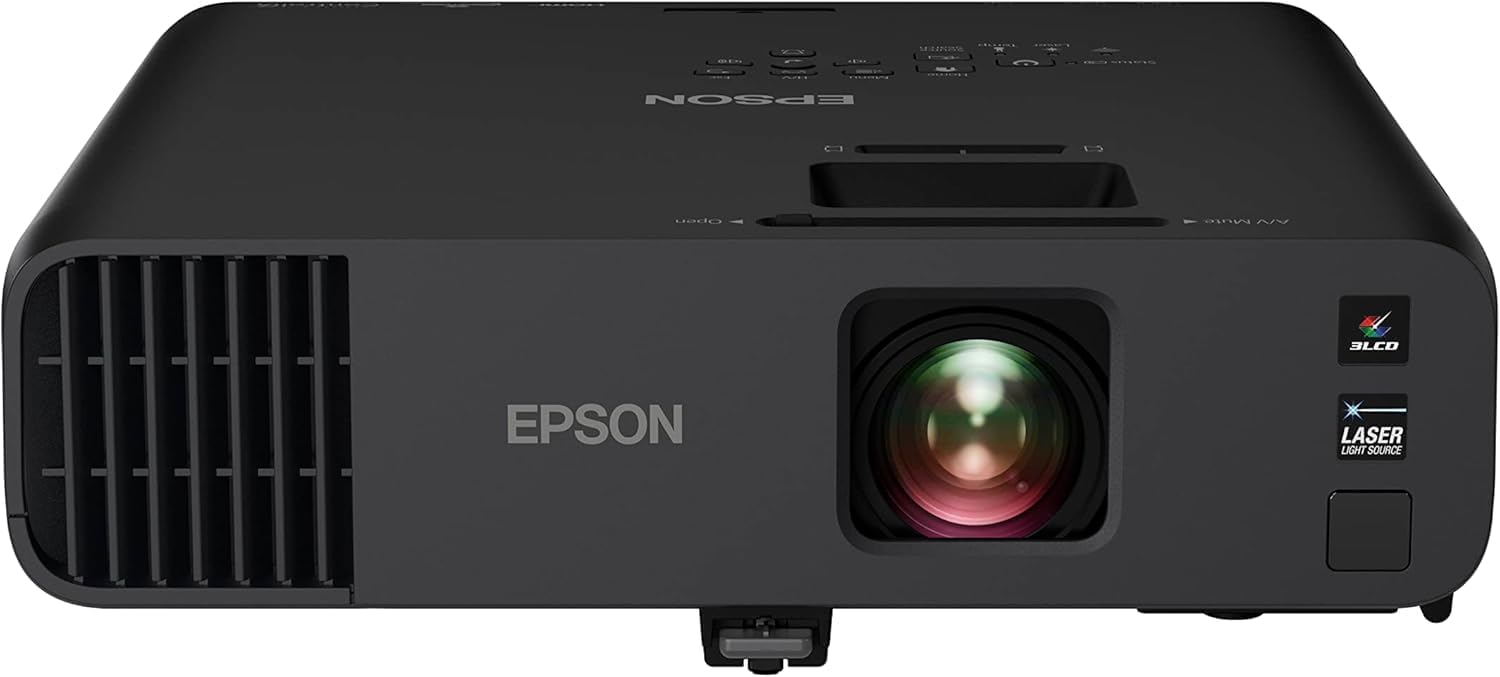 Epson Pro EX11000 Full HD 1080p Wireless Laser
|
9.8/10 | Buy on Amazon | |
| -17% OFF |
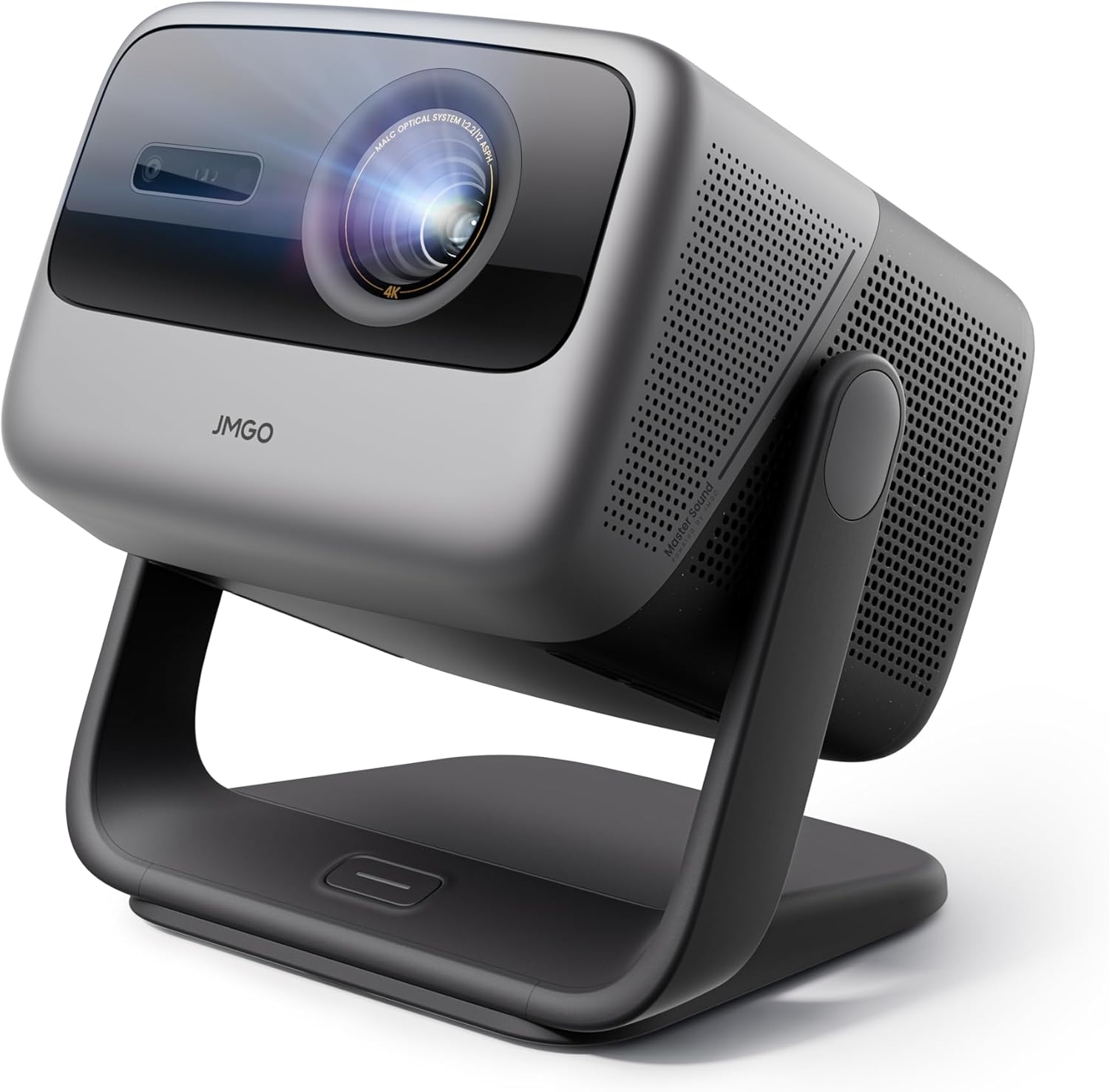 JMGO N1S Ultimate Triple Laser 4K Projector
|
9.7/10 | Buy on Amazon |
 XGIMI HORIZON 20 Pro 4K RGB Triple Laser
|
9.5/10 | Buy on Amazon | |
 Hisense C3 Triple Laser 4K UHD Smart Projector
|
9.5/10 | Buy on Amazon | |
| Prime |
 Optoma ZH521 Full HD 1080p Laser Projector
|
N/A | Buy on Amazon |
Pros
- Very bright 5,000 lumen output handles well-lit rooms with ease
- Long-lasting laser light source reduces maintenance and total cost of ownership
- Flexible setup with optical zoom, keystone correction, and lens shift
- Supports 4K/HDR input despite native 1080p resolution
- Backed by a solid three-year parts and labor warranty
Cons
- Native resolution is 1080p, not true 4K, despite HDMI 2.0b input support
- At 4.5 kg and requiring a dedicated setup, it's less convenient for casual home use
- Premium price point positions it mainly for institutional and business budgets rather than consumers
The ViewSonic LS751HD is a 1080p laser projector aimed squarely at businesses, schools, and other institutions that need dependable, high-brightness projection. With 5,000 ANSI lumens on tap, it's designed to perform in rooms where ambient light would wash out a typical consumer projector, making it a strong fit for boardrooms, lecture halls, and training centers.
The standout feature here is the laser phosphor light source, rated for up to 30,000 hours of use and free of mercury or replaceable lamps. Combined with 1.6x optical zoom, 40-degree horizontal and vertical keystone correction, and vertical lens shift, installers get real flexibility in positioning the unit without sacrificing image alignment. HDMI 2.0b input also allows it to accept 4K and HDR/HLG signals, even though the panel itself is native 1080p.
Build quality reflects its commercial focus: a compact, portable white chassis at 4.5 kg, tabletop mountable, and engineered for 24/7 operation. Network control support through Crestron, AMX, Extron, PJ Link, and ViewSonic's own vController software makes it easy for IT teams to manage remotely at scale, which is a meaningful advantage in multi-room deployments.
The main tradeoffs are that the resolution caps out at 1080p, so it's not a true 4K display despite accepting 4K input, and its size and setup requirements make it less practical for casual home theater use. It's also priced well above typical consumer projectors, reflecting its target market.
Overall, the LS751HD is a well-rounded choice for organizations that need bright, reliable, low-maintenance projection with flexible installation options. It's not built for movie nights at home, but for classrooms, offices, and public presentation spaces, it delivers strong value and long-term reliability.
Native resolution is 1920 x 1080 (1080p) with support for 4K input via HDMI 2.0b, including HDR and HLG compatibility. Brightness is rated at 5,000 ANSI lumens with a contrast ratio of 3,000,000:1 for deep blacks and vivid highlights.
Throw distance ranges from 0.93 to 14.88 meters, supporting image sizes from 30 to 300 inches, which suits both small meeting rooms and large auditoriums. The laser light source is rated for up to 20,000-30,000 hours depending on usage conditions.
Power consumption is rated at 260 watts, and the unit weighs 4.5 kg, making it portable enough for tabletop setups. It ships with a power cord, lens cover, HDMI cable, and instruction sheet, and is backed by a three-year limited warranty on parts and labor plus a one-year lamp warranty.
Pros
- Ultra short throw design fits tight spaces just over a foot from the wall
- Maintenance-free laser engine backed by a 3-year manufacturer warranty
- High 2,500,000:1 contrast ratio and WXGA resolution deliver crisp, readable visuals
- Integrates easily with Microsoft 365 and Google Workspace for classroom workflows
- Includes comprehensive accessory bundle (pens, cables, mounting hardware, GoBoard license)
Cons
- Premium price point compared to standard non-interactive projectors
- WXGA resolution falls short of Full HD or 4K clarity expected on higher-end displays
- Installation and pen calibration may require professional setup for best results
The Epson BrightLink 760Wi is an ultra short throw interactive projector purpose-built for classrooms, training rooms, and collaborative office environments. It's aimed at educators and teams who need a large, touch-enabled display without investing in an expensive flat-panel alternative.
Its standout feature is the laser-based interactive display that turns any flat surface into a 100-inch touchscreen, supporting dual-pen input and an optional module for up to eight simultaneous users. With 4,100 lumens of brightness and a 2,500,000:1 contrast ratio, images stay clear and vibrant even under typical classroom lighting, while WXGA resolution handles both widescreen and 4:3 content well.
Build quality reflects Epson's education-focused design, with a compact 13.2-pound wall-mountable chassis and a full accessory kit including interactive pens, corner markers, and a pen tray. The 20,000-hour laser light source removes the recurring cost and hassle of lamp replacements, making long-term ownership straightforward for IT departments.
The main drawbacks are the WXGA resolution, which trails Full HD and 4K projectors on the market, and a price point that positions this as a premium classroom investment rather than a budget buy. Setup and pen calibration are largely automated, but first-time installers may still want professional help to align everything properly.
Overall, the BrightLink 760Wi is a strong choice for schools and businesses that already use interactive displays or are upgrading from older BrightLink models, thanks to its compatible mounting and touch module. Anyone prioritizing large-format collaboration, low maintenance, and wireless device casting will find this projector delivers solid, dependable performance.
Pros
- Exceptional 4,600-lumen brightness performs confidently in well-lit rooms without washing out the image
- Laser light source eliminates ongoing lamp replacement costs and downtime over a 20,000-hour lifespan
- 3-Chip 3LCD technology provides superior color accuracy and eliminates the color-wheel rainbow effect common in DLP projectors
- Versatile connectivity with dual HDMI, USB power, Miracast, RJ-45, and RS-232 suits virtually any business setup
- Large 300-inch projection capability makes it ideal for big conference rooms and auditorium-style presentations
Cons
- At nearly 9.5 lbs and a premium price point, this projector is better suited as a semi-permanent installation than a portable travel unit
- Wireless functionality is limited to Miracast only, lacking native Apple AirPlay support found on some competing models
- The higher price compared to lamp-based alternatives may be difficult to justify for light or infrequent users
The Epson Pro EX11000 is a professional-grade Full HD laser projector built specifically for the modern workplace. Designed for conference rooms, training spaces, and large-group presentations, it delivers a 300-inch 1080p image with 4,600 lumens of color and white brightness, making it one of the brightest business projectors in its class. It is best suited for organizations that need reliable, high-quality projection on a daily basis.
The standout feature of this projector is its 20,000-hour laser light source, which effectively eliminates the recurring cost and hassle of lamp replacements. Paired with Epson's 3-Chip 3LCD technology, every frame is rendered using 100% of the RGB color signal, resulting in accurate, vibrant colors without the distracting rainbow effect associated with single-chip DLP projectors. In real-world use, the brightness holds up impressively well even with ambient lighting left on, which is a critical advantage in busy office environments.
Connectivity is a genuine strength of the EX11000. Two HDMI ports, a USB power port for streaming sticks, Miracast wireless mirroring, RJ-45, RS-232, and legacy inputs like RCA and D-Sub make this one of the most versatile projectors available in its category. The built-in 16W speaker is notably powerful for a projector, reducing the need for external audio equipment during meetings and video conferences.
On the downside, the EX11000 is a relatively heavy unit at 9.5 lbs, which makes it less practical for users who need to carry a projector between locations regularly. Apple AirPlay is absent, which may frustrate teams that rely heavily on iOS and macOS devices for wireless sharing. The premium price point also means it requires a clear business case to justify over more affordable lamp-based alternatives.
Overall, the Epson Pro EX11000 is a compelling investment for businesses that prioritize image quality, long-term reliability, and versatile connectivity. Its laser technology, exceptional brightness, and rich feature set make it a top-tier choice for organizations ready to upgrade their presentation infrastructure for the long haul.
Resolution: Full HD 1080p | Brightness: 4,600 lumens color and white (IDMS/ISO rated) | Light Source: Laser, up to 20,000 hours | Technology: 3-Chip 3LCD
Connectivity: 2x HDMI, RCA, D-Sub, RS-232, RJ-45, USB Power (5V-2A) | Wireless: Miracast | Optical Zoom: 1.0x to 1.6x | Vertical Correction: Auto
Built-In Speaker: 16W | Max Screen Size: 300 inches | Dimensions: 12.8 x 11.8 x 4.1 inches | Weight: 9.5 lbs | Warranty: 1-Year Limited
If you are evaluating the Epson Pro EX11000 against other business projectors, the most important factor to consider is your room size and lighting conditions. This projector's 4,600-lumen output is specifically designed for medium to large conference rooms where the lights stay on, giving it a clear edge over lower-lumen competitors in the same lineup.
For organizations planning a long-term installation, the laser light source is a major financial consideration. While the upfront cost is higher than lamp-based models, eliminating bulb replacements over a 20,000-hour lifespan can result in significant savings and reduced IT overhead over time. It is an especially smart choice for high-frequency users such as corporate training centers, universities, or boardrooms.
If wireless connectivity is a priority, confirm that your devices support Miracast before purchasing, as this projector does not include Apple AirPlay. Teams that rely primarily on iPhones and MacBooks may want to consider a streaming stick such as an Apple TV connected via HDMI as a simple workaround. For everyone else, the combination of dual HDMI, USB power for streaming devices, and Miracast covers virtually every modern use case with ease.
Pros
- Exceptional daylight-ready brightness at 3300 ISO lumens outperforms most competitors in its price range
- Comprehensive smart TV experience with official Netflix certification and Google TV 3.0 built in
- Intelligent FlexiSmart 2.0 system handles auto-focus, keystone, and obstacle detection automatically for effortless setup
- Versatile gimbal design supports ceiling, floor, and tabletop projection at virtually any angle
- Rich, built-in audio with Dolby Digital Plus reduces the need for external speakers in most setups
Cons
- No optical zoom or lens shift, which may limit precise screen positioning in smaller or awkward rooms
- At $1,499, it sits at a premium price point that may be difficult to justify for casual or occasional viewers
- Contrast ratio of 1600:1 is significantly lower than the pricier JMGO N3 Ultimate, which may affect deep black performance in very dark rooms
The JMGO N1S Ultimate is a flagship triple laser 4K projector designed for home theater enthusiasts who refuse to compromise on image quality or convenience. It targets buyers who want a true big-screen experience, whether in a dedicated media room, a bright living room, or even outdoors under the stars.
At the heart of this projector is its RGB Triple Laser engine, which produces 3300 ISO lumens of brightness alongside a 110% Rec. 2020 wide color gamut and 10-bit color depth. The result is vivid, accurate imagery that holds up well in ambient light, a common weakness for many home projectors. HDR10 support and Blu-ray 3D compatibility further cement its credentials as a serious cinephile tool.
The FlexiSmart 2.0 Adaptive System is arguably the N1S Ultimate's most practical innovation. Using a 3D-TOF sensor and CMOS camera, it automatically corrects focus, keystone, screen alignment, and even adapts to wall color and ambient lighting in real time. Setup that used to take minutes of manual tweaking now happens instantly, which is a genuine quality-of-life improvement for everyday use.
On the connectivity and entertainment front, the projector runs Google TV 3.0 with officially licensed Netflix, giving users a seamless smart TV experience without dongles or workarounds. Dual HDMI 2.1 ports, WiFi 6, and Bluetooth 5.2 ensure it is compatible with modern devices and ready for high-bandwidth content. The 20W subwoofer with Dolby Digital Plus delivers surprisingly robust audio that can stand alone in most casual viewing scenarios.
The main trade-offs are the absence of optical zoom and lens shift, which limits fine-tuned placement flexibility, and a contrast ratio that, while solid, does not match the top-tier performance of more expensive models. Overall, the JMGO N1S Ultimate is a well-rounded, feature-packed projector that delivers outstanding value for buyers seeking a premium home cinema upgrade without the complexity of a full custom installation.
Resolution: Native 4K | Brightness: 3300 ISO Lumens | Contrast Ratio: 1600:1 | Color Gamut: 110% BT.2020 | Color Depth: 10-bit
Operating System: Google TV 3.0 | Streaming: Officially Licensed Netflix, Google Cast, Google Assistant | Apps: 10,000+ available
Audio: 20W Subwoofer, 45Hz Ultra-Bass, Dolby Digital Plus, DTS-HD Master Audio | Projection Size: 40 to 300 inches
Connectivity: HDMI 2.1 x2, USB x1, WiFi 6, Bluetooth 5.2 | Gimbal: 360-degree horizontal, 135-degree vertical | HDR Support: HDR10 | 3D Support: Blu-ray 3D
Smart Features: Auto Focus, Auto Keystone, Obstacle Avoidance, Wall Color Adaptation, Ambient Light Adjustment, Intelligent Eye Protection | Laser Type: RGB Triple Laser
If you are comparing the JMGO N1S Ultimate to other models in the JMGO lineup, the key differentiator is its balance of brightness, smart features, and price. The N3 Ultimate offers higher contrast and optical zoom but costs significantly more, making the N1S Ultimate the smarter choice for most buyers who do not need lens shift for a fixed installation.
For buyers upgrading from a 1080p projector or a standard lamp-based model, the jump to triple laser 4K is substantial. Colors are more saturated, brightness is more consistent over the projector's lifespan, and the absence of lamp replacement costs makes laser a better long-term investment.
This projector is best suited for rooms where you cannot fully control ambient light, such as living rooms with windows or open outdoor spaces. The 3300 ISO lumen output handles these environments far better than entry-level projectors in the 800 to 1100 lumen range.
Keep in mind that while the built-in audio is impressive for a projector, serious audiophiles or large-room setups will benefit from pairing it with a dedicated soundbar or AV receiver via HDMI ARC. The Dolby Digital Plus and DTS-HD passthrough support ensures compatibility with external audio systems.
If you plan to mount this projector on a ceiling or use it in a fixed position, note that the lack of optical zoom or lens shift means precise physical placement is important. Use the gimbal flexibility and FlexiSmart digital correction to fine-tune the image once positioned correctly.
Pros
- Bright enough to replace a TV for daytime viewing
- Excellent color and contrast performance praised by cinema enthusiasts
- Strong gaming features including 240Hz and low input lag
- Flexible placement thanks to lens shift, zoom, and obstacle avoidance
- Premium built-in audio from Harman Kardon
Cons
- Auto keystone correction can be unreliable, requiring manual adjustment
- Some users report software bugs, including HDMI ARC audio dropouts and streaming quality restrictions
- Triple laser rainbow effect may be noticeable to sensitive eyes, especially in menus
The XGIMI HORIZON 20 Pro is a 4K RGB triple laser projector aimed at home theater enthusiasts and gamers who want a big-screen experience without sacrificing daytime usability. With 4100 ISO lumens of brightness, it stands out as one of the few projectors capable of holding its own against ambient light, making it a genuine TV replacement for many living rooms.
Where this projector really shines is color and contrast. The X-Master RGB triple laser engine combined with a 20,000:1 contrast ratio produces vibrant, lifelike visuals that reviewers describe as spectacular, even those who consider themselves longtime projector purists. Gamers will also appreciate the 240Hz refresh rate, 1ms response time, and support for VRR and ALLM, which together create a fluid, low-latency experience suited for fast-paced titles.
Build quality and setup flexibility are strong points as well. Flexible lens shift and optical zoom allow the projector to be placed off-center or at odd angles while still producing a clean, distortion-free image, and several users mention successfully hiding the unit in creative spots without compromising picture quality.
That said, the experience isn't flawless. The automatic keystone correction has been reported as unreliable, and the built-in Google TV software has drawn criticism for HDMI ARC audio dropouts and inconsistent streaming quality with certain services. A small percentage of viewers may also notice a rainbow effect from the laser system, particularly in menus, though most say it fades from notice once content starts playing.
Overall, the HORIZON 20 Pro delivers premium image quality, strong gaming performance, and real daytime usability that few projectors in this class can match. It's a compelling choice for movie lovers and gamers willing to work through some initial software quirks in exchange for a genuinely cinematic experience at home.
The HORIZON 20 Pro features native 4K UHD resolution (3840 x 2160) powered by DLP display technology and the MT9679 chipset with 4GB of RAM for smooth navigation and app performance.
Brightness is rated at 4100 ISO lumens with a 20,000:1 contrast ratio, supported by HDR10+, Dolby Vision, and IMAX Enhanced certification for a wide range of premium content formats.
Throw distance ranges from 1.06 to 5.31 meters, supporting image sizes from 40 to 300 inches, with 15cm of vertical keystone correction and flexible lens shift for versatile placement options.
Connectivity includes Bluetooth, HDMI, USB, and Wi-Fi, while built-in Harman Kardon speakers and Google TV integration round out a complete smart home theater package backed by a 2-year warranty.
Pros
- Exceptional color accuracy and brightness thanks to triple laser technology
- Flexible placement with gimbal design and automatic focus/keystone correction
- Strong built-in JBL audio reduces need for a separate sound system
- Supports 4K, Dolby Vision, and HDR10+ for a genuinely premium picture
- Smart VIDAA OS bundles major streaming apps in one simple interface
Cons
- Only a 1-year manufacturer warranty compared to some competitors offering 3 years
- Requires more throw distance than some compact projectors, which may not suit tight spaces
- Some daytime performance issues with black levels if ambient light isn't controlled
The Hisense C3 is a portable 4K UHD laser projector aimed at home theater lovers, gamers, and anyone who wants a flexible big-screen setup indoors or outdoors. Its triple RGB laser engine and support for Dolby Vision and IMAX Enhanced make it a strong pick for viewers who prioritize picture quality over a permanent installation.
Real-world performance stands out thanks to 2500 ANSI lumens and 110% BT.2020 color volume, producing vivid, accurate colors even in moderately lit rooms. The Auto Magic AI 2.0 system continuously adjusts focus and keystone correction, and the 360-degree gimbal design means you can point it at nearly any surface without complicated mounting.
Build quality feels solid for a portable unit, weighing just under 12 pounds with a compact footprint. The inclusion of JBL-tuned speakers with DTS certification adds meaningful value, delivering sound quality that can hold its own without an external soundbar.
On the downside, the C3 requires a bit more throw distance than some ultra-short-throw alternatives, which could be limiting in smaller rooms. The 1-year warranty is shorter than some premium competitors, and like most projectors, black levels can suffer in bright daylight conditions.
Overall, the Hisense C3 delivers a genuinely premium, cinema-like experience in a portable, easy-to-set-up package. It's an excellent choice for anyone wanting flexible large-screen entertainment with strong color accuracy, solid built-in audio, and smart streaming features baked in.
Pros
- Bright enough for well-lit classrooms and offices without dimming lights
- Long-life laser reduces maintenance costs and downtime
- Flexible installation options with zoom and geometric correction
- Strong connectivity suite for business and education AV systems
- Backed by a solid 3-year warranty plus 5-year light source coverage
Cons
- No listed customer reviews yet, so real-world reliability data is limited
- Fixed throw distance range may limit placement flexibility in smaller or larger rooms
- Price point is higher than typical home entertainment projectors, better suited for business budgets
The Optoma ZH521 is a Full HD 1080p laser projector designed primarily for classrooms, meeting rooms, and professional AV setups, though it can double as a bright home theater unit. With 5,500 lumens of output, it's built to handle spaces where controlling ambient light isn't always possible.
The standout feature here is the DuraCore laser engine, rated for up to 30,000 hours of maintenance-free operation. Combined with a 1.3x zoom lens and four-corner geometric correction, installers get real flexibility when mounting the unit in different room configurations, including portrait or 360-degree orientations.
Build quality reflects its business-first design: a compact 10.8 x 4.5 x 8.5 inch chassis weighing 6.4 pounds, with support for tabletop, wall, or floor mounting. Connectivity is comprehensive, featuring dual HDMI 2.0, VGA, LAN, RS232, and USB ports, making it easy to integrate into existing AV or classroom control systems.
One tradeoff is the fixed throw distance of 32.8 feet, which may not suit very small rooms without careful planning. There are also no user reviews yet, so buyers are relying on spec sheets and brand reputation rather than field-tested feedback.
Overall, the ZH521 is a well-equipped, low-maintenance projector aimed at schools, offices, and training facilities that need dependable brightness and centralized management through Optoma's OMS platform. It's less about home theater flair and more about consistent, hassle-free performance in professional environments.
The ZH521 features a native resolution of 1920 x 1080 (Full HD) with a maximum brightness of 5,500 ANSI lumens, making it suitable for rooms with moderate to high ambient light.
Its DuraCore laser light source is rated for up to 30,000 hours, and Optoma backs the unit with a 3-year limited parts and labor warranty plus a 5-year or 12,000-hour light source warranty, whichever comes first.
Connectivity includes dual HDMI 2.0 inputs, VGA, LAN, RS232, and USB, along with support for Miracast via the included Wi-Fi adapter. The projector measures 10.8 x 4.5 x 8.5 inches and weighs 6.4 pounds, making it easy to transport or permanently mount.
Key Factors for Choosing a Conference Room Projector
Brightness and Light Source
Lumens are your first defense against ambient light. For typical conference rooms with windows or overhead lighting, look for at least 3,000 ANSI or ISO lumens. Laser light sources, like those found in the Optoma ZH521 and ViewSonic LS751HD, offer superior longevity and consistent brightness over time compared to traditional lamp-based models, reducing maintenance concerns.
Image Quality and Resolution
Full HD 1080p resolution remains a sharp and cost-effective standard for detailed spreadsheets, text, and video conferencing. For the ultimate in clarity, especially in larger rooms or for premium presentations, 4K models like the JMGO N1S and XGIMI HORIZON 20 Pro provide exceptional detail. Color accuracy and contrast ratio are equally vital for vibrant charts and lifelike video calls.
Installation Flexibility and Setup
Not every room allows for perfect projector placement. Features like optical zoom, lens shift, and keystone correction are invaluable. The Epson BrightLink 760Wi’s ultra-short-throw design allows placement right against the wall, eliminating shadows and presenter interference. Automatic features, such as the auto-focus and keystone found on the Hisense C3, drastically simplify setup for non-technical users.
Connectivity and Smart Features
Modern meetings demand versatile connectivity. Ensure your pick has multiple HDMI ports for laptops and media players, and consider wireless screen mirroring via Miracast or built-in smart platforms. The Epson Pro EX11000 and JMGO N1S offer integrated streaming, turning the projector into an all-in-one presentation and entertainment hub, which is perfect for client meetings or company town halls. For further insights on projectors with excellent placement options, see our list of the best conference room projectors with flexible placement.
Final Thoughts
Ultimately, the ideal conference room projector aligns with your specific environment and usage patterns. For a traditional, high-brightness installation where reliability and remote management are paramount, the ViewSonic LS751HD 5000 Lumens 1080p Laser is a robust choice. Conversely, if your space benefits from a versatile, smart-enabled unit that excels in both business and casual settings with stunning 4K detail, the JMGO N1S Ultimate Triple Laser 4K Projector offers exceptional value and a premium viewing experience. Evaluate your room’s lighting, typical screen size, and desired features to select the model that will make every presentation a success.
Frequently Asked Questions
Is a laser projector worth it for a business?
Absolutely. Laser projectors offer significantly longer operational life, often exceeding 20,000 hours, which means virtually no maintenance or lamp replacements for years. They also provide consistent brightness from the moment you turn them on, with no warm-up time, and maintain their luminosity better over time compared to lamp-based models. This translates to lower total cost of ownership and reliable performance for daily business use.
What is the advantage of an ultra-short-throw projector in a conference room?
Ultra-short-throw projectors, like the Epson BrightLink 760Wi, can project a large image from just inches away from the wall or screen. This eliminates shadows cast by presenters walking in front of the beam and reduces glare in their eyes. It also saves valuable floor space, keeps cables tidy and out of walkways, and allows for a cleaner, more professional installation, which is ideal for compact or frequently reconfigured rooms.
Can I use these projectors for video conferencing?
Yes, many modern business projectors are excellent for video conferencing. Look for models with high color brightness and accuracy to ensure participants look natural, and a resolution of at least 1080p for clear detail. Some, like the Epson Pro EX11000, are specifically marketed to enhance Zoom meetings and video conferences by displaying content and participants with striking clarity on a large, immersive screen.
Do I need a separate sound system?
It depends on the room size and your audio needs. Many projectors, including the JMGO N1S with its 20W Dolby Digital+ system and the Hisense C3 with JBL-tuned speakers, have built-in audio powerful enough for small to mid-sized conference rooms. For larger auditoriums or spaces where audio clarity is critical, connecting to the room’s existing PA system or dedicated external speakers via the projector’s audio output is recommended. For other business-focused options, you can review our picks for the best business projectors under $2000.




Write Your Review
No reviews yet. Be the first to share your experience!