

Choosing a projector for your classroom involves balancing performance, reliability, and budget. You need a device that can deliver clear images under ambient lighting, connect easily with various devices, and withstand daily use without constant maintenance. This guide is crafted for educators and administrators seeking high-value projection solutions that enhance learning without straining funds.
We have assessed several leading models to identify the best classroom projectors under $800 for 2026. Our goal is to provide clear, actionable insights to help you select a projector that fits your specific teaching environment and technical requirements. For other budget options, you can explore our guide to the best classroom projectors under $500.
| Pick | Product | AI Score | Buy |
|---|---|---|---|
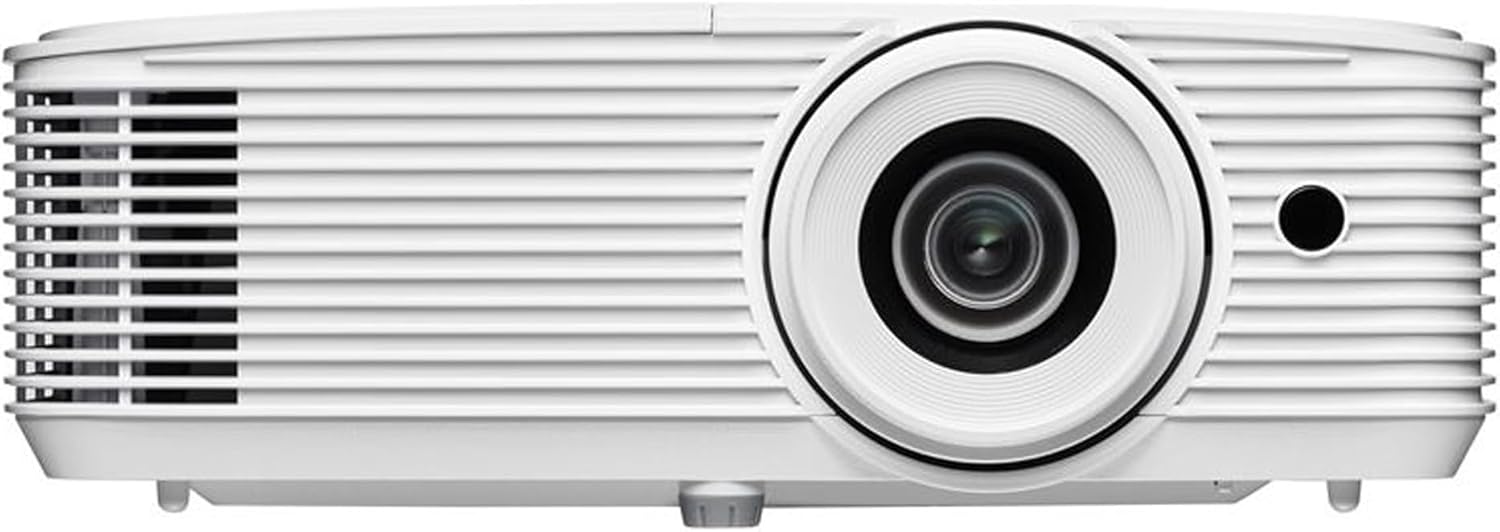 Optoma EH401 Full HD 1080p Projector, 4000 Lumens
|
9.9/10 | Buy on Amazon | |
 Epson PowerLite 119W LCD Classroom Projector
|
9.9/10 | Buy on Amazon | |
 Epson PowerLite W49 3LCD Projector 3800 Lumens
|
9.8/10 | Buy on Amazon | |
 ViewSonic PA503HD 4000 Lumens 1080p Full HD DLP
|
9.5/10 | Buy on Amazon | |
 ViewSonic LSD400W WXGA Laser Projector
|
N/A | Buy on Amazon |
Pros
- Very bright output ideal for rooms that can't be fully darkened
- Simple, clutter-free setup thanks to USB-powered streaming stick support
- Low input lag suitable for gaming, not just static presentations
- Built-in speaker removes the need for external audio equipment
- Backed by a 3-year manufacturer warranty for added peace of mind
Cons
- Lamp-based light source with a rated 15,000 hours means eventual bulb replacement costs
- Built-in speaker is convenient but unlikely to satisfy users wanting rich, room-filling audio
- No mention of wireless connectivity, so casting relies on plugging in a physical HDMI or USB streaming device
The Optoma EH401 is a Full HD 1080p projector aimed squarely at offices, classrooms, and meeting rooms where ambient light is often unavoidable. Its 4,000-lumen brightness rating is the headline feature, designed to keep slides, videos, and documents legible even without dimming the lights.
Beyond raw brightness, the EH401 supports 4K HDR input for sharper color and detail from modern source devices, while an 8.4ms input lag makes it surprisingly capable for light gaming sessions during breaks. Dual HDMI ports simplify switching between a laptop and a media player, and the USB power port is a thoughtful touch that lets users run a streaming stick directly off the projector, eliminating the need for an extra outlet or cable clutter.
Build quality follows Optoma's typical compact desktop design, weighing in at just 6.4 pounds and measuring roughly 15.5 x 13.25 x 6.75 inches, making it easy to move between rooms or mount semi-permanently on a wall, ceiling, or table. The included remote, cables, and quick-start guide support a fast, plug-and-play setup that doesn't require technical expertise.
The main tradeoffs come from its lamp-based light engine, rated for 15,000 hours but still subject to eventual replacement costs, and a built-in speaker that, while convenient, won't replace a proper sound system for larger rooms. These are reasonable compromises given the projector's price point and intended use case.
Overall, the EH401 is a solid choice for businesses, schools, and multi-purpose spaces that need dependable daytime brightness and simple connectivity over cinematic home-theater polish. Anyone prioritizing well-lit presentation clarity, easy streaming setup, and portability will find this projector a practical, dependable option.
The EH401 features native 1920x1080 resolution with support for 4K HDR input signals and HEVC Main 10 decoding, plus a strong 22000:1 contrast ratio for depth and clarity in bright environments.
Connectivity includes two HDMI ports, a USB power port for streaming sticks, and a 3.5mm audio output, alongside a built-in speaker for standalone audio playback.
Throw distance ranges from 3.6 to 32.8 feet, producing image sizes from about 30 inches up to a massive 301 inches, giving flexibility for small huddle rooms and large classrooms alike.
The projector runs on 210 watts with a 240-watt lamp rated for 15,000 hours of use, and it's backed by a 3-year manufacturer warranty for long-term reliability.
Pros
- Very long-lasting lamp reduces replacement costs and downtime
- Simple HDMI setup with built-in audio for all-in-one convenience
- Multi-user moderator function supports interactive, collaborative use
- Ceiling mountable for permanent classroom or office installs
- Highly rated by early users at 4.8 out of 5
Cons
- 1280x800 resolution is fine for classrooms but not ideal for high-definition home theater use
- 4:3-friendly design may feel dated compared to widescreen-only competitors
- Built-in speaker is convenient but likely underpowered for larger rooms
The Epson PowerLite 119W is a WXGA 3LCD projector designed primarily for classroom and small business environments. It targets teachers, trainers, and office users who need dependable, easy-to-use projection rather than cinematic home theater visuals.
Its standout feature is the 3LCD engine, which produces vibrant, accurate colors and avoids the rainbow effect sometimes seen with DLP projectors. The moderator function is a practical addition for group settings, letting up to 50 users connect and share their screens, making it a strong fit for collaborative lessons or meetings.
Build quality leans utilitarian, with a ceiling-mountable chassis suited for permanent installation in classrooms or conference rooms. The inclusion of HDMI and USB connectivity, along with a built-in speaker, keeps setup simple since users can run both video and audio through a single cable without extra gear.
The main tradeoff is resolution and audio power. At 1280x800, the image quality is adequate for presentations, text, and educational content, but it won't satisfy users looking for sharp video playback or home theater detail. The onboard speaker is a nice convenience but may need supplementing in larger rooms.
Overall, the PowerLite 119W is a smart, low-maintenance choice for schools and offices thanks to its remarkable 17,000-hour lamp life and multi-user support. Buyers seeking a dedicated home entertainment projector should look elsewhere, but for practical classroom or meeting-room use, this model delivers solid value.
Pros
- Exceptionally bright 3,800-lumen output performs well in ambient light conditions
- Industry-leading lamp life of up to 17,000 hours keeps long-term costs low
- Multi-user moderator function is ideal for collaborative classroom and meeting environments
- Dual HDMI and RJ-45 connectivity covers a wide range of setup and sharing scenarios
- Highly rated by verified buyers with strong satisfaction scores across performance categories
Cons
- WXGA 1280x800 native resolution may feel limiting for users who need full 1080p or 4K sharpness
- At this price point, wireless connectivity requires additional setup rather than being fully plug-and-play out of the box
The Epson PowerLite W49 is a WXGA 3LCD projector built primarily for education and business environments where reliable, high-brightness performance is a daily requirement. With 3,800 lumens of color and white brightness, it is one of the more capable projectors in its class for rooms that cannot be fully darkened.
The standout feature is undoubtedly the integrated moderator function, which allows a presenter to manage content from up to 50 connected laptops or mobile devices simultaneously. This makes it exceptionally well-suited for interactive classrooms, training sessions, and collaborative meetings where multiple participants need to share their screens.
Build quality reflects Epson's reputation for durability in the education sector. The 17,000-hour lamp life in Eco-mode is a genuine long-term cost saver, meaning most users will go years without ever needing a replacement lamp. The ceiling-mountable form factor and RJ-45 port further support permanent, professionally managed installations.
On the downside, the native WXGA resolution of 1280x800 is adequate for presentations and video but will not satisfy users seeking crisp 1080p or higher detail. Those streaming high-definition content or displaying fine graphics may notice a softness compared to Full HD alternatives at a similar price.
Overall, the Epson PowerLite W49 delivers exceptional value for its target audience. If you need a bright, durable, and network-ready projector for a classroom or conference room, this model checks nearly every box with confidence. Its strong user ratings and feature set make it a top recommendation in the education and business projector segment.
Display Technology: 3LCD (3-chip) for accurate, vibrant color reproduction without the rainbow effect associated with single-chip DLP projectors.
Brightness: 3,800 lumens of color and white brightness, suitable for use in large classrooms and conference rooms with ambient lighting.
Aspect Ratio and Resolution: Native 16:10 WXGA (1280x800) aspect ratio, optimized for widescreen laptop and presentation content.
Lamp Life: Up to 10,000 hours in Normal mode and up to 17,000 hours in Eco-mode, reducing total cost of ownership significantly over time.
Connectivity: Dual HDMI ports, RJ-45 LAN port for network management and presentations, and built-in speaker for all-in-one audio and video delivery.
If you are evaluating the Epson PowerLite W49, start by considering your room size and lighting conditions. At 3,800 lumens, this projector handles moderately lit rooms with ease, making it a strong fit for standard classrooms, training rooms, and mid-sized boardrooms.
For K-12 and higher education buyers, the moderator function is a compelling reason to choose this model over competitors. The ability to manage and display content from dozens of student devices without additional hardware is a significant workflow advantage that saves both time and IT resources.
Budget-conscious buyers should factor in the total cost of ownership. The 17,000-hour Eco-mode lamp life means lamp replacement costs are spread over many years, making the upfront price more competitive when viewed over a multi-year horizon compared to projectors with shorter lamp cycles.
If your primary use case involves watching 4K video or displaying highly detailed graphics, consider stepping up to a Full HD or 4K-capable model. For standard presentations, documents, and educational video content, however, WXGA resolution is entirely sufficient and will not disappoint in day-to-day use.
Pros
- Exceptionally bright 4,000-lumen output performs well even in rooms that are not fully darkened
- Full HD resolution ensures crisp, legible visuals for both detailed presentations and cinematic content
- Low 16ms input latency and 120Hz refresh rate make it genuinely suitable for gaming alongside business use
- Large 300-inch projection capability offers tremendous screen size for auditoriums or home theaters
- USB firmware update support keeps the projector current without requiring service visits
Cons
- Lamp-based technology means eventual bulb replacement costs and a shorter lifespan compared to laser projectors
- The 1.1x optical zoom range is relatively limited, requiring careful placement to achieve the desired screen size
The ViewSonic PA503HD is a full HD DLP lamp projector designed to serve a wide audience, from corporate presenters and classroom educators to home theater enthusiasts and casual gamers. With 4,000 ANSI lumens of brightness and a 1920x1080 native resolution, it positions itself as a versatile, high-performance option in the mid-range projector market.
The standout feature here is undeniably the brightness. At 4,000 lumens, the PA503HD holds its own in moderately lit rooms, making it practical for daytime presentations without requiring blackout curtains. Paired with a 22,000:1 dynamic contrast ratio and Texas Instruments 0.65-inch DMD chip, colors appear vivid and blacks look genuinely deep, which is impressive for a lamp-based unit at this price point.
For gamers and sports viewers, the 120Hz refresh rate and 16ms input latency are welcome additions that go beyond what most business projectors offer. Motion appears smooth and responsive, and fast-action scenes are rendered with minimal blur. The dual HDMI inputs and USB-A port add practical connectivity, and the auto vertical keystone correction simplifies setup considerably when ceiling mounting or placing on an uneven surface.
On the downside, the 1.1x optical zoom is narrower than competing models, which limits placement flexibility. Being a lamp-based projector, users should also factor in eventual bulb replacement costs and the fact that brightness will diminish gradually over the lamp's lifespan. Laser alternatives may offer longer-term value for heavy daily use.
Overall, the ViewSonic PA503HD delivers a compelling combination of brightness, image quality, and gaming-capable performance that justifies its position in the lineup. It is best suited for users who need a dependable, bright projector for mixed use across work, entertainment, and gaming, and who are comfortable with standard lamp maintenance over time.
Resolution: Full HD 1920x1080 (1080p)
Brightness: 4,000 ANSI Lumens
Contrast Ratio: 22,000:1 Dynamic
Technology: DLP with Texas Instruments 0.65-inch DMD Chip
Throw Ratio: 1.4 to 1.6
Optical Zoom: 1.1x
Digital Zoom: 0.8x to 2.0x
Screen Size Range: 80 inches to 150 inches (standard); up to 300 inches maximum
Throw Distance for 100-inch Image: 10.8 feet
Refresh Rate: 120Hz
Input Latency: 16ms
Connectivity: 2x HDMI, 1x USB-A
Keystone Correction: Auto Vertical Keystone
Firmware Updates: Via USB connection
Mounting: Ceiling mountable, compatible with ViewSonic PJ-WMK-007
If you are considering the ViewSonic PA503HD, the first question to ask is how much ambient light your space typically has. This projector shines brightest, literally, in environments where full blackout is not always possible, such as classrooms, conference rooms, or open living areas. Its 4,000-lumen output gives it a clear advantage over budget 2,000 to 3,000 lumen models in these settings.
For home theater purists who watch exclusively in a dark room, a projector with deeper native contrast or laser light source might be worth considering. However, if your usage spans presentations during the day and movies or gaming at night, the PA503HD handles both scenarios competently without requiring a second device.
Gamers should note that the 120Hz refresh rate and 16ms latency are genuine performance specs, not marketing additions. If you plan to connect a gaming console or PC, this projector delivers a noticeably smoother experience than standard 60Hz business projectors. Just ensure your source device supports 1080p at 120Hz to take full advantage.
Finally, consider placement before purchasing. The 1.1x optical zoom means you have limited room to adjust the image size without physically moving the projector. Measure your intended throw distance against the specification chart to confirm it fits your space before committing to a ceiling mount installation.
Pros
- Long 30,000-hour lamp-free lifespan cuts maintenance and replacement costs
- Bright 4,000-lumen output handles well-lit rooms without washing out images
- Compact, dust-sealed design fits tight installations and skips filter cleaning
- Instant on/off with no warm-up delay speeds up daily use
- 3-year limited warranty on parts and labor adds peace of mind
Cons
- WXGA (1280x800) resolution falls short of Full HD for detail-critical presentations
- No wireless connectivity listed, so casting or streaming requires additional hardware
- As a new listing with no reviews yet, real-world reliability is still unproven
The ViewSonic LSD400W is a laser-powered installation projector aimed squarely at classrooms, conference rooms, and small auditoriums where budget and uptime matter more than 4K sharpness. Its WXGA resolution and 4,000 ANSI lumens are tuned for text-heavy presentations and everyday business use rather than home theater visuals.
The standout here is the laser phosphor light source, rated for up to 30,000 hours without lamp swaps. Combined with instant-on brightness and no warm-up or cooldown wait, this projector is built for environments where it gets turned on and off multiple times a day. The IP6X-rated sealed engine also means no filters to clean, which is a real convenience for IT staff managing multiple units.
Build-wise, ViewSonic shrank the chassis by 32% compared to earlier models, making it easier to ceiling-mount in tighter rooms. Support for full 360° projection and portrait mode adds installation flexibility that's useful for unconventional setups like golf simulators or angled mounting.
The main tradeoff is resolution: WXGA (1280x800) is fine for spreadsheets, slides, and video calls, but it won't match the crispness of Full HD or 4K projectors for detailed graphics. There's also no built-in wireless casting, so schools or offices wanting screen mirroring will need extra streaming hardware.
Overall, the LSD400W is a sensible, low-maintenance choice for institutions and businesses that run projectors daily and want to avoid lamp replacement costs. It's not designed for cinephiles or 4K enthusiasts, but for its intended use case, the value proposition is strong.
Resolution: WXGA native (1280 x 800), max image size 300 inches.
Brightness: 4,000 ANSI lumens with a 3,000,000:1 contrast ratio for solid clarity in ambient light.
Light Source: Laser phosphor rated for 20,000-30,000 hours, using up to 49% less power (114 watts) than traditional lamp projectors.
Connectivity: Dual HDMI, USB, and 3.5mm audio jack; ceiling-mountable with a throw distance range of 3.28 to 36.45 feet.
Build: 6.8 pounds, 8.5" x 11.26" x 5.08", IP6X dust-sealed engine, backed by a 3-year limited warranty on parts and labor.
Buying Guide: Key Features for Classroom Projectors
Brightness and Image Clarity
Classrooms are rarely completely dark. You need sufficient brightness, measured in lumens, to ensure your presentations remain visible. A projector with at least 3,800 lumens performs well in rooms with windows or overhead lights.
This prevents images from washing out, keeping text sharp and colors vibrant for all students. Full HD 1080p resolution is now a standard expectation for detailed graphs, videos, and text.
Connectivity and Collaboration Features
Modern classrooms use multiple devices. Look for projectors with dual HDMI ports to switch between a laptop, document camera, or streaming device seamlessly. Some models offer advanced moderator functions.
These systems allow multiple users to connect and share content directly from their laptops or mobile devices, fostering interactive lessons. This feature is excellent for group work and student presentations.
Durability and Long-Term Value
Consider the total cost of ownership. Traditional lamp-based projectors require bulb replacements, which adds expense over time. Laser projectors offer a significant advantage here with extremely long lifespans.
A lamp-free design means less maintenance and more reliable performance year after year. For a durable option in a different setting, see our recommendations for the best training room projectors.
Setup Flexibility and Ease of Use
Teachers need technology that works instantly. Features like optical zoom, keystone correction, and ceiling mountability allow you to fit the projector to your room’s layout, not the other way around.
A compact, lightweight design with a built-in speaker simplifies setup for a true plug-and-play experience, letting you focus on teaching instead of troubleshooting.
Final Thoughts
Selecting the right classroom projector is an investment in engagement. For educators prioritizing vibrant, reliable performance with excellent collaboration tools, the Epson PowerLite W49 LCD Projector – 16:10 is a standout choice. If your priority is long-term value with minimal maintenance and instant readiness, the modern laser technology in the ViewSonic LSD400W WXGA 4000 Lumens Laser projector offers compelling benefits. Both models deliver the essential brightness and connectivity needed for dynamic, effective classroom presentations.
Frequently Asked Questions
What is the most important spec for a classroom projector?
Brightness, measured in ANSI lumens, is critical. A minimum of 3,800 lumens ensures your image remains clear and legible even with some ambient light in the room. This is more important than ultra-high resolution for most educational content.
Are laser projectors better than lamp projectors for schools?
Laser projectors generally offer superior long-term value for classrooms. They have lifespans exceeding 20,000 hours with no bulb replacements, turn on and off instantly, and maintain consistent brightness. While sometimes at a higher initial cost, they reduce maintenance and downtime.
Can I use a classroom projector for videos and multimedia?
Absolutely. Most modern classroom projectors feature Full HD resolution, built-in speakers, and HDMI inputs perfect for educational videos, documentaries, and interactive software. For specialized multimedia needs, you might also explore options in our home theater projectors category.
How do I choose between different aspect ratios like 4:3 and 16:10?
The 4:3 aspect ratio matches the shape of older presentation slides and standard definition content. The 16:10 widescreen format is ideal for modern laptops, HD video, and displaying multiple windows side-by-side. Choose based on your primary content sources.




Write Your Review
No reviews yet. Be the first to share your experience!