

Picture this: a critical client presentation is about to begin, but the image on screen is dim, washed out, or poorly aligned. The technology, meant to empower your message, instead becomes a distraction. In today’s professional environment, a boardroom projector is not just a piece of equipment; it’s a cornerstone of effective communication and decision-making.
This guide is crafted for business leaders, IT managers, and facility planners tasked with outfitting a professional conference space. We have assessed leading projectors that deliver the brightness, clarity, and reliability demanded for high-stakes meetings. For a broader look at professional-grade options, explore our review of the best commercial projectors.
| Pick | Product | AI Score | Buy |
|---|---|---|---|
| Prime |
 Optoma ZU500UST Ultra-Short-Throw WUXGA Laser
|
9.9/10 | Buy on Amazon |
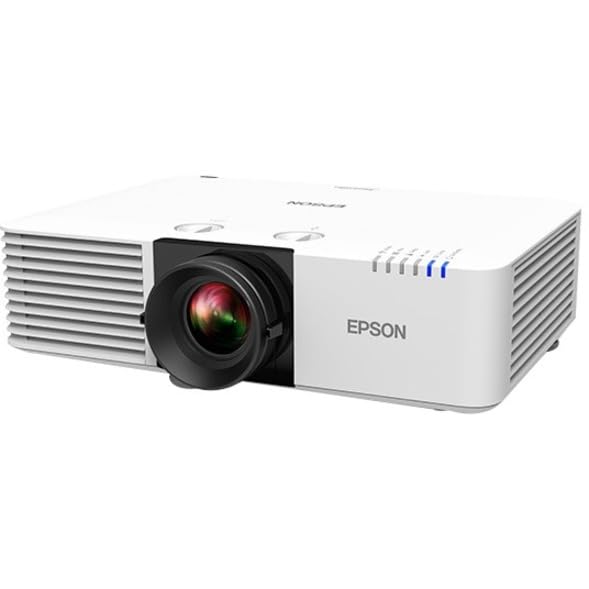 Epson PowerLite L570U 3LCD Laser Projector
|
9.9/10 | Buy on Amazon | |
| Prime |
 ViewSonic LS831WU WUXGA Laser Ultra Short Throw
|
9.3/10 | Buy on Amazon |
Pros
- Bright 5,000-lumen output suited for large classrooms and boardrooms
- Long-lasting laser light source reduces lamp replacement costs
- Ultra short throw design minimizes shadows and installation space
- Built-in PC-free media viewer adds convenience for quick presentations
- Professional connectivity options support managed AV installations
Cons
- Premium price point may be steep for home or small business use
- 225-watt power draw and 12.5-pound weight make it less portable than compact projectors
- Limited customer reviews available to gauge long-term reliability
The Optoma ZU500UST is an ultra short throw laser projector designed for professional environments like classrooms, boardrooms, and digital signage displays. Its 0.25:1 throw ratio lets it sit just inches from the screen while still producing images up to 120 inches, making it a smart choice for tight spaces where traditional projectors can't be mounted far enough back.
Performance is a highlight here, with 5,000 lumens of brightness and a 100,000:1 contrast ratio that keep images crisp and visible even under ambient lighting. The WUXGA native resolution ensures sharp text and graphics, which matters for detailed presentations, spreadsheets, and signage content. The laser light source is rated for 30,000 hours, supporting round-the-clock use without the frequent bulb swaps of traditional lamp projectors.
Build quality feels purpose-built for institutional use rather than home theater aesthetics, with a straightforward black tabletop design and button controls. The inclusion of a PC-free USB media viewer and 4-corner geometric correction adds real convenience for presenters who need quick setup without a laptop or precise alignment tools.
On the downside, this is a heavier, higher-wattage unit at 12.5 pounds and 225 watts, so it's not meant for casual portability, and the price positions it firmly in the commercial and educational market rather than budget home use. With only a single review available, buyers are relying mostly on Optoma's reputation and spec sheet rather than a large pool of user feedback.
Overall, the ZU500UST is a strong pick for schools, offices, and signage applications that need a bright, reliable, low-maintenance projector capable of continuous operation in space-limited rooms. It's less suited for casual home viewing or users seeking a portable, budget-friendly option.
Pros
- Extremely bright at 5200 lumens, suitable for large rooms and ambient light
- Laser light source rated for 20,000 hours reduces long-term maintenance
- Flexible installation with lens shift, zoom, and geometric correction tools
- Rich connectivity options including HDBaseT and networking for enterprise use
- Supports massive 500-inch displays and multiple wide aspect ratios
Cons
- High price point puts it out of reach for casual or home users
- Bulky at 18.7 pounds, requiring professional mounting for ceiling installs
- Advanced features like PixAlign camera and wireless adapter are sold separately
The Epson PowerLite L570U is a professional-grade 3LCD laser projector designed for classrooms, corporate boardrooms, and large meeting spaces rather than home entertainment. Its 5200-lumen brightness and WUXGA native resolution make it ideal for organizations needing reliable, high-impact visuals in varying lighting conditions.
Standout features include 4K Enhancement technology that sharpens WUXGA content, along with the ability to project images up to 500 inches across multiple aspect ratios, including ultra-wide 21:9 for video conferencing. The 2,500,000:1 contrast ratio and 3-chip 3LCD engine combine to produce vivid, true-to-life color reproduction that should hold up well during long presentations or lecture use.
Build quality feels purpose-built for permanent installation, weighing 18.7 pounds with a ceiling-mountable white housing that blends into office or classroom environments. Installation flexibility is a highlight, with wide lens shift, 1.6x optical zoom, and built-in edge blending and geometric correction tools that simplify setup for multi-projector or large-format displays.
The main drawbacks are practical: this is a heavy, professional-tier unit that isn't meant for casual plug-and-play use, and unlocking its full potential such as multi-projector blending requires the optional PixAlign camera and wireless adapter sold separately. Its price and connectivity suite (HDBaseT, RJ-45, RS-232) also signal that it's intended for AV integrators, not typical consumers.
Overall, the PowerLite L570U is a strong choice for schools, corporations, and event spaces needing a bright, low-maintenance laser projector with serious installation flexibility. Home theater buyers will likely find it overbuilt and overpriced, but for its intended commercial and educational use cases, it delivers dependable, high-quality performance.
The PowerLite L570U features a native WUXGA resolution of 1920x1200 with support for 4K input content through Epson's 4K Enhancement technology. Brightness is rated at 5200 ANSI lumens for both color and white output, backed by a 2,500,000:1 contrast ratio for deep, detailed imagery.
Throw distance ranges from 4.9 to 30.6 feet, supporting image sizes up to 500 inches diagonal, making it suitable for large auditoriums and conference rooms. The laser light source is rated for approximately 20,000 hours of operation, significantly reducing long-term maintenance needs.
Connectivity includes dual HDMI inputs, HDMI output, HDBaseT, RJ-45 Ethernet, RS-232, and USB, allowing for integration into complex AV control systems. The unit runs on 323 watts and comes backed by a 3-year manufacturer warranty, reflecting its positioning as a durable, professional installation projector.
Pros
- Extremely bright 4500-lumen output suited for large rooms
- Ultra short throw design saves space and reduces shadow interference
- Long-lasting laser light source cuts down on maintenance costs
- Flexible connectivity including HDMI, USB and LAN control
- Backed by a solid three-year warranty on parts and labor
Cons
- Premium price point may be steep for smaller businesses or schools
- Limited customer review data makes long-term reliability hard to confirm
- At nearly 22 pounds, it's not the most portable option for frequent relocation
The ViewSonic LS831WU is a laser-based ultra short throw projector aimed squarely at business and education environments that need a big, bright display without the hassle of long throw distances. Its 0.25 throw ratio means it can sit just inches from the projection surface, making it ideal for classrooms and meeting rooms with limited space.
Performance-wise, the 4500-lumen output and WUXGA native resolution combine to produce sharp, readable content even under ambient lighting, a common challenge in office and school settings. SuperColor technology helps maintain accurate color reproduction, while SonicExpert audio adds clarity without requiring separate speakers, a nice convenience for smaller rooms.
Build quality feels functional rather than flashy, with a tabletop mount design and straightforward physical controls. The inclusion of H/V keystoning and 4 corner adjustment shows ViewSonic's attention to easy, tool-free setup, which is a real time-saver for IT staff installing multiple units across a facility.
On the downside, the price sits well above consumer-grade projectors, and with only a handful of customer reviews available, it's difficult to gauge long-term durability or firmware reliability. The 21.8-pound weight also makes it less suited for users who need to move the projector frequently between rooms.
Overall, the LS831WU is a strong pick for schools, training centers, and corporate meeting spaces that want a maintenance-light, bright, and easy-to-install ultra short throw solution. Buyers prioritizing image size and low upkeep over portability will likely find it a worthwhile investment.
Native resolution is 1920x1200 (WUXGA) with DLP display technology and a contrast ratio of 3,000,000:1, giving the LS831WU crisp detail and strong black levels for presentations and video content.
The laser phosphor light source is rated for up to 20,000 hours of operation, drastically reducing the need for lamp replacements compared to traditional projector bulbs.
Throw distance ranges from 1 to 14 feet, supporting image sizes from about 28 inches up to a massive 200 inches, making it adaptable to a variety of room sizes.
Connectivity includes HDMI and USB inputs along with Ethernet LAN control, supporting integration with Crestron, AMX, Extron, PJ Link, and ATEN systems for centralized management.
What to Look for in a Boardroom Projector
Brightness and Image Clarity
Boardrooms often have ambient light from windows or overhead fixtures. A projector with high lumen output ensures your content remains vivid and readable. Look for models offering at least 4,500 lumens.
This brightness, combined with a high native resolution like WUXGA, guarantees that detailed charts, fine text, and high-definition videos are displayed with sharp precision. Superior contrast ratios add depth, making colors pop.
Installation Flexibility and Setup
Every boardroom has unique spatial constraints. Ultra-short-throw models can project a large image from just inches away, eliminating shadows and presenter glare. This is ideal for rooms with limited depth.
Features like lens shift, keystone correction, and four-corner adjustment are invaluable. They allow for perfect image alignment even when ceiling mounting isn’t perfectly centered, simplifying installation. Our guide on best installation projectors for conference rooms dives deeper into this topic.
Longevity and Reliability
Frequent lamp replacements are disruptive and costly. Modern laser or laser phosphor light sources offer dramatically extended lifespans, often exceeding 20,000 hours. This means years of maintenance-free operation.
Reliability also comes from robust connectivity. Ensure the projector has the necessary inputs, such as HDMI and USB, to connect seamlessly with laptops, media players, and videoconferencing systems used in your organization.
Ease of Use and Management
The best technology is intuitive for everyone. Look for projectors with network control capabilities, allowing IT staff to monitor status, schedule power cycles, and manage settings remotely from a central dashboard.
Features like automatic source detection and quick power-on/off streamline the meeting experience. This reduces setup time and ensures presenters can focus on their message, not the machinery. For environments that also serve educational purposes, consider insights from our list of best ultra short throw projectors for classrooms in 2026.
Final Thoughts
Investing in the right boardroom projector is an investment in your company’s professional image and communication efficacy. For teams prioritizing brilliant color accuracy and hassle-free connectivity, the Epson PowerLite L570U 3LCD Projector – 16:10 is a standout choice. Conversely, if your space requires a large image from a very short distance with exceptional brightness, the ZU500UST Ultra-Short-Throw WUXGA Laser Multimedia from Optoma offers a compelling ultra-short-throw laser solution. Evaluate your specific room layout and presentation needs to select the model that will perform flawlessly for years to come.
Frequently Asked Questions
Is a laser projector better than a lamp-based model for a boardroom?
For most professional settings, yes. Laser light sources provide instant on/off capability, maintain consistent brightness over a much longer lifespan, and eliminate the cost and hassle of periodic lamp replacements. This leads to lower total cost of ownership and greater reliability.
What resolution is sufficient for boardroom presentations?
WUXGA (1920 x 1200) is currently the sweet spot. It displays full 1080p content natively and provides extra vertical pixels for spreadsheets and documents without scrolling. It offers significantly more detail than standard HD, ensuring text and graphics are razor-sharp from anywhere in the room.
How important is brightness, and how many lumens do I need?
Brightness is critical to combat ambient light. For a typical boardroom with some light control, 4,500 to 5,500 lumens is a recommended range. This ensures vivid, high-contrast images that remain clear even if blinds are open. You can compare different high-output models in our feature on best large venue projectors.
Can these projectors be integrated with existing room control systems?
Absolutely. The projectors reviewed here typically support industry-standard control protocols like Crestron, AMX, Extron, and PJ Link. This allows them to be seamlessly integrated into centralized AV control systems for automated operation alongside room lights, displays, and audio.


Write Your Review
No reviews yet. Be the first to share your experience!