

You have invested in a stunning 4K laser TV, but the experience is only complete with the perfect mount. Whether you dream of projecting onto your bedroom ceiling or need flexible wall mounting for a multi-use living space, the right hardware is essential. This guide reviews three excellent mounting solutions tailored for different needs and setups, helping you secure your premium projector safely and stylishly.
Our selection covers versatile stands and robust wall mounts from trusted brands like Nebula, USXMOUNT, and MOUNTUP. Each product was assessed for its stability, range of motion, ease of installation, and overall value. For a broader look at compatible displays, explore our guide to the top wall mounted 4K laser TVs for a seamless home cinema.
| Pick | Product | AI Score | Buy |
|---|---|---|---|
| Prime |
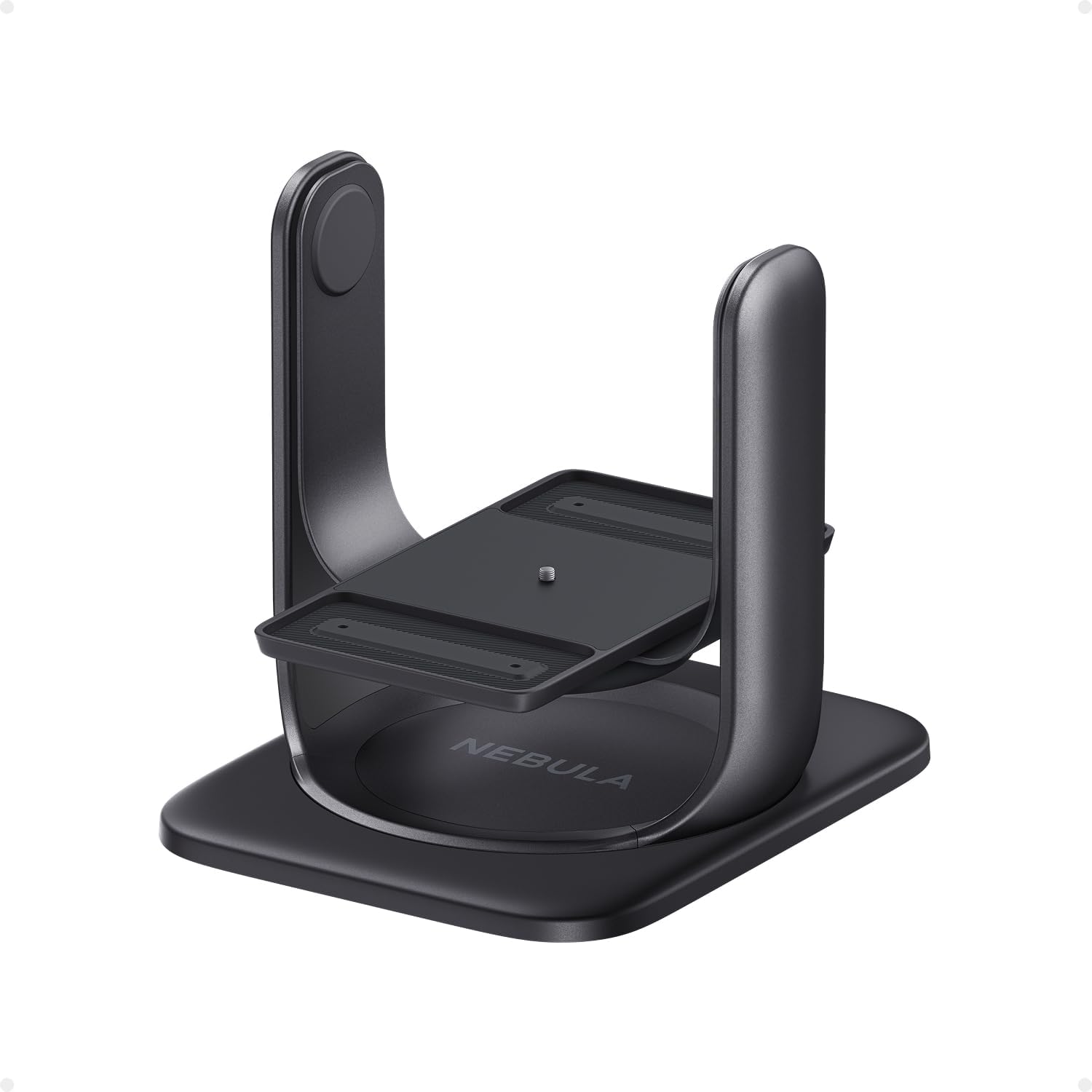 NEBULA Gimbal Stand for Projectors, 360° Rotation
|
9.9/10 | Buy on Amazon |
| -23% OFF Prime |
 MOUNTUP TV Wall Mount for 32-65 inch TVs
|
9.8/10 | Buy on Amazon |
| -18% OFF |
 USX Mount Full Motion TV Wall Mount for 42-90 Inch
|
9.8/10 | Buy on Amazon |
Pros
- Sturdy, well-built aluminum design that feels premium
- Extremely flexible positioning for ceiling and multi-angle projection
- Quick one-second setup and teardown
- Secure automatic locking prevents accidental drops
- Reviewers report it holds projectors steady without sagging over time
Cons
- Higher price point than typical projector mounts
- Only compatible with select Nebula projector models
- No included mounting hardware or extra components
The NEBULA Gimbal Stand is a dedicated mounting accessory designed for the Nebula X1, Cosmos 4K SE, and Cosmos Laser 4K projectors. It's aimed at owners who want to project onto ceilings or hard-to-reach angles without investing in a permanent installation.
The standout feature is its flexibility: 360° horizontal rotation combined with 90° vertical tilt lets you point the projector virtually anywhere in a room. Reviewers highlight how easy it is to reposition the projector between rooms, with an attach-and-release system that takes just seconds.
Build quality is a recurring theme in customer feedback, with multiple reviewers calling it well-constructed and durable. The aluminum body supports up to 15 lbs, and an automatic locking mechanism adds a layer of security, ensuring the projector doesn't shift or drop unexpectedly during use.
The main drawback mentioned across reviews is the price, several buyers note it's a bit expensive for what is essentially a mount. That said, most feel the quality justifies the cost, especially compared to flimsier alternatives on the market.
Overall, this is a premium accessory for a niche use case. If you already own a compatible Nebula Cosmos or X1 projector and want reliable, adjustable ceiling projection, this gimbal delivers solid performance and should last for years of regular use.
Constructed from aluminum, this gimbal stand weighs 2.4 kg and measures 29.53 x 8.66 x 9.84 inches, striking a balance between portability and stability.
It supports a load capacity of up to 15 pounds, making it suitable for the compact form factors of Nebula's X1, Cosmos 4K SE, and Cosmos Laser 4K projectors.
The stand includes a detachable swivel base for standalone 360° rotation and comes backed by a 24-month manufacturer warranty from Anker, the parent company behind the Nebula brand.
Pros
- Wide TV size and VESA compatibility fits most common flat screens
- Full articulation (swivel, tilt, extend) offers flexible placement options
- Sturdy metal build supports up to 99 lbs
- Installation aids included (template and level tool) make setup easier
- Affordably priced compared to similar full-motion mounts
Cons
- Requires mounting into at least one stud; not suitable for drywall alone
- TV mounting screws (M8x45mm) are not included and must be requested separately
- Limited tilt range (5° up, 10° down) may not suit rooms needing steeper angles
The MOUNTUP EconoMe TV Wall Mount is designed for anyone looking to install a flat-screen TV between 32 and 65 inches with the flexibility of full motion adjustment. It's a great fit for living rooms, bedrooms, offices, or commercial spaces like cafes and gyms where viewing angles need to change throughout the day.
The standout feature here is the dual articulating arm system, which allows the TV to swivel up to 45 degrees in either direction, tilt 5 degrees up or 10 degrees down, and extend outward from the wall. This makes it easy to adjust the screen for glare reduction or to accommodate multiple seating zones, a level of flexibility that's uncommon at this price point.
Build quality appears solid thanks to the metal construction, and the mount is rated to hold TVs up to 99 lbs with VESA patterns ranging from 100x100mm to 400x400mm. Installation is aided by an included paper template and level tool, which should make the mounting process more approachable for DIYers, though a stud is required since drywall alone won't support the weight.
One minor drawback is that the mounting screws for attaching the TV itself aren't included in the box and need to be requested from the seller, which could delay installation for some buyers. Additionally, the tilt range is somewhat limited compared to premium mounts, so those needing a steep downward angle might find it restrictive.
Overall, this mount delivers strong value for its price, backed by a high average rating from thousands of buyers. It's a smart choice for anyone wanting flexible, full-motion TV positioning without paying a premium, as long as they're comfortable with basic stud-mounted installation.
Pros
- Strong build quality that reliably holds large, heavy TVs like 85-inch Samsung models
- Wide range of motion including tilt, swivel, and pull-out extension for flexible viewing
- Straightforward installation with detailed instructions and organized hardware bags
- Great value compared to pricier competing mounts
- Versatile enough to use consistently across multiple TV sizes in the same household
Cons
- Included bubble level is reportedly small and can be hard to use precisely
- Some buyers have reported missing hardware pieces in the box, so checking contents before installing is wise
- Concrete anchors are not included and must be requested separately for non-wood-stud walls
The USX Mount Full Motion TV Wall Mount is designed for anyone setting up a mid-to-large screen TV, from 42 inches all the way up to 90 inches, weighing as much as 132 lbs. It's a strong fit for home theater setups, living rooms, or bedrooms where viewers want the flexibility to adjust their screen angle from multiple seating positions.
The standout feature here is the dual articulating arm system, which allows for tilt, swivel, and extension adjustments so the TV can be angled precisely where it's needed. Reviewers consistently note that the mount handles large, heavy TVs like 85-inch Samsung sets without issue, and the smooth movement makes fine-tuning the viewing angle simple even after installation.
Build quality appears solid, with an alloy steel construction that feels durable and stable once mounted. The space-saving design, retracting to just 2.4 inches from the wall, is a nice touch for rooms where extra clearance matters, and the inclusion of a bubble level plus post-install leveling adjustment helps achieve a clean, straight look.
On the downside, a few buyers have run into missing hardware during installation, so it's worth double-checking all parts against the included list before starting. The bubble level is also on the smaller side, which can make fine leveling slightly trickier than expected, and concrete anchors aren't included for those mounting on non-wood-stud walls.
Overall, this mount delivers strong functionality and durability at a reasonable price point, making it a smart choice for anyone needing a flexible, heavy-duty TV mount without paying premium prices for similar performance.
VESA Compatibility: 200x100mm up to 600x400mm, supporting most 42 to 90 inch flat screen, LED, and 4K TVs.
Weight Capacity: Up to 132 lbs, suitable for large and heavy modern televisions.
Movement Range: +5°/-15° tilt, up to ±45° swivel depending on TV size, plus +/-3° post-installation leveling adjustment.
Extension: Retracts to 2.40 inches and extends out to 16.49 inches from the wall for flexible positioning.
Mounting Requirements: Fits wood studs up to 16 inches apart; concrete anchors sold separately.
Buying Guide
Mounting Type and Flexibility
The first decision is between a standalone stand and a wall mount. A gimbal stand, like the one from Nebula, offers incredible portability and the unique ability to project onto ceilings or walls from any room. Wall mounts provide a permanent, space-saving solution with articulating arms for tilt and swivel.
Consider your room’s layout and how often you plan to move your projector. For a dedicated theater room, a wall mount is ideal. For flexible use in a bedroom, living room, or even outdoors, a portable stand unlocks more creative possibilities. Our expert guide to the best ceiling mount compatible 4K laser TVs dives deeper into overhead installation options.
Weight Capacity and VESA Compatibility
Always verify that a mount can securely hold your specific projector’s weight. Check your device’s manual for its VESA pattern, the standard measurement for mounting hole spacing. The products reviewed support a wide range, but matching these specifications is non-negotiable for safety.
A mount rated for a higher weight than your projector offers an added margin of safety. Ensure the included hardware fits your projector’s screw holes. If you are unsure, most reputable brands offer responsive customer service to confirm compatibility before you buy.
Range of Motion and Adjustability
The best mounts offer multiple axes of adjustment to combat glare and perfect your viewing angle. Look for key features like tilt (up and down), swivel (side to side), and extension (pulling the screen away from the wall). The degree of adjustment varies significantly between models.
Full-motion wall mounts provide the most flexibility for rooms with multiple seating areas. A 360-degree rotating stand is perfect for creating immersive environments. Think about where light sources are in your room and whether you need to adjust the screen throughout the day.
Ease of Installation and Build Quality
Nobody wants a complicated installation. Look for mounts that come with clear instructions, pre-labeled hardware bags, and useful tools like a bubble level or template. A well-designed mount makes the process straightforward, even for DIY beginners.
Build quality directly impacts stability and longevity. Materials like heavy-gauge steel or aluminum ensure your valuable projector stays secure. A sturdy construction minimizes wobble and vibration, which is crucial for maintaining a clear, stable image from your high-end 4K laser TV.
Final Thoughts
Selecting the right mount is the final step in building your ultimate home theater. For unparalleled versatility and ceiling projection, the NEBULA Gimbal Stand for Projectors, 360° Rotation is a superb choice. If you need a heavy-duty, full-motion solution for a large screen, the robust USX Mount Full Motion TV Wall Mount for Most 42-90 offers exceptional value and reliability. Both options will elevate your viewing experience and protect your investment.
Frequently Asked Questions
Can I use a regular TV wall mount for my 4K laser TV?
Yes, but with critical caveats. You must confirm the mount’s weight capacity exceeds your projector’s weight and that the VESA hole patterns match. Ultra-short-throw projectors often have unique center-of-gravity considerations, so using a mount verified for stability with such devices is recommended. For more on selecting the right display, see our guide to the best UST overall.
What is the benefit of a full-motion mount over a fixed one?
A full-motion or articulating mount allows you to tilt, swivel, and extend the screen. This lets you reduce glare from windows or lights, achieve a better viewing angle from different seats in the room, and push the screen flush against the wall when not in use to save space. It adds significant flexibility for optimizing your picture.
How do I know if a projector stand is stable enough?
Check the manufacturer’s stated maximum weight capacity and ensure it is well above your projector’s weight. Look for features like a wide, weighted base and high-quality construction materials like aluminum. User reviews are also a valuable resource for real-world feedback on stability and any potential wobble.
Are these mounts compatible with all 4K laser TV brands?
Compatibility depends on the specific mount and your projector’s VESA pattern and weight. The wall mounts reviewed have universal VESA support within their stated ranges. The Nebula stand is designed specifically for Nebula models. Always double-check your projector’s specifications against the mount’s requirements before purchasing.


Write Your Review
No reviews yet. Be the first to share your experience!