

You’ve invested in a great projector and a crisp screen, but the final piece of your home cinema puzzle is often overlooked. A quality projector mount is essential for a clean, professional look and, more importantly, for achieving that perfect, steady image. The right mount securely holds your valuable equipment, allows for precise alignment, and keeps cables out of sight, transforming your viewing experience.
This guide is for anyone building or upgrading a home theater, from dedicated media rooms to versatile living room setups. We’ve assessed a wide range of mounts to help you find one that matches your projector’s weight, your ceiling type, and your need for adjustability. For those with specific projector types, you might also explore our guides on the best mount for laser projectors or the best mount for heavy projectors.
Pros
- Extremely versatile with three mounting options in a single product
- Sturdy steel build holds projectors securely without wobbling, per reviewers
- Wide compatibility across projector brands and mounting hole patterns
- Flexible tilt and swivel adjustments make screen alignment easy
- Backed by a 2-year manufacturer warranty
Cons
- Some users report the included instructions could be clearer
- Not water resistant, so limited to indoor use only
- Buyers must carefully check their projector's mounting hole spacing before purchase
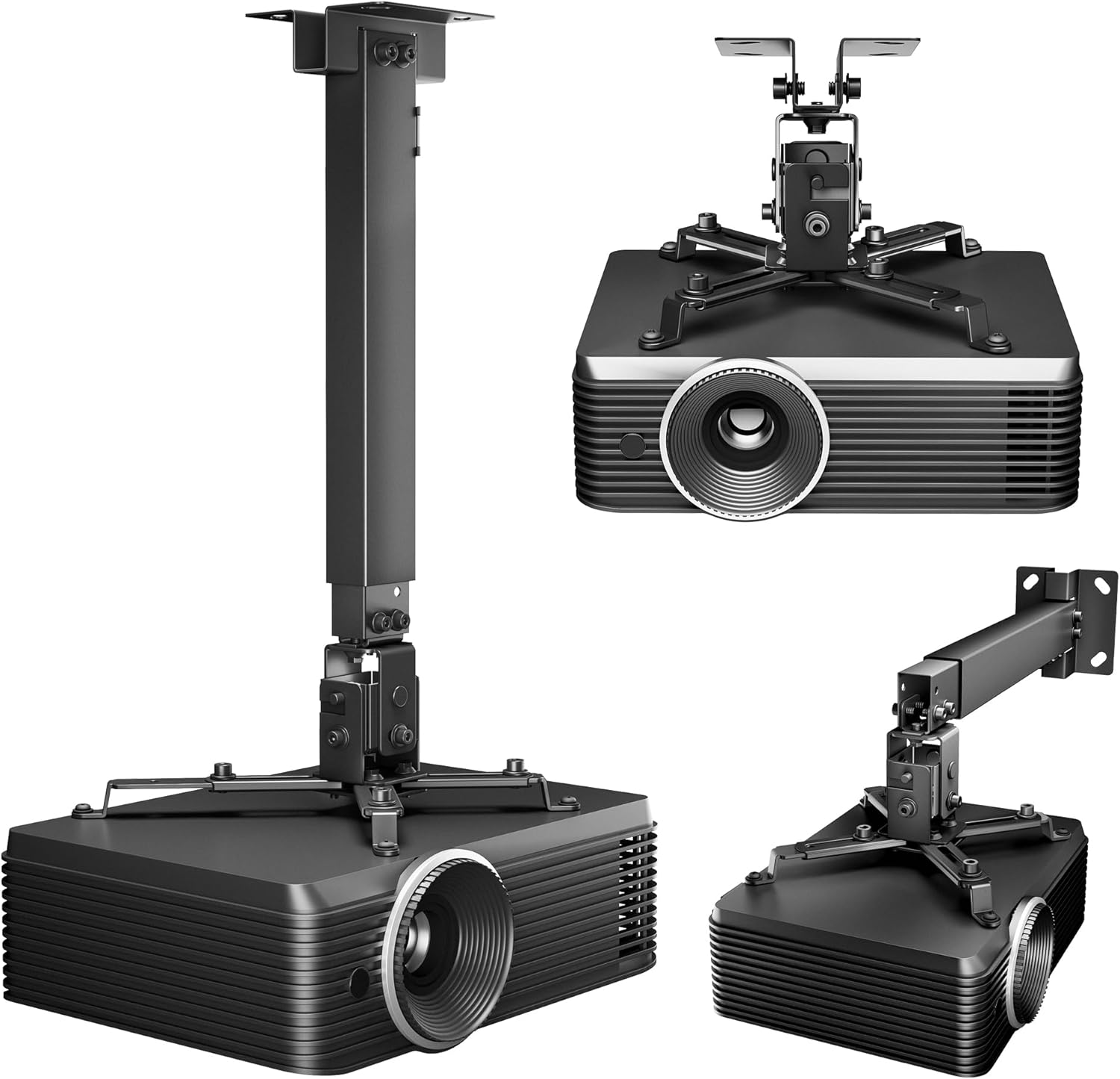
The PEGZONE Projector Ceiling Mount is a 3-in-1 bracket designed for anyone needing flexible projector installation, whether that's a home theater enthusiast, office manager, classroom teacher, or short-term rental host. It converts between a flush ceiling mount, an extendable ceiling arm, or a wall mount, making it adaptable to nearly any room layout.
In real-world use, the mount's standout feature is its adjustability. With tilt of +15/-15 degrees, swivel of +8/-8 degrees, and extension ranges up to 650mm on the ceiling, users can fine-tune projector placement for a sharp, properly aligned image. Reviewers consistently note that once installed, the bracket holds projectors steady with no wobbling, which is critical for maintaining picture clarity.
Build quality relies on premium steel construction rated to support projectors up to 44lbs, paired with anti-slip pads and reinforced joints for added stability. The black finish blends discreetly into most ceilings, and built-in cable management helps keep cords tidy for a professional-looking setup in offices or conference rooms.
The main drawback mentioned by buyers is that the included instructions could be more detailed, though the drilling template and included hardware still make installation manageable for most DIYers. Buyers should also double check their projector's mounting hole pattern, since compatibility depends on hole spacing between 8.85 and 12.44 inches.
Overall, this mount delivers strong value for its price point, offering genuine flexibility and dependable holding strength. It's a smart choice for anyone installing a projector in a home theater, classroom, church, or rental property who wants a mount that adapts to their space rather than the other way around.
The PEGZONE mount (model HWO1005BK) is built from steel and aluminum components, finished in black with a rectangular profile. It measures 25.59 x 9.33 x 7.99 inches and supports a maximum weight capacity of 44 pounds, making it suitable for most consumer and small office projectors.
Adjustability specs include a ceiling extension range of 430-650mm (16.9-25.6 inches) and a wall mounting range of 225-316mm. Tilt adjustment spans +15 to -15 degrees, while swivel ranges from +8 to -8 degrees, giving installers precise control over screen alignment.
The mount fits wood studs, concrete walls, and flat ceilings, and includes all necessary fasteners along with a drilling template for installation. It's backed by a 2-year manufacturer warranty, though it is not rated as water resistant, so indoor use only is recommended.
Buying Guide: How to Choose Your Mount
1. Assess Compatibility and Weight Capacity
Your first step is to confirm the mount will fit your specific projector. Check the distance between the mounting holes on the bottom of your device, often called the VESA pattern. Most universal mounts list a compatible range, such as 8.85 to 12.44 inches.
Equally critical is the weight rating. Ensure the mount’s maximum capacity exceeds your projector’s weight with a comfortable margin. This guarantees long-term stability and safety for your equipment. For smaller devices, a dedicated mount for mini projectors may offer a better fit.
2. Consider Mounting Flexibility and Adjustability
<!–Think about your room’s layout. A 3-in-1 design that works as a flush ceiling, extended ceiling, or wall mount offers maximum versatility if your plans change. The height adjustment range is also key for positioning the lens correctly relative to your screen.
For fine-tuning the image, look for mounts with tilt, swivel, and rotation features. These adjustments help you correct keystone distortion and align the picture perfectly without moving the entire mount. Full-motion mounts provide the greatest flexibility for challenging room setups.
3. Evaluate Build Quality and Installation
<!–A mount constructed from heavy-duty steel will provide a vibration-free foundation, crucial for a sharp image. Look for features like anti-slip pads and reinforced joints that add extra security.
Ease of installation varies. Some mounts come pre-assembled with quick-release hooks, while others require more assembly. A clear manual, a drilling template, and all necessary hardware are signs of a user-friendly product. Integrated cable management is a valuable bonus for a clean, professional finish.
Final Thoughts
Choosing the right mount solidifies your home cinema setup, ensuring stability and optimal viewing angles. For a versatile and widely compatible option, the VIVO Universal Adjustable Ceiling Projector mount is an excellent, reliable choice. If you need maximum flexibility for different room configurations, consider the Mount-It! Projector Ceiling Mount and Wall Mount with its 3-in-1 design and built-in cable management. Whichever you select, a proper mount is the final touch for a truly immersive viewing experience.
Frequently Asked Questions
Can I use any ceiling mount for my projector?
No, you must verify compatibility. Check your projector’s mounting hole pattern and weight against the mount’s specifications. Some mounts are not compatible with certain brands or models, like specific Epson or LG units, so always review the product details carefully before purchasing.
How do I align my projector perfectly after mounting it?
Use the mount’s adjustable features. Tilt controls vertical angle, swivel controls horizontal angle, and rotation helps orient the image. Combine these with your projector’s digital keystone correction for a perfectly rectangular picture. For high-end setups, especially with 4K projectors, using a dedicated mount designed for 4K models can ensure precise alignment for the best detail.
What’s the difference between a flush mount and an extended arm mount?
A flush mount holds the projector close to the ceiling for a minimalist look, ideal when the projector’s lens naturally aligns with the screen. An extended arm mount allows you to lower the projector away from the ceiling, which is necessary when you need to adjust the throw distance or clear an obstruction like a ceiling fan or light fixture.
Are projector mounts difficult to install?
Most quality mounts are designed for DIY installation with clear instructions. The key is ensuring you mount it into a solid ceiling joist or wall stud, not just drywall. Using the provided template and having a helper to hold the projector during final attachment makes the process much easier and safer.


Write Your Review
No reviews yet. Be the first to share your experience!