

You’re ready to upgrade your meeting room’s presentation capabilities, but navigating the sea of projector specifications can feel overwhelming. You need a reliable, bright, and clear display to make every presentation impactful, whether in a small huddle room or a larger conference space. This guide is crafted for business professionals, educators, and decision-makers seeking high-value projection solutions that enhance collaboration without exceeding a specific budget. We have assessed several leading models to identify the top performers for professional environments. For a broader look at options for educational settings, you can explore our guide on the best classroom projectors with flexible placement.
| Pick | Product | AI Score | Buy |
|---|---|---|---|
| Prime |
 Epson PowerLite L265F 3LCD Laser Projector 1080p
|
9.9/10 | Buy on Amazon |
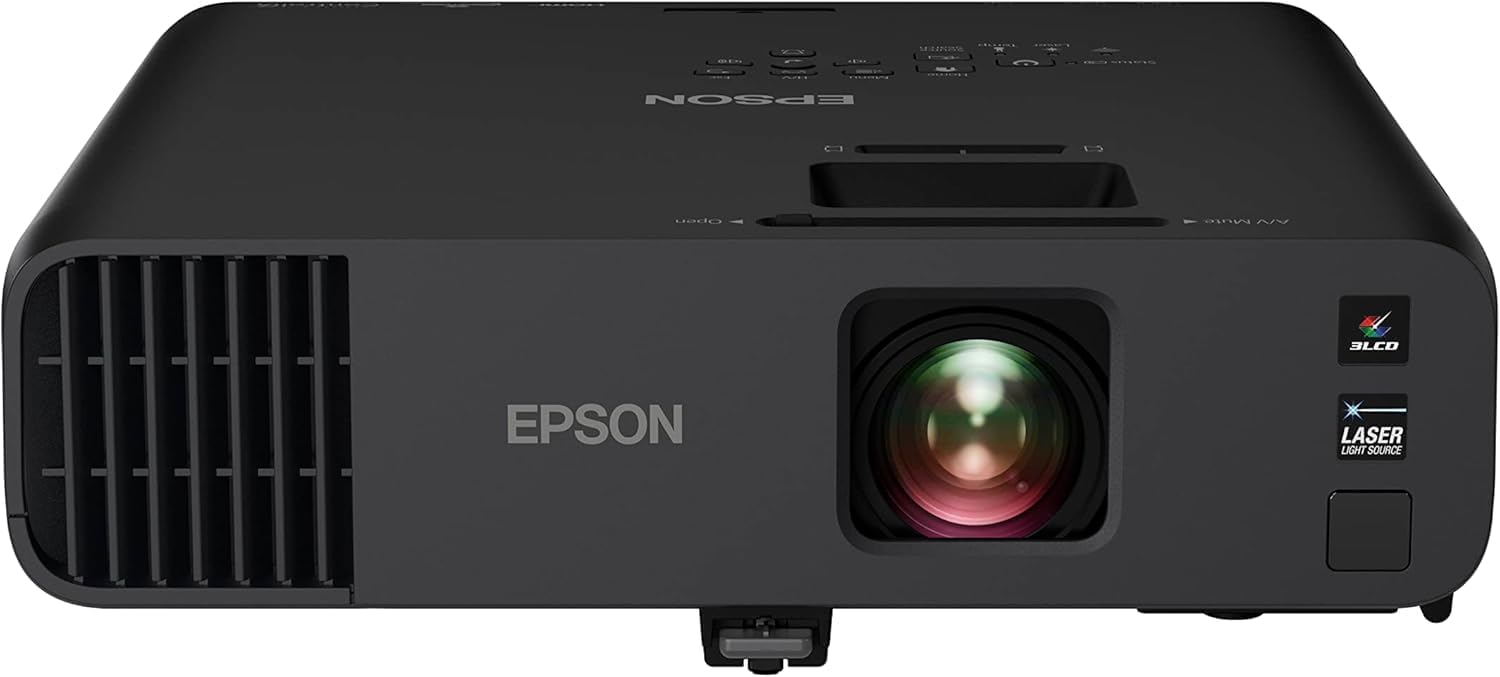 Epson Pro EX11000 Full HD 1080p Wireless Laser
|
9.8/10 | Buy on Amazon | |
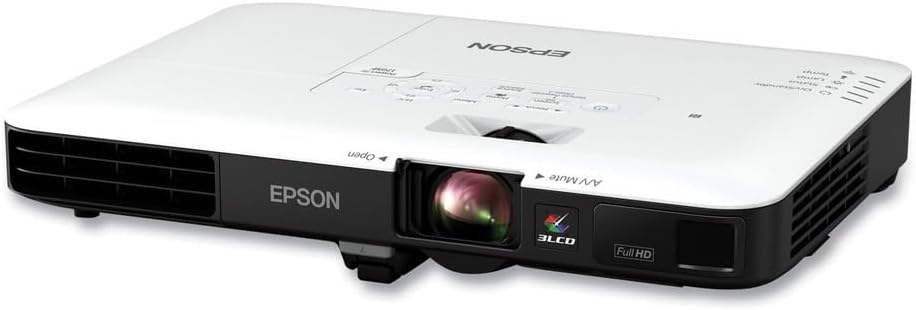 Epson PowerLite 1795F 3LCD Portable Projector
|
9.6/10 | Buy on Amazon | |
 Optoma GT1090HDRx Short Throw Laser Projector
|
9.3/10 | Buy on Amazon | |
| Prime |
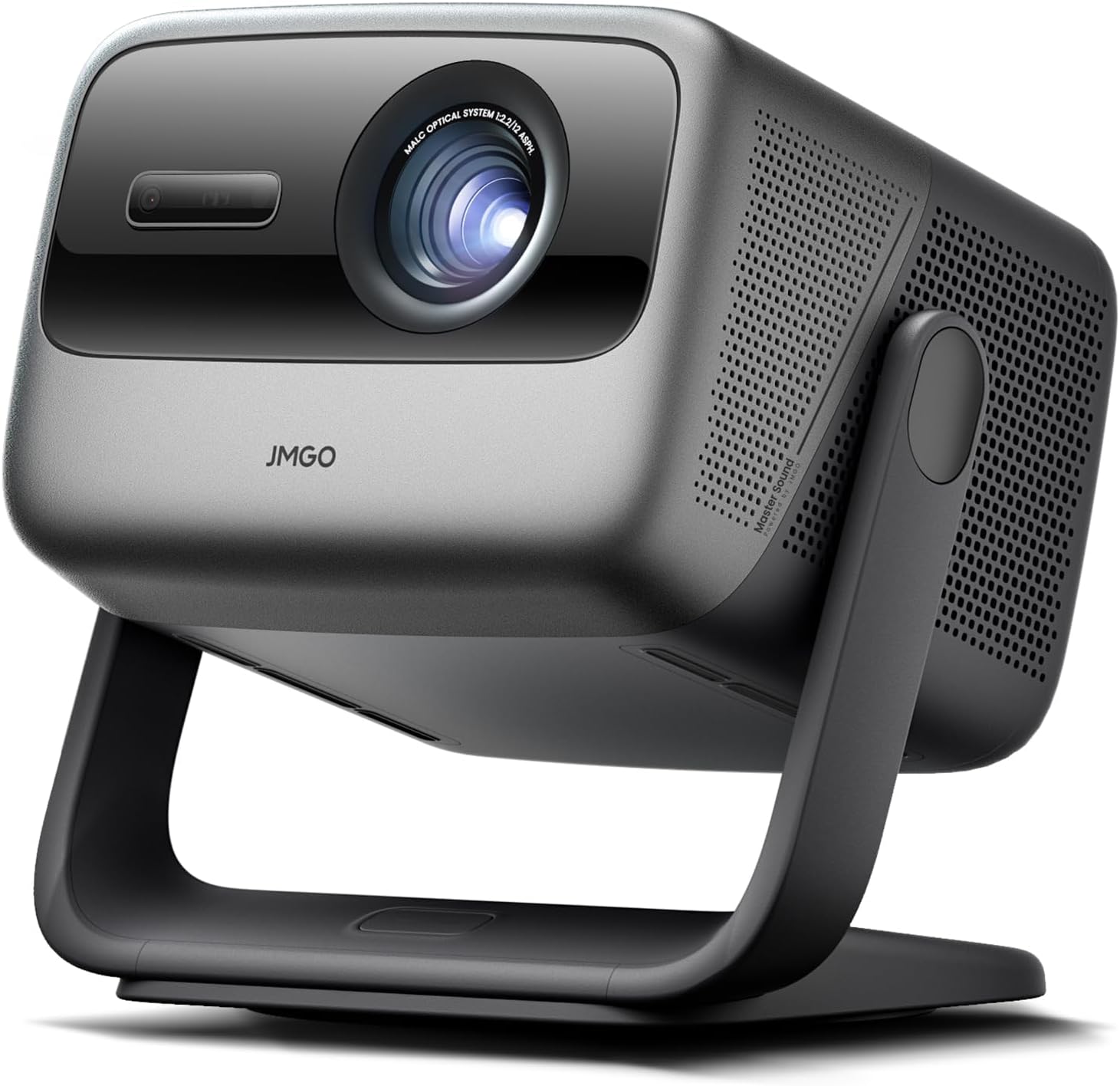 JMGO N1S Ultra 4K Triple Laser Projector
|
N/A | Buy on Amazon |
Pros
- Exceptional brightness at 4,600 lumens handles challenging ambient light conditions with ease
- No lamp replacements needed, dramatically reducing long-term ownership costs
- Built-in media player and free software make it a self-contained digital signage solution
- Large image projection up to 310 inches offers far greater visual impact than flat-panel displays
- Wireless casting and HDMI connectivity provide flexible, hassle-free content delivery
Cons
- Premium pricing puts it above entry-level business projectors, which may not suit smaller budgets
- Advanced features like edge blending and media player software may require a learning curve for new users
- No built-in Android or smart platform means content management depends on external devices or the proprietary app
The Epson PowerLite L265F is a professional-grade 3LCD laser projector designed for commercial environments such as conference rooms, restaurants, retail lobbies, and event spaces. It targets businesses and organizations that need a dependable, high-brightness display solution without the ongoing cost and downtime associated with traditional lamp-based projectors.
At the heart of this projector is a solid-state laser light source rated for 20,000 hours of virtually maintenance-free operation, eliminating the need for ever replacing a lamp. Paired with Epson's 3-chip 3LCD technology, the L265F produces 4,600 lumens of both color and white brightness, ensuring vibrant, accurate colors that hold up well even in moderately lit rooms. The 2,500,000:1 dynamic contrast ratio adds impressive depth to images, making content look polished and professional.
The L265F is built with a clean, sleek black exterior that integrates unobtrusively into modern commercial ceilings and spaces. It supports both tabletop and ceiling-mount configurations, giving installers flexibility to suit a wide range of venue layouts. The compact form factor belies its powerful output, and the included mounting compatibility makes permanent installation straightforward.
One consideration is the price point, which reflects its commercial positioning and may be a stretch for very small businesses or casual users. Additionally, those unfamiliar with digital signage workflows may need time to get comfortable with the Epson Projector Content Manager software and the edge blending features, though Epson does provide templates and tutorials to ease the process.
Overall, the Epson PowerLite L265F is a compelling, future-proof investment for any organization serious about high-quality visual communication. Its combination of laser longevity, exceptional brightness, built-in media playback, and wireless connectivity makes it one of the most well-rounded commercial projectors in its class. For venues that need reliable, large-format visuals day after day, this projector is a highly recommended choice.
Display Technology: 3LCD, 3-chip technology for accurate, vibrant color reproduction without color wheel artifacts.
Brightness: 4,600 lumens of color and white brightness, suitable for large rooms and ambient light environments.
Resolution: Full HD 1080p for sharp, detailed imagery across presentations and digital signage content.
Contrast Ratio: Up to 2,500,000:1 dynamic contrast, delivering rich blacks and bright highlights simultaneously.
Light Source: Solid-state laser with a rated lifespan of 20,000 hours, virtually maintenance-free with no lamp replacements required.
Projection Size: Capable of projecting images up to 310 inches diagonal, far exceeding the visual footprint of standard flat-panel displays.
Connectivity: HDMI port for external devices such as Blu-ray players and laptops, USB port for PC-free projection, and wireless casting capability for convenient content sharing.
Software: Includes free downloadable Epson Projector Content Manager and the Epson Creative Projection App for iOS devices.
Special Features: Built-in media player, edge blending, split screen support, playlist and multi-projector management.
Mounting Options: Tabletop and ceiling mountable, with a sleek black finish designed to blend into dark ceilings.
When evaluating the Epson PowerLite L265F, the most important question is whether your environment demands sustained, high-brightness projection over long operating hours. If your venue runs displays for extended periods daily, the laser light source pays for itself by eliminating lamp replacement costs and unplanned downtime.
Consider your ambient lighting conditions. At 4,600 lumens, this projector performs well in spaces with moderate lighting, but for very bright, sun-filled rooms, you may still want to consider window treatments or positioning the projector to minimize glare on the screen surface. For evening events or controlled-light environments, the image quality will be exceptional.
If digital signage is a primary use case, the built-in media player and Epson Projector Content Manager software are significant value-adds. They allow you to run scheduled, dynamic content without needing a dedicated media player device, simplifying your setup and reducing points of failure. The multi-projector management capability is also worth noting for larger installations.
For buyers comparing this to flat-panel commercial displays, keep in mind that this projector can produce images up to 16 times larger than a 75-inch screen, at a fraction of the cost of an equivalent-sized LED video wall. This makes it particularly attractive for lobbies, auditoriums, and large meeting rooms where visual impact is a priority.
Finally, ensure your installation space accommodates the throw distance requirements for your desired image size, and verify ceiling height and mounting bracket compatibility before purchase. With proper planning, the L265F is a versatile, long-lasting display solution that delivers outstanding value for commercial buyers.
Pros
- Exceptional 4,600-lumen brightness performs confidently in well-lit rooms without washing out the image
- Laser light source eliminates ongoing lamp replacement costs and downtime over a 20,000-hour lifespan
- 3-Chip 3LCD technology provides superior color accuracy and eliminates the color-wheel rainbow effect common in DLP projectors
- Versatile connectivity with dual HDMI, USB power, Miracast, RJ-45, and RS-232 suits virtually any business setup
- Large 300-inch projection capability makes it ideal for big conference rooms and auditorium-style presentations
Cons
- At nearly 9.5 lbs and a premium price point, this projector is better suited as a semi-permanent installation than a portable travel unit
- Wireless functionality is limited to Miracast only, lacking native Apple AirPlay support found on some competing models
- The higher price compared to lamp-based alternatives may be difficult to justify for light or infrequent users
The Epson Pro EX11000 is a professional-grade Full HD laser projector built specifically for the modern workplace. Designed for conference rooms, training spaces, and large-group presentations, it delivers a 300-inch 1080p image with 4,600 lumens of color and white brightness, making it one of the brightest business projectors in its class. It is best suited for organizations that need reliable, high-quality projection on a daily basis.
The standout feature of this projector is its 20,000-hour laser light source, which effectively eliminates the recurring cost and hassle of lamp replacements. Paired with Epson's 3-Chip 3LCD technology, every frame is rendered using 100% of the RGB color signal, resulting in accurate, vibrant colors without the distracting rainbow effect associated with single-chip DLP projectors. In real-world use, the brightness holds up impressively well even with ambient lighting left on, which is a critical advantage in busy office environments.
Connectivity is a genuine strength of the EX11000. Two HDMI ports, a USB power port for streaming sticks, Miracast wireless mirroring, RJ-45, RS-232, and legacy inputs like RCA and D-Sub make this one of the most versatile projectors available in its category. The built-in 16W speaker is notably powerful for a projector, reducing the need for external audio equipment during meetings and video conferences.
On the downside, the EX11000 is a relatively heavy unit at 9.5 lbs, which makes it less practical for users who need to carry a projector between locations regularly. Apple AirPlay is absent, which may frustrate teams that rely heavily on iOS and macOS devices for wireless sharing. The premium price point also means it requires a clear business case to justify over more affordable lamp-based alternatives.
Overall, the Epson Pro EX11000 is a compelling investment for businesses that prioritize image quality, long-term reliability, and versatile connectivity. Its laser technology, exceptional brightness, and rich feature set make it a top-tier choice for organizations ready to upgrade their presentation infrastructure for the long haul.
Resolution: Full HD 1080p | Brightness: 4,600 lumens color and white (IDMS/ISO rated) | Light Source: Laser, up to 20,000 hours | Technology: 3-Chip 3LCD
Connectivity: 2x HDMI, RCA, D-Sub, RS-232, RJ-45, USB Power (5V-2A) | Wireless: Miracast | Optical Zoom: 1.0x to 1.6x | Vertical Correction: Auto
Built-In Speaker: 16W | Max Screen Size: 300 inches | Dimensions: 12.8 x 11.8 x 4.1 inches | Weight: 9.5 lbs | Warranty: 1-Year Limited
If you are evaluating the Epson Pro EX11000 against other business projectors, the most important factor to consider is your room size and lighting conditions. This projector's 4,600-lumen output is specifically designed for medium to large conference rooms where the lights stay on, giving it a clear edge over lower-lumen competitors in the same lineup.
For organizations planning a long-term installation, the laser light source is a major financial consideration. While the upfront cost is higher than lamp-based models, eliminating bulb replacements over a 20,000-hour lifespan can result in significant savings and reduced IT overhead over time. It is an especially smart choice for high-frequency users such as corporate training centers, universities, or boardrooms.
If wireless connectivity is a priority, confirm that your devices support Miracast before purchasing, as this projector does not include Apple AirPlay. Teams that rely primarily on iPhones and MacBooks may want to consider a streaming stick such as an Apple TV connected via HDMI as a simple workaround. For everyone else, the combination of dual HDMI, USB power for streaming devices, and Miracast covers virtually every modern use case with ease.
Pros
- Extremely lightweight and easy to transport for business use
- Bright, vivid, and sharp image quality even in daylight
- Simple wireless setup with smartphones and tablets via Miracast
- Effective auto keystone correction and screen sizing
- Strong contrast ratio and color accuracy for presentations and media
Cons
- Fan noise can be noticeable, especially in small rooms or full brightness mode
- No audio output ports, including no Bluetooth, requiring external speakers for sound
- Only one HDMI port limits simultaneous wired connections
The Epson PowerLite 1795F is a portable 1080p projector designed specifically for business professionals who travel frequently and need reliable presentation quality on the go. Weighing just 4 lbs and as thin as a laptop, it's built for portability without sacrificing image performance.
The standout feature here is Epson's 3LCD, 3-chip technology, which delivers 3,200 lumens of both color and white brightness, resulting in vivid, accurate colors even in well-lit conference rooms or daylight settings. Reviewers consistently praise the sharpness and clarity of the image, along with the convenience of Miracast wireless streaming that lets users mirror content from smartphones or tablets in about a minute, no cables required.
Build quality is solid, with an intuitive button layout and remote control that most users find easy to navigate. Auto keystone correction and screen sizing work well right out of the box, simplifying setup considerably for users who need to present quickly in unfamiliar rooms.
On the downside, the fan noise is noticeable, particularly at full brightness, though switching to ECO mode helps reduce it significantly. The unit also runs hot during extended sessions, and there's no audio output whatsoever, not even Bluetooth, so an external speaker or soundbar is necessary for anything beyond casual built-in sound. Only one HDMI port may also limit multi-device setups.
Overall, the PowerLite 1795F is a strong choice for business travelers and presenters who prioritize portability, brightness, and wireless convenience over multimedia extras. It's less suited for home theater enthusiasts who want built-in audio or multiple wired connections, but for its intended use case, it performs admirably.
Pros
- Bright enough for daytime and outdoor movie nights
- Lamp-free laser design cuts long-term maintenance costs
- Short throw lens works well in small rooms
- Sharp, vibrant 4K HDR image quality praised by several users
- Quiet operation suitable for mounted installs
Cons
- Only digital zoom, which limits fine image adjustment
- Documentation and manuals are reportedly sparse and hard to find
- Some users report keystone correction is fiddly and image edges can appear uneven
The Optoma GT1090HDRx is a short throw laser projector built for home theater fans who lack the room for a traditional long-throw setup. With a 0.50:1 throw ratio, it can cast a 100-inch image from only a few feet away, making it a smart pick for smaller living rooms or dedicated media spaces.
Its standout feature is brightness: at 4,200 lumens, this projector holds up in daylight or lit rooms, not just blacked-out theaters, so it doubles well for backyard movie nights or casual daytime gaming. Paired with 4K HDR input (HDR10 and HLG) and a 300,000:1 contrast ratio, the picture delivers strong detail and color depth, even though native resolution is 1080p.
Build quality benefits from the DuraCore laser light source, rated for 30,000 hours, which removes the ongoing cost and hassle of lamp replacements. The compact, lightweight chassis and quiet operation make ceiling mounting straightforward, and auto keystone plus four-corner correction aim to ease alignment during setup.
That said, real-world feedback flags some friction: several users mention only digital zoom being available, confusing or missing manuals, and keystone correction that can be finicky, occasionally leaving picture edges slightly uneven. A handful of reviewers also reported reliability issues after limited use, so it's worth registering the warranty promptly and testing the unit early.
Overall, the GT1090HDRx is a solid choice for buyers prioritizing brightness, short-throw convenience, and lamp-free operation over pixel-perfect native 4K resolution. It's best suited to space-constrained rooms and those wanting flexibility for both day and night viewing, though buyers should go in aware of the documentation and setup quirks some owners have faced.
The GT1090HDRx uses DLP display technology with a native resolution of 1920x1080 and support for 4K input up to 3840x2160. It offers a maximum image size of 301.4 inches and a minimum of 36.43 inches, with throw distances ranging from 3 to 11 feet.
Connectivity includes HDMI, USB, and Ethernet, making it compatible with laptops and gaming consoles alike. The projector draws 20 watts and includes vertical keystone correction up to 30 inches for easier alignment.
It comes backed by a 1 year parts and labor warranty, plus a 5-year or 12,000 hour light source warranty, whichever comes first, giving some peace of mind around the laser engine's longevity.
Pros
- Fully automated setup: focus, keystone, screen fit, and obstacle avoidance all handled by sensors
- Wide color gamut (110% BT.2020) and low blue light laser design for accurate, eye-friendly color
- Google TV built-in removes the need for external streaming devices
- Strong connectivity with dual HDMI 2.1, USB, WiFi 6, and Bluetooth 5.2
- Portable design with a long 35,000-hour laser light source lifespan
Cons
- 1600:1 contrast ratio is modest compared to JMGO's own N3 Ultimate (20000:1)
- 2800 lumens is bright for a home projector but not ideal for very large screens in daylight
- Premium price point puts it in competition with higher-brightness laser projectors
The JMGO N1S Ultra 4K is a triple RGB laser projector built for buyers who want a genuine home theater setup without the hassle of manual calibration. It's a strong fit for home cinema enthusiasts, gamers, and anyone who wants a plug-and-play big screen experience up to 300 inches.
What stands out most is JMGO's smart adaptive system. Using a 3D TOF sensor and CMOS camera, the projector handles auto-focus, keystone correction, screen alignment, and obstacle avoidance in real time, so the image stays sharp and properly framed even if you move the unit or the surface changes. Paired with 2800 ISO lumens and a 110% BT.2020 color gamut, everyday viewing looks vivid even with some ambient light present.
Build quality reflects JMGO's portable-projector design language, compact at under 10 inches per side and just under 10 pounds, with a built-in gimbal for flexible placement. The inclusion of dual HDMI 2.1 ports, WiFi 6, Bluetooth 5.2, and Google TV baked in means fewer external boxes cluttering the entertainment setup.
The main tradeoff is contrast and brightness headroom. At 1600:1 contrast and 2800 lumens, it sits below JMGO's own N3 Ultimate, which offers 20000:1 contrast and over double the brightness, so very large screens in bright rooms may not look as punchy. It's also a premium-priced unit, so buyers should weigh it against similarly specced competitors.
Overall, the N1S Ultra 4K is a well-rounded, convenience-focused 4K laser projector that removes most of the friction typically associated with home projection setups. It's an easy recommendation for anyone prioritizing automated picture accuracy and smart features over chasing the highest brightness or contrast numbers.
The N1S Ultra 4K features native 3840 x 2160 resolution with HDR10 support and a triple-laser RGB light engine rated at 2800 ISO lumens and 35,000 hours of operating life.
Contrast ratio is 1600:1 FOFO with a 110% BT.2020 color gamut and ΔE<1 color accuracy. Projection size ranges from 60 to 300 inches, with a throw distance between 5.2 and 25.1 feet.
Connectivity includes dual HDMI 2.1 ports, one USB 2.0 port, WiFi 6, and Bluetooth 5.2, plus a 3.5mm audio output. Audio is handled by 20W dual speakers with Dolby Digital Plus and bass response down to 45Hz.
The unit runs Google TV out of the box, weighs 9.9 pounds, and measures roughly 9.57 x 8.27 x 9.37 inches, backed by a 1-year manufacturer warranty.
Buying Guide: Key Features for Conference Room Projectors
Brightness and Image Clarity
Conference rooms often have ambient light from windows or overhead fixtures. A projector with sufficient lumens is crucial to combat this and maintain a vivid, readable image. Look for models that specify both color and white brightness, as this indicates consistent performance. High contrast ratios also contribute to sharper text and more defined graphics, ensuring your spreadsheets and slides look professional.
Technologies like 3LCD, found in several Epson models, are renowned for delivering excellent color brightness and accuracy without the color separation issues sometimes seen in other technologies. This results in more lifelike images for video conferences and multimedia content. If your primary use involves detailed financials or design work, clarity is non-negotiable.
Connectivity and Ease of Use
Modern meetings demand seamless connectivity. Essential ports include multiple HDMI inputs for laptops and media players, and USB ports for direct display or powering streaming sticks. Wireless screen mirroring via Miracast or built-in smart TV platforms, like Google TV on the JMGO N1S Ultra, eliminates cable clutter and allows presenters to move freely.
Features such as automatic keystone correction and focus save valuable setup time, especially in multi-use rooms. A projector should facilitate the meeting, not complicate it. For environments where placement flexibility is key, our review of the best conference room projectors with flexible placement offers additional insights.
Light Source and Maintenance
The shift from traditional lamp-based projectors to laser and LED light sources is a major benefit for business users. Laser engines, like the DuraCore laser in the Optoma GT1090HDRx, offer incredibly long lifespans, often exceeding 20,000 hours. This translates to years of virtually maintenance-free operation with no costly bulb replacements, reducing total cost of ownership and downtime.
This reliability is essential for ensuring your technology is always meeting-ready. A lamp-free design also means consistent brightness from the first minute to the last, with no gradual dimming over time. When evaluating projectors for heavy-use scenarios like classrooms or training centers, this factor becomes even more critical.
Portability and Installation Flexibility
Consider your room’s layout and how the projector will be used. Ultra-portable models like the Epson PowerLite 1795F are ideal for professionals who present in different rooms or off-site locations. Their lightweight design and wireless capabilities offer great freedom.
For permanent installations, ceiling mountability is a standard requirement. Short-throw projectors, such as the Optoma GT1090HDRx, are perfect for rooms with limited depth, as they can produce a large image from just a few feet away, minimizing shadows and presenter glare. Understanding your spatial constraints will guide you to the right form factor. For more powerful options in a similar category, see our expert picks for the best business projectors under a higher budget threshold.
Final Thoughts
Selecting the right conference room projector hinges on matching key features to your specific environment and usage patterns. For organizations prioritizing brilliant, reliable image quality and robust connectivity for hybrid meetings, the Epson Pro EX11000 3-Chip 3LCD Full HD 1080p stands out as a top-tier solution. Alternatively, teams needing exceptional installation flexibility and vibrant 4K content in a smart, portable package should strongly consider the feature-rich JMGO N1S Ultra 4K Triple Laser Projector. Both models represent excellent investments in modern collaboration technology.
Frequently Asked Questions
What is the most important specification for a projector in a lit conference room?
Brightness, measured in lumens, is the most critical factor. A projector with high lumens output, such as 4,000 or more, will maintain a clear and visible image even with ambient light. Look for models that specify both color and white brightness for the best performance.
Are laser projectors worth the investment for business use?
Absolutely. Laser light sources offer significantly longer lifespans than traditional lamps, often exceeding 20,000 hours. This eliminates the cost and hassle of bulb replacements, reduces maintenance, and provides consistent brightness over time, making them a cost-effective and reliable choice for daily business operations.
Can I use a conference room projector for multimedia or video conferencing?
Yes, modern business projectors are well-suited for both. Features like high resolution (1080p or 4K), accurate color reproduction, and built-in speakers enhance video playback. For conferencing, ensure the projector has the necessary HDMI ports or wireless screen mirroring to connect your laptop or conferencing system seamlessly. For more on projectors suited for dynamic content, check our reviews on the best Dolby Vision gaming projectors, which highlight advanced visual performance.
How do I choose between a standard throw and a short throw projector?
Your room size and layout dictate the choice. Standard throw projectors need more distance from the screen and are suitable for larger rooms with ceiling mounts. Short throw models can project a large image from a very short distance, ideal for smaller rooms or where you want to avoid shadows and glare from presenters standing in front of the beam.




Write Your Review
No reviews yet. Be the first to share your experience!