

Juggling textbooks, lecture notes, and online resources is a core part of student life. A personal projector can transform this routine, turning a cramped dorm room into a study hub or a makeshift home theater for well-deserved downtime. The challenge is finding a device that fits a tight budget without sacrificing essential performance.
This guide is crafted specifically for students seeking the best projectors under $300. We have evaluated key models from brands like AKASO and PUTRIMSFlagship, focusing on features that matter most for academic and personal use. Whether you need to review detailed diagrams, collaborate on group presentations, or simply unwind with a movie, our picks offer reliable quality without breaking the bank.
| Pick | Product | AI Score | Buy |
|---|---|---|---|
| -50% OFF |
 PUTRIMS S36 Mini Projector
|
9.8/10 | Buy on Amazon |
| -37% OFF |
 Roconia L308 4K Projector with WiFi 6 & Bluetooth
|
9.6/10 | Buy on Amazon |
 AKASO WT50 Mini Portable DLP Projector with WiFi
|
9.7/10 | Buy on Amazon | |
 KODAK Luma 75 Portable Mini Projector, 1080p HD
|
9.5/10 | Buy on Amazon | |
| -65% OFF |
 Epson PowerLite 98H LCD Projector 1024x768 HDMI
|
9.7/10 | Buy on Amazon |
Pros
- Genuine native app support (Netflix, YouTube, Prime Video, ESPN) without extra hardware
- Fast, accurate auto-focus and auto-keystone setup saves time versus manual adjustment
- Lightweight and compact, easy to pack for travel or outdoor movie nights
- Flexible placement options with 330° stand and tripod mount compatibility
- Strong after-sales support with extended warranty and lifetime technical assistance
Cons
- Native resolution is 1080P; '4K support' only means decoding, not true 4K output
- Best performance requires dim or dark rooms, not ideal for daylight use
- 1.5GB RAM is an improvement over budget models but still modest for heavier multitasking
The PUTRIMS S36 is a compact smart projector aimed at casual home theater fans, travelers, and anyone wanting an all-in-one streaming solution without juggling extra devices. Running on a proprietary Whale TV based Smart OS, it bundles native streaming apps and over 1,000 free live TV channels directly into the projector, cutting out the need for a separate streaming stick.
Its standout feature is the AI Auto-Setup system, which handles focus, keystone correction, and screen alignment automatically, even when the projector is placed at odd angles or upside down. Combined with a short 1.19:1 throw ratio, it can produce a 100-inch image from under 9 feet away, making it practical for smaller rooms. The 1.5GB of RAM helps keep apps responsive, though it's not built for heavy multitasking.
Build quality favors portability over bulk, weighing under 2 lbs and roughly the size of a tablet, with a 330° rotating stand that allows projection onto ceilings, walls, or angled surfaces. Connectivity is modern for this price range, featuring Wi-Fi 6, two-way Bluetooth, and HDMI ARC for soundbar pairing, plus tripod mounting for flexible setups indoors or outdoors.
The main caveat is that despite '4K support' branding, the native resolution is 1080P, meaning 4K content gets decoded and downscaled rather than displayed at true 4K clarity. It's also best suited for dim or dark environments, so outdoor daytime use isn't recommended.
Overall, the S36 delivers solid value for buyers who want a lightweight, easy-to-set-up projector with genuine app support and reliable streaming performance. It's not a home theater flagship, but for bedroom setups, small living rooms, or portable movie nights, it hits a practical sweet spot backed by strong after-sales support.
Pros
- Crisp, bright picture that holds up well even at large screen sizes
- Simple, tool-free setup with flexible mounting options
- Stable WiFi and quick Bluetooth pairing for wireless audio
- Great image quality for the price point according to reviewers
- Long-rated lamp life with solid warranty backing
Cons
- Built-in speakers are functional but not very loud, better suited to small rooms
- Direct phone or laptop screen mirroring can be unreliable, most buyers rely on a streaming stick
- Wireless connections show some pixelation during fast-motion content like gaming
The Roconia L308 is a budget-friendly home theater projector aimed at movie lovers, casual gamers, and small business users who want a big-screen experience without a huge price tag. With native 1080P resolution, 4K decoding support, and 3500 ANSI lumens of brightness, it's designed to handle everything from living room movie nights to outdoor screenings and simple boardroom presentations.
Pros
- Extremely compact and lightweight design makes it one of the most portable projectors in its class
- DLP technology delivers cleaner, sharper images than comparable LCD mini projectors at this price point
- Built-in Android 9.0 eliminates the need for a separate streaming device, adding great standalone value
- Multiple connectivity options including HDMI, USB, Micro SD, Bluetooth, and wireless mirroring cover virtually every use case
- Long 30,000-hour lamp life means you won't need to worry about bulb replacements for years
Cons
- Native resolution is WVGA (854x480), so while it supports 1080p input, the actual projected image is not true 1080p and may look soft on larger screens
- At only 50 ANSI lumens, brightness is limited and the projector performs best in dim or dark environments, making daytime or well-lit room use difficult
- Battery life of approximately 2 hours may not be enough for longer movies without access to a power source
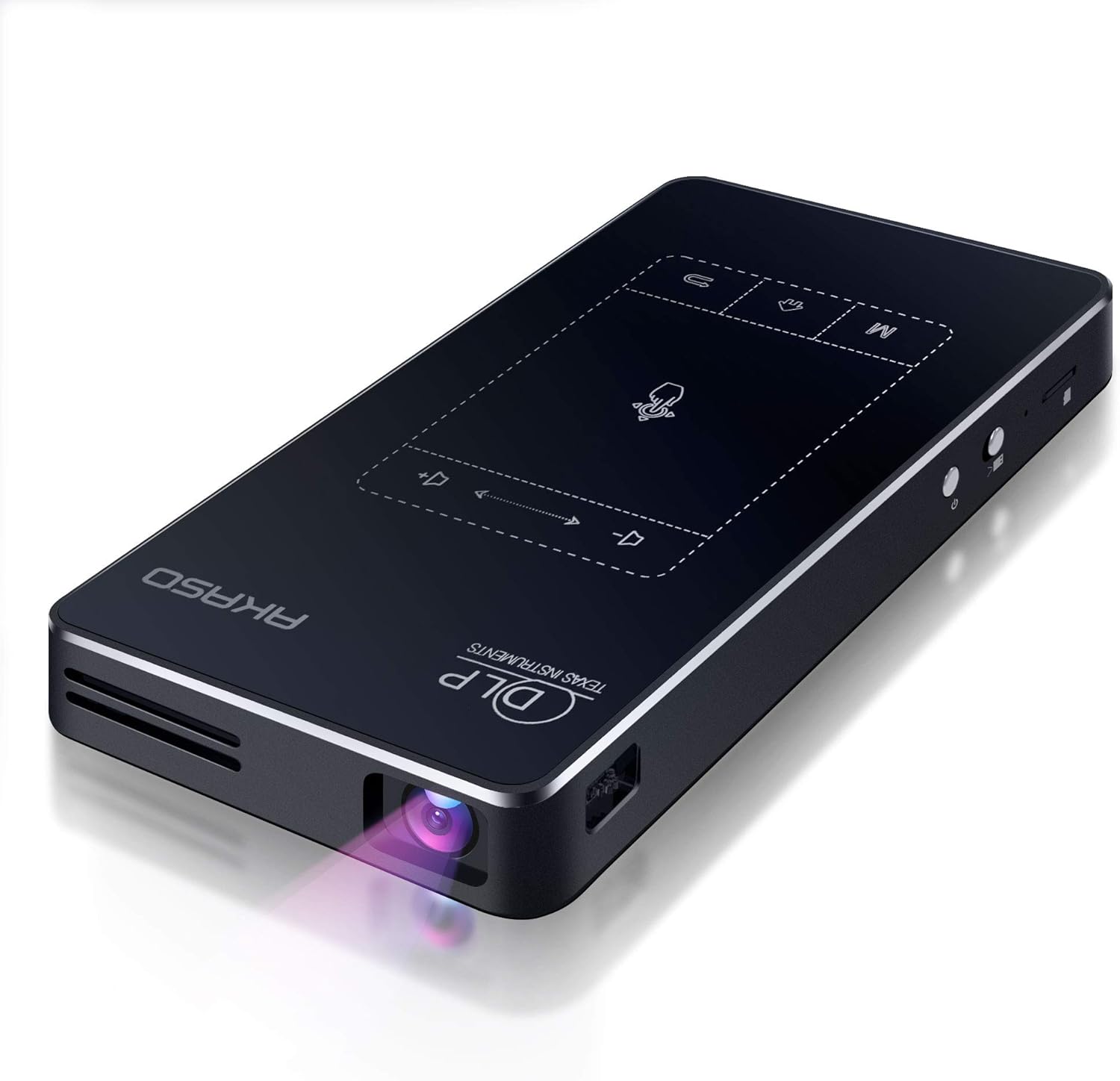
The AKASO WT50 is a palm-sized DLP projector designed for users who want big-screen entertainment without the bulk of a traditional projector. Built around an Android 9.0 system with built-in WiFi, Bluetooth, and a rechargeable battery, it targets movie fans, travelers, outdoor enthusiasts, and even creative hobbyists who need a versatile, go-anywhere display solution.
Performance-wise, the WT50 uses DLP technology with a 0.2 DMD chip, which produces noticeably cleaner and sharper images than LCD-based mini projectors at this price. Colors are vivid and the diffuse reflection design is gentler on the eyes during extended viewing sessions. That said, the native resolution is WVGA (854x480), meaning content is upscaled rather than displayed in true 1080p, so image sharpness on very large screens may not match higher-end projectors.
The build quality is a genuine highlight. The all-metal aluminum alloy casing feels premium and durable for its size, and at just 0.64 lbs, it is remarkably light. The compact footprint, roughly the size of a large smartphone, means it fits in a jacket pocket or small bag with ease. The included mini tripod and remote control add practical value right out of the box.
There are a few trade-offs worth noting. At 50 ANSI lumens, the brightness is modest, and the projector really shines only in dim or dark environments. Outdoor use at dusk or night works well, but daytime use in a lit room will result in a washed-out image. The 2-hour battery life is also a limitation for feature-length films, though a power bank or wall outlet can extend usage. Additionally, Netflix and Hulu cannot be wirelessly mirrored due to DRM restrictions, though you can download their apps directly via Google Play as a workaround.
Overall, the AKASO WT50 is an impressive feat of miniaturization and a genuinely useful portable projector for its price. It is best suited for users who prioritize portability and versatility over raw brightness or pixel-perfect resolution. Whether you are hosting a backyard movie night, decorating cookies with projected templates, or watching videos while camping, the WT50 delivers a compelling and creative experience in a remarkably small package.
Display Technology: DLP (0.2 DMD Optically Processed Chip)
Native Resolution: WVGA 854 x 480, supports up to 1920 x 1080p input
Brightness: 50 ANSI Lumens
Aspect Ratio: 16:9
Projection Size: 30 to 120 inches
Projection Ratio: 1.19:1
Operating System: Android 9.0
WiFi: Dual-band 2.4G and 5G (802.11ac)
Bluetooth: Yes
Screen Mirroring: AirPlay, Miracast, EShare, DLNA
Battery: 3.7V, 5000mAh built-in rechargeable
Battery Life: Approximately 2 to 3 hours
Lamp Life: 30,000 hours
Connectivity: HDMI, 2x USB 2.0, Micro SD (up to 32GB), 3.5mm Audio Jack
Keystone Correction: Automatic, up to 40 degrees
Dimensions: 5.5 x 3.1 x 0.8 inches
Weight: 0.64 lbs
Casing Material: Aluminum Alloy
In the Box: WT50 Projector, Remote Control, Mini Tripod, HDMI Cable, Charger, Quick Reference Guide
If you are considering the AKASO WT50, it helps to understand exactly what kind of projector this is and who it suits best. This is a mini projector built for portability and convenience, not a home theater replacement. If your priority is the sharpest possible 1080p image in a bright living room, a larger, higher-lumen projector will serve you better.
The WT50 is ideal for users who value portability above all else. Campers, travelers, and dorm room users will appreciate the battery-powered design and pocket-friendly size. The built-in Android system is a major convenience, removing the need to carry a separate Chromecast, Fire Stick, or laptop just to stream content. Simply connect to WiFi and download your preferred apps directly onto the projector.
For creative applications, the WT50 has found a surprisingly enthusiastic following. Cookie decorators, mural artists, and holiday decorators use it to project templates and designs onto surfaces with precision. The compact form and short throw distance make it well suited for these close-range creative tasks.
A few practical tips before buying: always use the projector in a dim or completely dark environment for the best image quality. Keep the projection distance between 1 and 1.5 meters for the sharpest focus. For Netflix or Hulu, download the apps directly via Google Play rather than attempting wireless mirroring. And if you plan extended sessions, keep a power bank or charger nearby to supplement the built-in battery.
Pros
- Genuinely pocket-sized design at 3.46 x 3.46 x 0.91 inches makes it the ultimate travel companion
- 2-hour rechargeable battery eliminates the need for constant power outlet access
- Simple one-touch controls and plug-and-play setup work for anyone, regardless of tech skill
- Versatile connectivity with HDMI, USB, microSD, and 3.5mm audio inputs covers all your devices
- Impressive 100-inch maximum display capability transforms any space into a cinema
Cons
- Native 640x360 resolution is lower than advertised 1080p, which may affect text clarity and fine details
- 35 ANSI lumens brightness is modest and may struggle in well-lit rooms or outdoor daytime use
- Some users report focus inconsistency and occasional reliability issues despite compact design
The KODAK Luma 75 is a genuinely pocket-sized projector designed for travelers, campers, and anyone seeking portable entertainment. It weighs just 6.35 ounces and measures under 3.5 inches on each side, fitting easily into backpacks, messenger bags, or even large jacket pockets. This projector targets users who prioritize portability over maximum brightness or resolution, making it perfect for spontaneous movie nights, camping trips, or business presentations on the go.
The standout feature is the 2-hour rechargeable battery combined with the ability to project up to 100-inch displays. Setup is refreshingly simple with one-touch controls and plug-and-play functionality, requiring no technical knowledge. The projector supports multiple input sources including HDMI, USB, microSD, and 3.5mm audio, ensuring compatibility with smartphones, laptops, tablets, and gaming consoles. The included carrying case, HDMI cable, and power cord add immediate value out of the box.
Build quality reflects the compact form factor, with a lightweight plastic body designed for durability during travel. The 30,000-hour LED lifespan suggests longevity, though the modest 35 ANSI lumens brightness means performance is best in darker environments. The native 640x360 resolution is lower than the 1080p marketing claim, which may affect text sharpness and fine detail visibility compared to larger projectors.
Real-world performance shows mixed results based on user feedback. When properly focused, the image quality is described as beautiful and vibrant. However, some users report occasional focus inconsistency and reliability concerns, with a few units experiencing display failures after limited use. The low brightness also makes daytime outdoor projection challenging.
The KODAK Luma 75 excels as a portable entertainment solution for travel and casual use in controlled lighting conditions. It delivers genuine pocket-sized convenience with reasonable image quality for the price, but buyers should have realistic expectations about brightness and resolution. Best suited for travelers, campers, and casual users prioritizing portability over performance specs.
Display and Image
Native Resolution: 640 x 360 pixels
Maximum Display Size: 100 inches
Minimum Display Size: 3 inches
Brightness: 35 ANSI lumens
Contrast Ratio: 400:1
Display Type: DLP
Throw Distance: 0.5 to 8.5 feet
Power and Battery
Power Source: Rechargeable micro USB battery
Runtime: Up to 2 hours
Voltage: 5 volts
Wattage: 10 watts
LED Lifespan: 30,000 hours
Connectivity and Inputs
HDMI, USB 2.0, microSD card slot, 3.5mm audio jack
Compatible Devices: Smartphones, tablets, laptops, gaming consoles, streaming devices
Physical Specifications
Dimensions: 3.46L x 3.46W x 0.91H inches
Weight: 6.35 ounces
Color: Black
Mounting: Tripod mount compatible
Controller: Push button controls
Included Accessories
Carrying bag, HDMI cable, power cord, user manual
Warranty: 1 year manufacturer warranty
Is This Projector Right for You?
The KODAK Luma 75 is ideal if you prioritize portability and spontaneous entertainment. It works best for travel, camping, backyard movie nights, and informal presentations in dimly lit environments. It's not designed for bright rooms, professional presentations requiring sharp text, or users who need maximum image size and brightness.
Best Use Cases
Travel and camping entertainment, casual backyard movie nights, bedroom or dorm room projection, art tracing and creative projects, kids' bedtime stories, small group presentations in controlled lighting. The 2-hour battery runtime suits road trips and outdoor activities where power outlets are unavailable.
Performance Expectations
Expect beautiful, vibrant colors in darker environments and up to 100-inch displays at proper throw distances. Focus may require manual adjustment. The 35 ANSI lumens brightness is adequate for evening use but struggles in daylight or well-lit rooms. Native 640x360 resolution handles video content well but may show text pixelation.
Alternative Considerations
If you need brighter projection for daytime use, consider projectors with 100+ ANSI lumens. If sharp text clarity is essential for presentations, look for higher native resolution models. If you prioritize reliability above all else, read detailed reviews carefully and consider brands with stronger track records for durability.
Pros
- Bright LCD display with excellent color saturation ideal for well-lit classroom environments
- Affordable renewed pricing makes it accessible for budget-conscious educational institutions
- Dual HDMI ports enable direct connection from laptops, tablets, and gaming consoles without adapters
- Integrated speakers eliminate the need for separate audio systems in small to medium rooms
- Compact and portable design allows easy repositioning between classrooms or venues
Cons
- Native resolution of 1024x768 is lower than modern standards, limiting clarity for text-heavy presentations
- No wireless connectivity options, requiring physical HDMI cable connections
- 90-day limited warranty is shorter than typical new projector coverage
The Epson PowerLite 98H is a practical LCD projector engineered for educational settings and small meeting spaces. This renewed unit combines affordability with reliable performance, making it an excellent choice for schools, training centers, and organizations seeking cost-effective presentation solutions without compromising on brightness and color quality.
The standout feature of the PowerLite 98H is its exceptionally bright 3x color output, which delivers vibrant, engaging visuals even in naturally lit classrooms. The dual HDMI connectivity supports BYOD (Bring Your Own Device) workflows, allowing teachers and presenters to connect laptops, tablets, and other devices instantly. Built-in speakers provide sufficient audio output for small to medium-sized rooms, eliminating the need for external audio equipment in most classroom scenarios.
Build quality reflects Epson's reputation for durability. The compact, portable design with tabletop mounting makes repositioning between locations straightforward. The 10000:1 contrast ratio ensures sharp text and detailed images, though the native 1024x768 resolution is suited for general presentations rather than high-definition content. Long-lasting, low-cost lamps help minimize operational expenses over the projector's lifetime.
The main limitation is the relatively low native resolution compared to modern projectors. Users working with complex spreadsheets or detailed graphics may notice reduced clarity. Additionally, the lack of wireless connectivity means you'll need HDMI cables for every connection. The 90-day limited warranty is shorter than new projector coverage, though the Amazon Renewed Guarantee provides replacement or refund protection.
The Epson PowerLite 98H Renewed is a smart investment for budget-conscious educators and organizations prioritizing brightness, reliability, and ease of use over cutting-edge resolution. It delivers solid performance for classroom instruction, training sessions, and small venue presentations at a fraction of new equipment costs.
Display Technology: LCD
Native Resolution: 1024 x 768 pixels
Maximum Display Resolution: 1024 x 768 pixels
Contrast Ratio: 10000:1
Connectivity: 2x HDMI digital ports
Form Factor: Portable with tabletop mount
Color: White
Power Consumption: 299 watts
Audio: Built-in speakers
Compatible Devices: Gaming consoles, laptops, speakers
Warranty: 90 days limited warranty
Manufacturer: Epson
Model: V11H687020
Who Should Buy This Projector? The PowerLite 98H Renewed is ideal for K-12 educators, corporate trainers, small venue operators, and organizations with limited budgets. It works best in classrooms, training rooms, and meeting spaces where brightness and color vibrancy matter more than ultra-high resolution.
Classroom Integration: The dual HDMI ports and built-in speakers make this projector perfect for BYOD classrooms where students bring their own devices. Teachers can connect laptops or tablets directly without adapters or external audio systems.
Resolution Considerations: The 1024x768 resolution is adequate for presentations, videos, and general classroom content. However, if you frequently display detailed graphics, spreadsheets, or high-resolution images, consider a projector with higher native resolution.
Brightness Advantage: The 3x brighter colors perform exceptionally well in naturally lit rooms, making this projector more versatile than models requiring complete darkness. This is a significant advantage for active classroom environments.
Cost Savings: Choosing a renewed unit instead of new equipment can save 50% or more while maintaining reliable performance. The long-lasting, low-cost lamps further reduce total ownership costs over time.
Buying Guide for Student Projectors
Prioritize Portability and Connectivity
As a student, your living and study spaces can change frequently. A compact, lightweight projector is easier to transport between your dorm, the library, or a study group session. Look for models with built-in batteries for cord-free use in common areas. Seamless connectivity is equally crucial.
Your projector should easily link to laptops, smartphones, and tablets via HDMI, USB, or reliable wireless screen mirroring. This flexibility allows you to present from any device without fuss. For more ideas on versatile, budget-friendly setups, explore our guide on the best projectors under $300 for classrooms.
Evaluate Image Clarity and Brightness
Reading text from slides or viewing detailed charts requires a clear, sharp image. Native 1080p resolution is a strong baseline for ensuring legibility. While high ANSI lumens are great for bright rooms, most student viewing happens in controlled, dim lighting where moderate brightness suffices.
Technologies like DLP can offer better contrast and reduce the “screen door” effect. Features like auto-keystone correction are invaluable, as they instantly square up the image even when the projector is placed at an angle on a desk or shelf, saving you setup time.
Consider Smart Features and Audio
A projector with a built-in smart system or Android OS adds tremendous value. It lets you stream educational content or entertainment apps directly, without needing an external streaming stick. This all-in-one approach simplifies your setup and reduces the number of devices you need to manage.
Integrated speakers are a must for personal viewing. While they may not replace a dedicated sound system, decent built-in audio means you do not need to pack separate speakers for every use. For projectors that excel in professional settings too, check our recommendations for the best projectors under $300 for business presentations.
Assess Durability and Support
Your projector is an investment. Look for models with a sealed optical engine to protect the lens from dust, which can cause dark spots over time. A long lamp life, often measured in tens of thousands of hours, promises longevity throughout your academic career and beyond.
Reliable customer support and a clear warranty provide peace of mind. This is especially important for refurbished models, which offer great value but should come from a certified program with validated quality checks, like Amazon Renewed.
Final Thoughts
Selecting the right projector enhances both your academic productivity and leisure time. For students who value a full smart TV experience with exceptional ease of use, the [Official Apps & Live TV & 330° Stand]Smart Mini is a standout choice. If your priority is maximum brightness and a large display for group study sessions, the 3500 ANSI Large Projector with WiFi delivers impressive performance. Each model reviewed here offers a compelling blend of features tailored to a student’s dynamic lifestyle and budget.
Frequently Asked Questions
Can I use a budget projector for everyday note-taking or document review? Absolutely. Many models under $300 provide sufficient clarity for displaying text-heavy slides, PDFs, and web pages. Using them with a dim environment will yield the best results for prolonged reading sessions.
How important is wireless connectivity for a student projector? Wireless screen mirroring via WiFi or Bluetooth is highly convenient. It allows you to quickly share content from your phone or laptop without cables, making impromptu study collaborations or sharing videos with roommates much smoother.
Are refurbished projectors a reliable option for students? Yes, certified refurbished projectors from reputable programs can be an excellent way to get a higher-spec model within a strict budget. They are professionally inspected and restored to working condition, often including a warranty. For more options across different budgets, visit our main Best Projectors by Budget category page.
What should I look for if I want to use the projector outdoors? For occasional outdoor use, prioritize portability and a built-in battery. While no budget model is daylight-bright, one with higher ANSI lumens will perform better in a shaded backyard setting at dusk. Ensure it has robust connectivity options for your devices.



Write Your Review
No reviews yet. Be the first to share your experience!