

You’re standing in a conference room or classroom, trying to engage your audience with a static presentation. The desire for a dynamic, interactive experience is there, but the budget for high-end tech isn’t. This is the exact scenario where affordable interactive whiteboard projectors shine. This guide is crafted for educators, small business owners, and team leaders who need a collaborative tool that encourages participation without draining resources. For those exploring other budget tiers, our review of budget-friendly interactive projectors offers additional context.
Pros
- Long-lasting mercury-free LED light source reduces maintenance
- Fast startup and shutdown save time in busy environments
- Sharp WXGA resolution and strong contrast for presentations and video
- Lightweight and portable for multi-room or on-the-go use
- Reviewers report reliable performance even after years of daily use
Cons
- WXGA resolution falls short of true HD or 4K for home theater enthusiasts
- Manual zoom and focus lack the convenience of motorized lens controls
- Maximum throw distance of 25 feet may limit use in larger venues
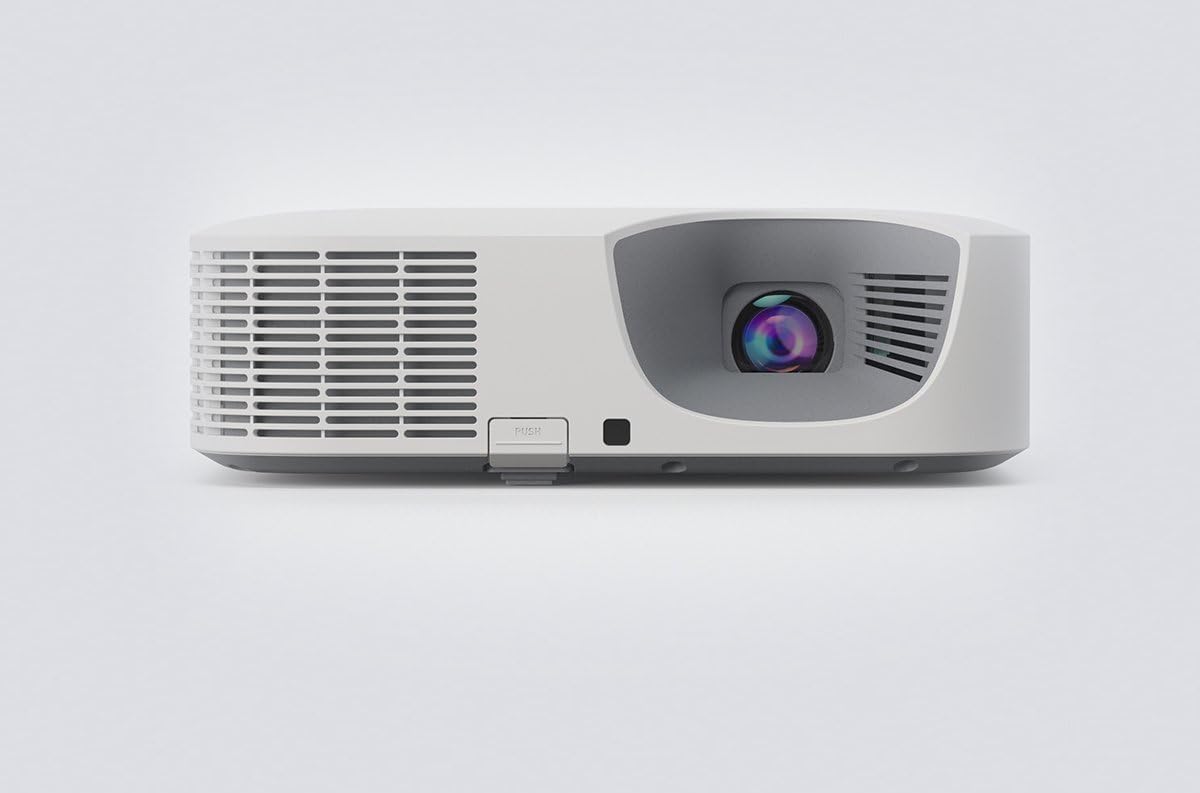
The Casio XJ-F100W is a budget-friendly LED hybrid projector built for classrooms, boardrooms, and houses of worship that need dependable daily performance. Its 3,500-lumen output and WXGA resolution make it well suited for presentations, teaching, and casual video playback rather than cinematic home theater use.
The standout feature is Casio's mercury-free hybrid LED light source, rated for up to 20,000 hours, which removes the recurring cost and hassle of lamp replacements. Reviewers confirm this durability firsthand, with one user reporting flawless performance after 10,000 hours of daily use since 2018. The instant on/off function and near-zero warm-up time are also praised, making it convenient for quick setups and shutdowns between sessions.
Build quality feels solid despite the lightweight, portable form factor, weighing just 8.4 pounds. A church reviewer noted that using two units in their sanctuary provided excellent keystone correction, improved color and contrast over their older projector, and a noticeably smaller footprint. Connectivity is generous for a projector in this class, with dual HDMI ports, VGA, S-Video, and RS232 covering most legacy and modern devices.
The main limitations are the WXGA resolution, which won't satisfy those wanting sharper HD or 4K detail, and the manual zoom/focus lens, which lacks the convenience of motorized adjustments found on pricier models. The 25-foot maximum throw distance also means it's better suited to mid-sized rooms than large auditoriums.
Overall, the Casio XJ-F100W is a smart pick for institutions and professionals prioritizing reliability, low maintenance, and quick usability over ultra-high resolution. Backed by a 3-year warranty and glowing long-term user feedback, it's a practical, no-fuss projector for everyday presentation needs.
Buying Guide
Light Source Longevity and Brightness
For interactive use, a projector must be reliably bright and ready when you are. Traditional lamp-based models can have lengthy warm-up times and expensive, frequent replacements. This disrupts the flow of a session.
Modern solutions like hybrid LED or laser light sources offer instant on/off capability and lifespans measured in tens of thousands of hours. Look for a lumen output suitable for your ambient light conditions to ensure your interactive content remains vivid and clear for all participants.
Image Quality for Clarity
The foundation of any good interactive display is a sharp, high-contrast image. You need text to be crisp and colors to pop for educational diagrams or business charts. A muddy or dim projection makes annotation difficult and strains viewers’ eyes.
Focus on native resolution and contrast ratio. A WXGA (1280×800) resolution provides a good balance of detail and affordability for most content. A high contrast ratio ensures that blacks are deep and details in shadows or dark images are not lost, which is crucial for detailed presentations.
Interactive Features and Compatibility
The core promise of an interactive projector is turning any surface into a collaborative space. This functionality hinges on the device’s compatibility with interactive pens, touch technology, and software. Not all projectors in this category include these tools in the box.
Verify what is included and what requires separate purchase. Ensure the system works seamlessly with your preferred operating system and presentation software. The goal is a low-friction experience where the technology facilitates interaction, not hinders it. For dedicated educational environments, our guide on the best interactive projectors for teachers dives deeper into classroom-specific needs.
Final Thoughts
Selecting the right interactive projector involves balancing immediate needs with long-term value. For users prioritizing a reliable, lamp-free design with excellent core image quality, the Casio XJ-F100W LED WXGA Projector + PSC Lens Cloth presents a compelling solution with its hybrid light source and vibrant output. Those with different feature priorities or budgets should thoroughly explore all options, such as the models compared in our broader assessment of interactive projectors for various setups, to find the perfect match for their collaborative space.
Frequently Asked Questions
What exactly makes a projector “interactive”?
An interactive projector uses specialized technology, often an infrared camera or sensor, to track the movement of a stylus or finger on the projected image. This allows you to write, draw, or control software directly on the wall or screen, similar to a giant touchscreen. It transforms the projection surface into an input device.
Can I use any surface as an interactive whiteboard?
Generally, yes. Most interactive projector systems are designed to work on any flat, smooth surface like a white wall, a standard projection screen, or a dedicated interactive whiteboard. The key is proper calibration during setup so the projector’s sensor accurately maps your touch or pen input to the correct on-screen location.
Are budget-friendly interactive projectors reliable for daily use?
Absolutely. Advancements in LED and laser light source technology have brought durability and low maintenance to more accessible price points. Models designed for business and education are built for regular operation. When evaluating, prioritize units with robust construction and proven light source longevity to ensure reliability over years of use, as validated in our expert review for 2026.
What should I look for beyond the projector itself?
Consider the complete ecosystem. Check what interactive pens or accessories are included. Assess the compatibility and ease of use of the required software. Also, factor in installation needs like ceiling mount compatibility, keystone correction for angled placement, and audio capabilities if you plan to show videos with sound during your interactive sessions.





Write Your Review
No reviews yet. Be the first to share your experience!