

Your 4K gaming projector deserves a throne, not just a spot on the coffee table. A cluttered setup with wires snaking everywhere can break immersion faster than a lag spike. You need a secure, flexible mounting solution that lets you dial in the perfect screen alignment from your favorite gaming chair.
This guide focuses on ceiling mounts that bring organization and professional polish to your game room. We evaluated models based on universal compatibility, adjustability, and installation ease to help you achieve that clean, cinematic look. For more ideas on optimizing your gaming space, explore our picks for the best 4K gaming projectors for game rooms.
| Pick | Product | AI Score | Buy |
|---|---|---|---|
| -20% OFF |
 PUTORSEN Universal Projector Ceiling Mount
|
9.8/10 | Buy on Amazon |
| -5% OFF |
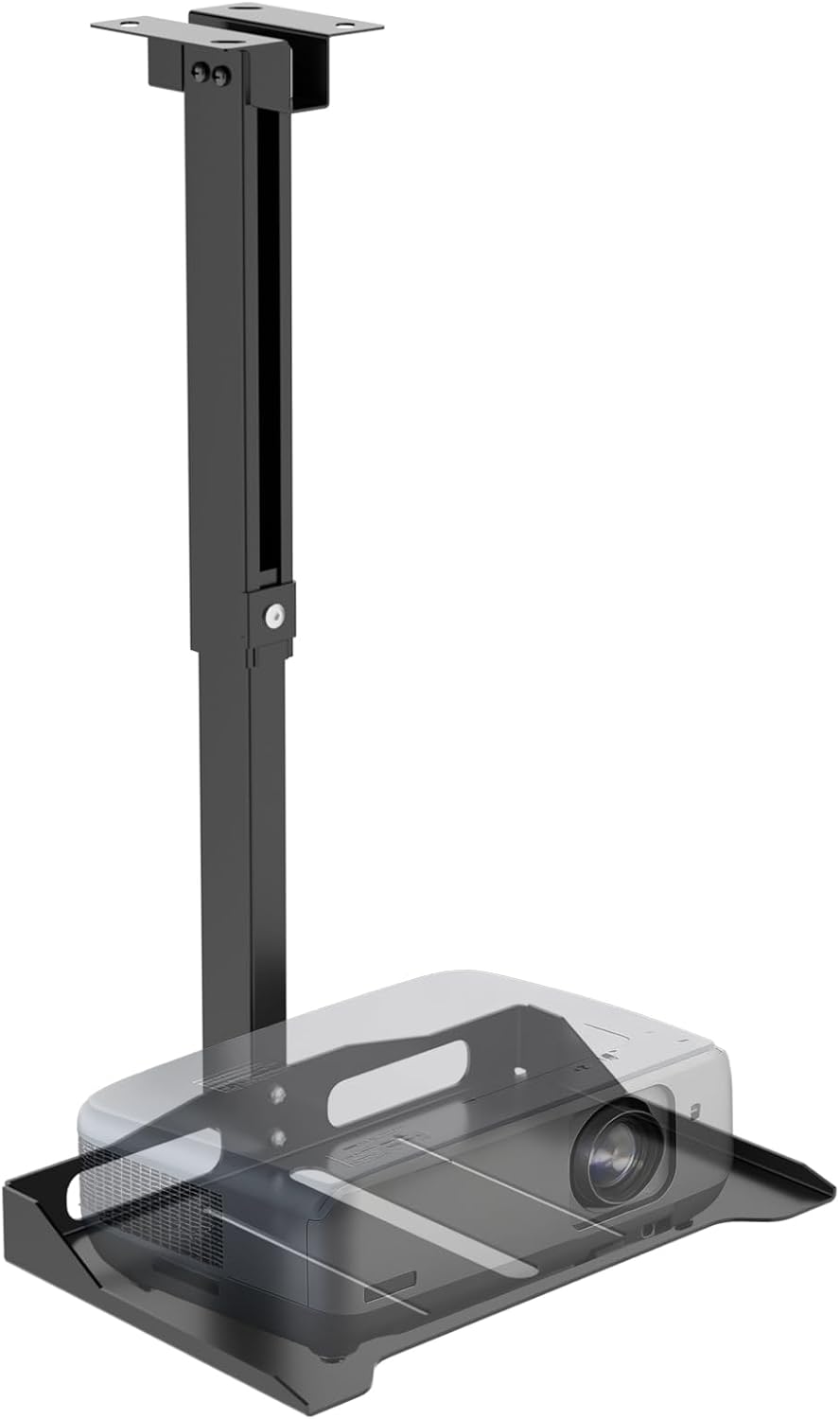 WALI Universal Projector Ceiling & Wall Mount
|
9.5/10 | Buy on Amazon |
 VIVO Universal Ceiling Projector Mount Tray
|
9.5/10 | Buy on Amazon | |
 DYNAVISTA Full Motion Universal Ceiling Projector
|
9.5/10 | Buy on Amazon |
Pros
- Easy, tool-free installation that reviewers say takes just minutes
- Smooth 360° rotation makes screen alignment simple, even when seating changes
- Large tray comfortably fits bigger projectors like Optoma models
- Cable management keeps setups looking neat and professional
- Sturdy steel build with no reported wobble
Cons
- Ceiling mounting requires accessible joists or structural support, which may not suit all rooms
- 22 lb weight limit may not accommodate larger or heavier projectors
- Limited long-term review history since the product is relatively new
The PUTORSEN Universal Projector Ceiling Mount is designed for home theater owners, classrooms, and conference rooms that need a flexible way to suspend a projector overhead. Its wide steel tray and universal design mean it can accommodate most projector models, webcams, or similar AV gear up to 22 lbs.
The standout feature is the 360° swivel arm, which lets users rotate the projector to realign the image without unmounting or repositioning the entire unit. This is especially useful for rooms where seating changes frequently, as one reviewer noted switching between a couch and bean bags. The tool-free telescopic arm, adjustable from 14.5 to 22.2 inches, adds further flexibility for dialing in the ideal projection height.
Build quality appears solid, with a heavy-duty steel frame that reviewers describe as stable and wobble-free even when fully extended. Installation is reported to be quick and straightforward, with all necessary hardware included and no drilling required in some setups. The hidden cable management channel is a nice touch, helping to keep HDMI and power cords tucked away for a cleaner look.
Potential drawbacks include the need for accessible ceiling structure to mount securely, and the 22 lb weight capacity, which may rule out some larger, heavier projectors. Since the product is relatively new, there's limited long-term reliability data, though early feedback is uniformly positive.
Overall, this mount is a strong choice for anyone setting up a home theater or presentation space who wants an adjustable, professional-looking installation without a complicated setup process. The combination of swivel flexibility, tool-free height adjustment, and cable concealment makes it a practical upgrade over a basic shelf or fixed-arm mount.
Pros
- Sturdy, heavy-duty build that feels stable once installed
- Simple installation process praised by multiple reviewers as quick and straightforward
- Flexible adjustability makes fine-tuning projector angle easy
- Hidden cable management keeps the setup tidy and safe
- Great value for the price compared to similar mounts
Cons
- A few users report the mount can slowly drift or creep to one side over time
- Not suitable for oversized projectors exceeding 13.7" length or 8.6" width
- Iron construction adds some weight, making solo installation slightly trickier
The WALI Universal Projector Ceiling Wall Mount is designed for anyone setting up a home theater, office presentation space, or golf simulator who needs a reliable way to suspend a projector from a ceiling or wall. It accommodates most projectors under 13.7 inches long and 8.6 inches wide, with a maximum load capacity of 22 lbs, making it suitable for the vast majority of consumer and small commercial projectors.
Where this mount stands out is its flexibility. Users can adjust height and tilt angle across multiple dimensions, which helps dial in the exact projection alignment needed for different screen sizes and room layouts. Reviewers specifically praised how easy it was to fine-tune the angle for golf simulators and home theater screens without needing extra hardware.
Build quality is another highlight, with reviewers describing the mount as having a solid, heavy-duty steel-like construction that feels secure once installed. The hidden cable management channel is a practical touch, keeping cords tucked away and reducing clutter and tripping or tangling hazards in the installation space.
On the downside, a small number of users noted that the mount can gradually creep or shift to one side over time, requiring occasional readjustment. It's a minor annoyance rather than a dealbreaker, and most reviewers found the fix quick and simple. Buyers with oversized projectors should also double check dimensions before purchasing.
Overall, the WALI mount delivers strong value for its price point, backed by a 10-year manufacturer warranty and an impressive 4.4-star average from thousands of buyers. It's a smart choice for beginners and experienced installers alike who want a dependable, adjustable, and tidy projector mounting solution.
Model: PM-005-B | Brand: WALI | Weight Capacity: 22 lbs (10 kg) | Mounting Type: Wall, Ceiling, and Floor Mount compatible.
Item Dimensions: 14.86 x 8.91 x 2.06 inches | Item Weight: 2.92 kg | Enclosure Material: Iron | Color: Black.
Compatibility: Fits projectors with length under 13.7 inches and width under 8.6 inches with standard mounting interfaces.
Warranty: 10-year manufacturer warranty with professional customer support available for installation or usage issues.
Pros
- Universal fit works with most projectors regardless of mounting holes
- Adjustable height range offers flexible placement options
- Hidden cable management for a tidy look
- Sturdy steel construction rated by users as heavy-duty
- 3-year warranty adds confidence in durability
Cons
- Included mounting screws are reported as low quality and prone to stripping
- Not suitable for sloped or pitched ceilings
- Weight capacity of 11 lbs may not fit larger or heavier projectors
The VIVO MOUNT-VP08B is a ceiling tray mount built specifically for projectors that lack standard mounting holes, though it doubles as a platform for laptops, cameras, or other small electronics. It's aimed at home theater enthusiasts and anyone setting up a fixed projector display who wants flexibility without modifying their device.
The standout feature is the height-adjustable arm, which extends from 12.3 to 20.4 inches, giving users room to fine-tune projector placement for the ideal image size and focus. The 13.8 x 8.7 inch steel tray holds up to 11 lbs, and cable routing runs hidden through the pole for a cleaner overall look, a detail reviewers specifically praised.
Build quality is generally solid, with multiple users describing the mount as sturdy and heavy-duty enough for both indoor rooms and covered outdoor spaces like patios or gazebos. However, one recurring complaint centers on the included screws, which some found to be low quality and prone to stripping during installation.
On the downside, this mount is not designed for sloped or pitched ceilings, and the 11 lb weight limit means it's best suited for lighter projectors rather than large home theater units. Buyers with heavier equipment should double check compatibility before purchasing.
Overall, the VIVO MOUNT-VP08B delivers strong value for its price point, offering flexible height adjustment and a clean cable-hidden setup that most users find easy to install and reliable once mounted. It's a smart choice for flat-ceiling installations, though it's worth having quality replacement screws on hand just in case.
Pros
- Wide extension range makes it easy to achieve ideal screen distance and minimize keystone distortion
- Sturdy steel build feels solid and secure once properly installed on ceiling studs
- Simple, well-documented installation process praised by multiple reviewers
- Flexible tilt, swivel, and rotation options accommodate diverse room layouts
- Great value for a full-motion mount at this price point
Cons
- Ceiling top plate only has two screw holes, which may feel insufficient for heavier projectors
- Requires careful tightening of all joints before final ceiling installation to avoid wobble
- Not suitable for angled or vaulted ceilings, only flat surfaces
The DYNAVISTA Full Motion Ceiling Projector Mount is designed for home theater enthusiasts and office users who need flexible positioning for their projector. Its extendable arm and universal mounting holes make it compatible with most major brands, from BenQ to Sony, making it a practical choice for a wide range of setups.
In real-world use, the standout feature is its adjustability. Users report successfully mounting projectors weighing anywhere from 9 to over 15 lbs, using the tilt, swivel, and rotation functions to fine-tune image alignment. The 43.6-inch max extension is particularly useful for taller rooms where minimizing keystone correction is a priority.
Build quality is generally well-regarded, with reviewers noting the steel construction feels sturdy and doesn't wobble once properly secured to ceiling studs. The interlocking pipe design also prevents accidental over-extension, adding a layer of safety during adjustment.
The most common criticism centers on the ceiling top plate, which only includes two screw holes. Some users with heavier projectors felt more anchoring points would provide extra peace of mind, and a few opted to add supplementary wood backing for reinforcement. Reviewers also stress the importance of fully tightening all screws before final installation to prevent shifting later.
Overall, this mount delivers strong value for anyone needing a versatile, adjustable ceiling solution. It's best suited for users mounting into solid studs and willing to follow setup instructions carefully, especially those with mid-weight projectors seeking precise viewing angle control.
Buying Guide: How to Choose Your Mount
1. Compatibility and Weight Capacity
Start by confirming the mount fits your specific projector model. Check the distance between your projector’s mounting holes against the mount’s listed specifications. More importantly, verify the weight rating. Your mount should support your projector’s weight with a comfortable margin to ensure long-term stability and safety.
2. Range of Motion and Adjustability
Look for mounts offering tilt, swivel, and rotation. This flexibility is crucial for fine-tuning your image to eliminate keystone distortion and perfectly hit your screen or wall. An extendable arm is also valuable for adjusting the projection height after installation, allowing you to optimize the image size.
–>3. Cable Management System
A clean setup is a pro setup. Integrated cable channels or clips help route power and HDMI cords neatly along the mount’s arm, concealing them from view. This not only looks better but also reduces clutter and minimizes the risk of accidentally disconnecting a cable mid-game.
Proper mounting is just one part of the equation. For the full visual experience, pairing your setup with a projector known for sharp detail in low light can make a significant difference. Consider reviewing options for the best 4K gaming projectors for dark rooms.
4. Ease of Installation
Consider your comfort with tools and DIY projects. Some mounts come largely pre-assembled with clear instructions, while others may require more assembly. Look for features like tool-free adjustments or quick-release plates that can simplify the process of attaching and leveling your projector.
Final Thoughts
Choosing the right mount elevates your gaming experience from functional to fantastic. For maximum flexibility and a tool-free setup, the PUTORSEN Universal Projector Ceiling Mount is a standout choice with its 360-degree swivel. If you prioritize a proven track record and straightforward installation from a trusted brand, the widely reviewed WALI Universal Projector Ceiling Wall Mount offers reliable performance and clean cable management. Either option will securely showcase your projector and help create the immersive gaming environment you deserve.
Frequently Asked Questions
Will a universal ceiling mount fit my specific 4K gaming projector?
Most universal mounts are designed to fit projectors with standard VESA mounting patterns or that fit within a specified tray size. Always double-check your projector’s mounting hole spacing and dimensions against the mount’s product specifications before purchasing to ensure compatibility.
Can I install a projector ceiling mount by myself?
Many mounts are designed for DIY installation and include necessary hardware and instructions. The process typically involves locating a ceiling joist for secure anchoring, mounting the base plate, assembling the arm, and finally attaching the projector. Having a helper to hold components can make the job easier and safer.
How important is cable management for a gaming projector setup?
It is very important for both aesthetics and safety. Neatly routed cables prevent tripping hazards and create a cleaner, more professional-looking installation. It also makes it easier to identify and swap cables if needed. For a comprehensive look at projector accessories that enhance your setup, check out our guide on the best 4K gaming projector remotes.
Are these mounts suitable for high refresh rate gaming projectors?
Yes, a sturdy mount is essential for any projector, including high refresh rate models used for fast-paced gaming. A secure, vibration-free installation ensures your image remains stable. The mounts reviewed here offer robust support suitable for the projectors listed in our low input lag / 120Hz+ category.



Write Your Review
No reviews yet. Be the first to share your experience!